Architecting Multi-Agent Systems for Complex Workflows
- June 1, 2026
- 7 min read
Founder, Boffin Coders
Beyond the Monolith: Why Single Prompts Fail Complex Workflows
Early AI applications relied on a monolithic approach - asking a single Large Language Model (LLM) to handle reasoning, data retrieval, and formatting all at once. In this pattern, we send a massive prompt packed with instructions, expecting a single output:
1[User Request] ──► [System Prompt + LLM] ──► [Complex Output] (Prone to reasoning drift)For simple queries, this works. But as companies realize a single chatbot prompt cannot handle complex, multi-step business logic (such as auditing an inventory catalog against compliance guidelines and updating stock thresholds), the monolithic model breaks down under:
- Reasoning Drift: The model loses track of early constraints as it processes middle steps.
- Context Exhaustion: Forcing search results, DB records, and format specifications into one prompt pollutes the model's focus.
- All-or-Nothing Failures: If step 4 of 5 fails, the entire request fails, with no checkpoint to resume from.
Enter Multi-Agent Systems (MAS)
Instead of a single "genius" chat prompt, a Multi-Agent System (MAS) decomposes complex tasks into smaller, isolated roles assigned to specialized agents. Each agent operates under a strict contract, armed with specific tools (like code execution or web scraping).
An orchestration layer (the central controller) manages the communication, state, and safety rules between these agents, allowing them to iteratively plan, reflect, and execute until the larger goal is achieved.
🛠️ The Core Library: Orchestrating with LangGraph.js
To build cyclic, stateful multi-agent workflows in TypeScript, we use LangGraph.js (built by the LangChain team). LangGraph treats agent systems as stateful graphs where each agent is a Node, and transitions (decisions, loops) are Edges.
Here is how we set up specialized tools and schema contracts using zod and @langchain/core:
While Zod handles schema validation within the application, developers may also encounter Schema.org when structuring standardized information for websites and search engines. Schema.org provides a shared vocabulary for describing entities and content in a machine-readable format, helping systems better understand structured information.
Code Snippet: Defining Scoped Tools with Schema Contracts
1import { tool } from "@langchain/core/tools";
2import { z } from "zod";
3
4// 1. Define a tool with strict input validation using Zod
5export const searchInventoryTool = tool(
6  async ({ query, limit }) => {
7    // In a real implementation, this queries the tenant's database
8    console.log(`Searching database for: "${query}" (Limit: ${limit})`);
9    return JSON.stringify([
10      { sku: "MD-MSK-50", name: "Surgical Mask Box (50)", stock: 12, expiry: "2026-06-28" }
11    ]);
12  },
13  {
14    name: "search_inventory",
15    description: "Queries the organization catalog by product name or SKU.",
16    schema: z.object({
17      query: z.string().describe("Search query, e.g. 'surgical mask'"),
18      limit: z.number().default(5).describe("Max results to return")
19    })
20  }
21);
The Orchestration Layer: Graph State Machine
The orchestration layer acts as the state manager. Every node (agent) receives the current state, performs its work, and returns state updates.
Here is the blueprint for creating the orchestration graph:
Code Snippet: Building the Stateful Multi-Agent Graph
1import { StateGraph, Annotation } from "@langchain/langgraph";
2import { ChatOpenAI } from "@langchain/openai";
3
4// 1. Define the shared state structure
5const StateAnnotation = Annotation.Define({
6  messages: Annotation<any[]>({
7    reducer: (x, y) => x.concat(y),
8    default: () => [],
9  }),
10  sender: Annotation<string>({
11    reducer: (x, y) => y ?? x,
12    default: () => "User"
13  }),
14  complianceApproved: Annotation<boolean>({
15    reducer: (x, y) => y ?? x,
16    default: () => false
17  })
18});
19
20// 2. Instantiate LLMs with bound tools
21const model = new ChatOpenAI({ modelName: "gpt-4o", temperature: 0 });
22const researcherModel = model.bindTools([searchInventoryTool]);
23
24// 3. Define Node: Researcher Agent
25const researcherNode = async (state: typeof StateAnnotation.State) => {
26  const response = await researcherModel.invoke(state.messages);
27  return {
28    messages: [response],
29    sender: "Researcher"
30  };
31};
32
33// 4. Define Node: Auditor Agent (performs reflection and rules validation)
34const auditorNode = async (state: typeof StateAnnotation.State) => {
35  const lastMessage = state.messages[state.messages.length - 1];
36  const auditReport = await model.invoke([
37    { role: "system", content: "Analyze research logs for compliance violations. Output APPROVED or REJECTED." },
38    lastMessage
39  ]);
40
41  const approved = auditReport.content.includes("APPROVED");
42  return {
43    messages: [auditReport],
44    sender: "Auditor",
45    complianceApproved: approved
46  };
47};
48
49// 5. Compose the state machine graph
50const workflow = new StateGraph(StateAnnotation)
51  .addNode("researcher", researcherNode)
52  .addNode("auditor", auditorNode)
53  .addEdge("__start__", "researcher")
54  .addEdge("researcher", "auditor");
55
56// 6. Define Conditional Edges (Routing Loop)
57workflow.addConditionalEdges(
58  "auditor",
59  (state) => state.complianceApproved ? "end" : "researcher", // loop back if compliance checks fail
60  {
61    end: "__end__",
62    researcher: "researcher"
63  }
64);
65
66// 7. Compile workflow with a memory saver checkpointer for state preservation
67export const agenticApp = workflow.compile();
Visualizing the Reasoning and Action Loop (ReAct)
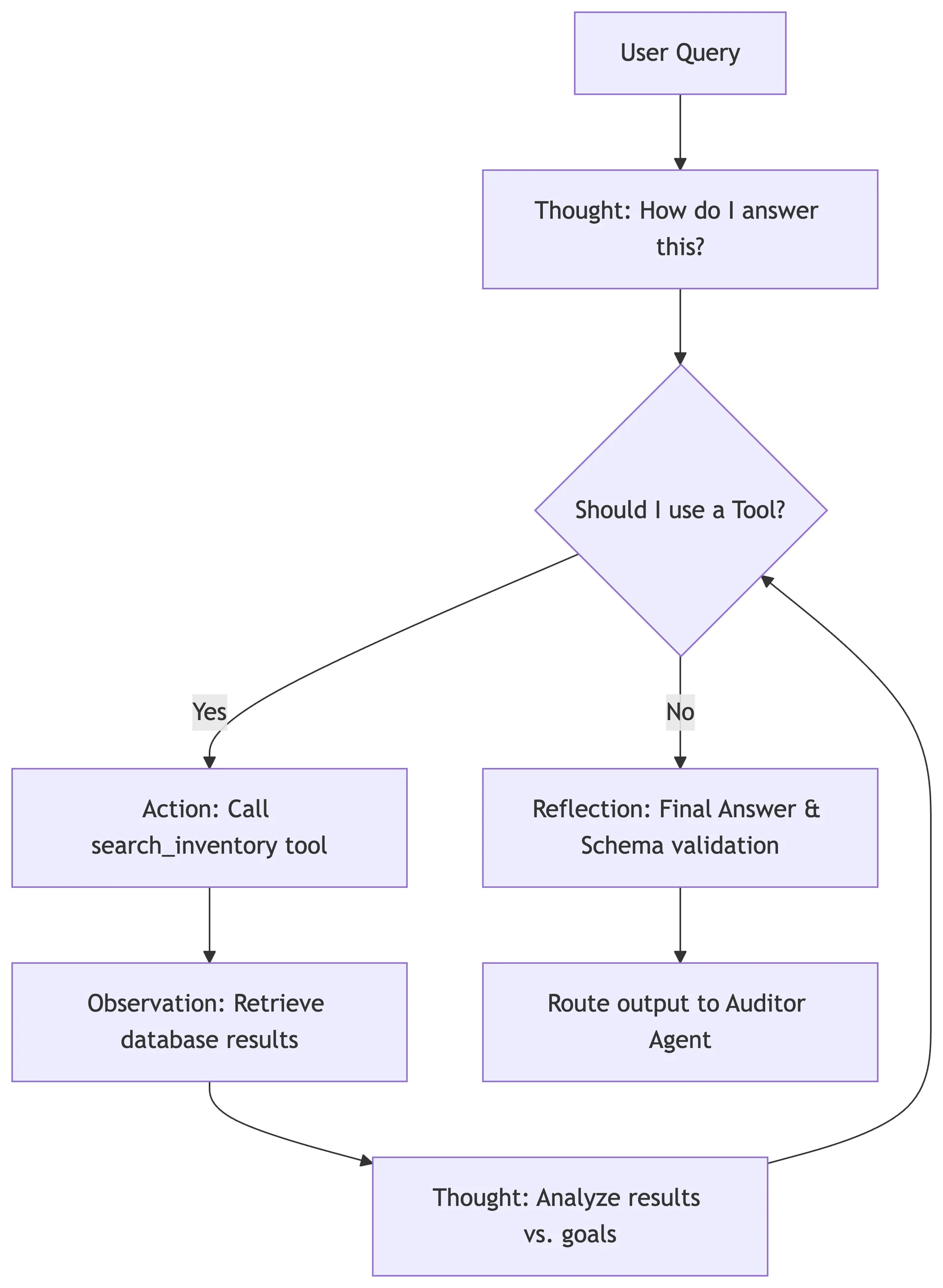
Under the hood of the researcher node, the agent executes a Reasoning and Action (ReAct) loop. The model goes through alternating cycles of thinking (Thought), choosing a tool (Action), reviewing the results (Observation), and reflecting (Reflection) until it has completed its portion of the contract.
Here is a visual breakdown of how the reasoning and action loops operate within our agentic architecture:
Human-in-the-Loop (HITL) & Stateful Interruptions
While autonomous agents are powerful, enterprise operations require guardrails. You cannot let an AI agent initiate a high-value warehouse stock transfer or email a client without Human Verification.
LangGraph solves this by introducing State Interruptions. This allows you to pause the graph execution immediately before a specific node is run, store the state snapshot to disk, and await external input.
Code Snippet: Setting up Interruption Handlers in LangGraph.js
1import { MemorySaver } from "@langchain/langgraph";
2
3// 1. Compile the graph with instructions to interrupt execution
4// BEFORE the "publish_changes" node is run.
5const checkpointer = new MemorySaver();
6
7export const compiledAgent = workflow.compile({
8  checkpointer,
9  interruptBefore: ["publish_changes"] // Node will pause and await approval
10});
11
12// 2. Client-side trigger: Resuming the paused workflow
13async function handleHumanApproval(threadId: string, userApproved: boolean) {
14  const config = { configurable: { thread_id: threadId } };
15
16  if (userApproved) {
17    // Write the human feedback directly to the graph's shared state
18    await compiledAgent.updateState(config, {
19      complianceApproved: true
20    });
21
22    // Resume the graph. It will pick up exactly where it paused.
23    const finalState = await compiledAgent.resume(config);
24    console.log("Workflow completed:", finalState);
25  } else {
26    console.log("Workflow rejected by supervisor.");
27  }
28}
Observability, Tracing, and Guardrails
Decomposing a system into multiple agents introduces complexity. If the final output is flawed, how do you know which agent failed?
1. Granular Tracing (LangSmith)
By attaching tracing middleware, developers can inspect step-level metrics:
- Prompt vs. Response Tokens: Identifying cost-inefficient prompts.
- Latency Hotspots: Finding which specialized agent is taking too long to execute its tool loop.
- Tool Input/Output Logging: Auditing if the data scraper returned junk output.
2. Operational Guardrails
- Max Iteration Limits: Setting loop ceilings (e.g. max 10 steps) to prevent agents from falling into infinite recursion patterns if a tool is buggy.
- Output Schema Validation: Enforcing Zod structure verification at every node boundary, discarding invalid responses before they reach downstream agents.
Real-world Impact of Agentic Architecture
After moving a workflow to a multi-agent design, measure it against the old single-prompt version on the same real inputs:
- Fulfilment accuracy: the share of runs that finish correctly, before and after, so you can see whether the automated correction routines earn their cost.
- API call overhead: tokens and calls per completed task, to confirm that routing work to scoped agents stops redundant context reaching every prompt.
- Failure isolation: how often a crashed node, such as a web scraping step, is retried by the orchestrator without losing the state the researcher node produced.
Keep reading
Manoj Sethi
Founder, Boffin Coders
Manoj founded Boffin Coders in 2017 and leads its work with agencies: white-label builds, delivery and partnerships. Manoj writes about how agencies can add development capacity without losing control of their clients.
Need this built?
Hire dedicated AI engineers in India
US$25-40 an hour, or from US$4,000 a month for a dedicated developer. Shortlisted profiles within two working days; an engineer you choose starts within one to two weeks. They work in your tools, under your management.
How hiring AI engineers in India worksNeed this built?
We build websites and apps for businesses, and work behind digital agencies as their development team. Tell us where things stand on a 20-minute call.