Your redirect list is about to swallow a page that still works
You move your blog. You add one line to send every old article address to the new topic page. That one line also catches a page that still works. Google is told it has moved, and three weeks later its traffic is gone. Here is how that happens, how to write the rule so it cannot, and four commands that prove it on a live site.
6 September 2026
Check it yourself. curl -sI https://boffincoders.com/website-development/projects
Most advice about redirects stops at one sentence: use a 301. That is the easy part. Sites do not get hurt when the redirects are written. They get hurt in the second week, when somebody adds one sensible-looking rule to catch a few hundred old addresses, and that rule quietly claims a page that was working fine.
Two words first, because the whole piece depends on them. A redirect is an instruction a website gives to a browser or a search engine: the page you asked for is now at this other address, go there instead. A 301 is the permanent kind of redirect. It says “this move is final”. Google takes that at its word: it stops visiting the old address, moves whatever ranking the old page had to the new one, and forgets the old page existed. That is exactly what you want for a page that is gone. It is exactly what you do not want for a page that is not.
A shop moves its blog
Take a furniture shop. For years its blog lived under folder names that matched its products: /sofas/how-to-clean-a-sofa, /sofas/best-sofa-for-small-flats, and a few hundred more like them. The shop rebuilds its website. The new blog lives at /blog/sofas, and all the old article addresses now show a “page not found” error. Customers with old bookmarks hit the error. Google, which had linked to those articles for years, hits the error too.
The developer does the sensible thing. Instead of writing three hundred separate redirects, one for each old article, she writes one rule with a wildcard - a pattern that matches many addresses at once:
1// The shop's first attempt. "Anything under /sofas goes to the new sofa blog."
2{
3  source: '/sofas/:slug*',
4  destination: '/blog/sofas',
5  statusCode: 301,
6}
7// Catches /sofas/how-to-clean-a-sofa      ✓  an old article, gone
8// Catches /sofas/best-sofa-for-small-flats ✓  an old article, gone
9// Catches /sofas/sale                      ✗  the live sale page
Read the pattern in plain words: “anything that starts with /sofas/, whatever comes after, send it to the sofa blog.” Three hundred old articles are handled in one line. It works. It ships.
The rule that eats a live page
The shop also has a page at /sofas/sale. It is not an old article. It is the live sale page, in the main menu, with links pointing at it from other sites, ranking on Google for “sofa sale”. And it starts with /sofas/.
The wildcard does not know the difference. A pattern matches by shape, not by whether a page exists. So the next time Google visits /sofas/sale, the site answers: this page has moved permanently to /blog/sofas. Google believes it. Within a few weeks the sale page is dropped from the index and its ranking is handed to a blog listing page. Nobody sees an error. The first sign is a sales report three weeks later with a hole in it.
Say “except this one” in the rule
The fix is to write the exception into the pattern itself, so the rule can never match the live page no matter who edits the file later:
1// The same rule with one exception written into it.
2// "Anything under /sofas, except exactly 'sale'."
3{
4  source: '/sofas/:slug((?!sale$).*)',
5  destination: '/blog/sofas',
6  statusCode: 301,
7}
The strange-looking part, (?!sale$), is a standard pattern feature that most routers support. In words it means: “whatever follows/sofas/, as long as it is not exactly sale”. The three hundred old articles still redirect. The sale page is never matched, so it renders as itself. One rule, one exception, and the trap is closed for good.
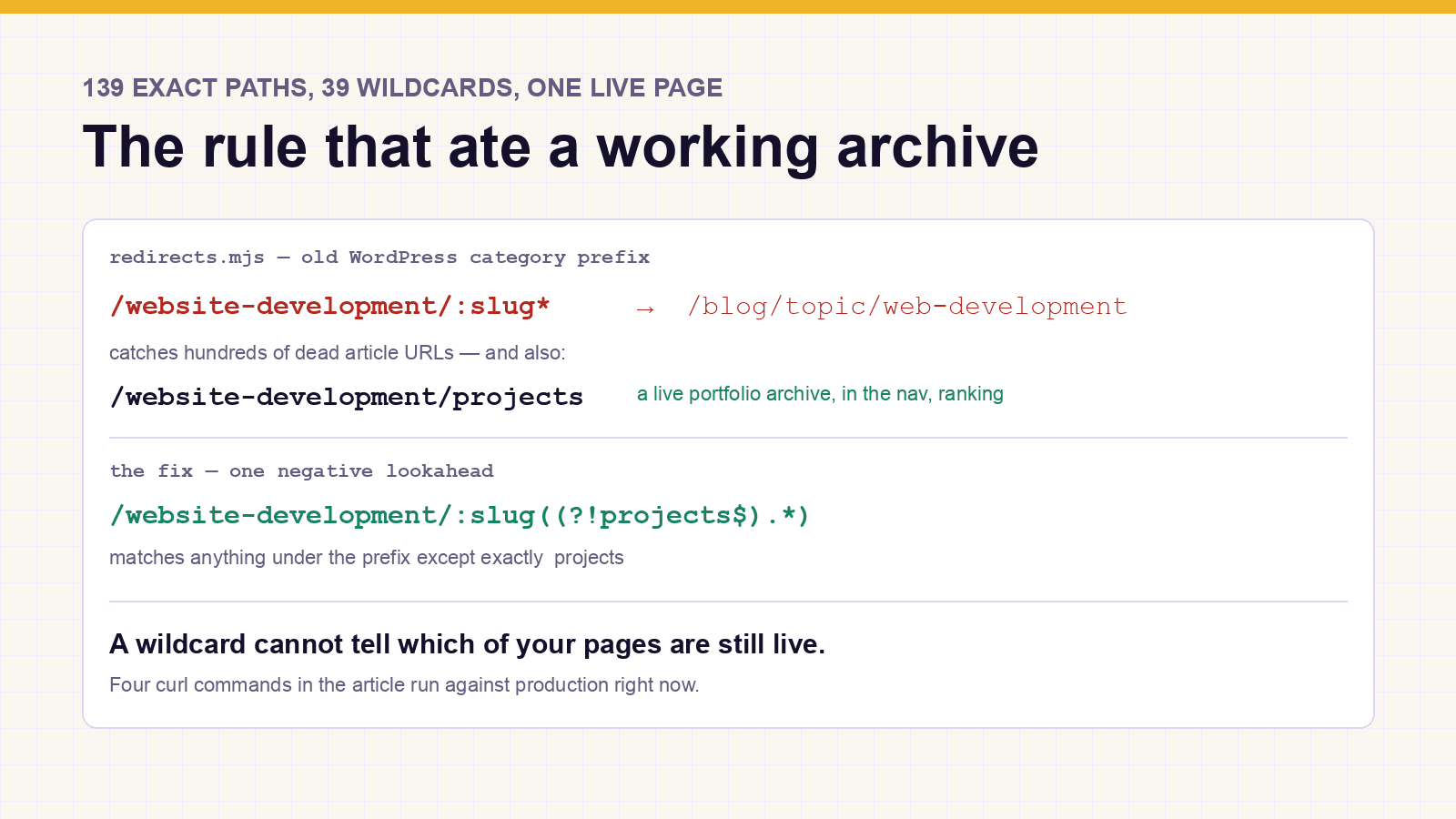
Here is the same pair of rules from a real site - this one. The old WordPress category was /website-development, and a live portfolio archive still sits at /website-development/projects:
1// The obvious rule. Every old /website-development/* article
2// now points at the topic that replaced it.
3{
4  source: '/website-development/:slug*',
5  destination: '/blog/topic/web-development',
6  statusCode: 301,
7}1// The same rule, refusing to claim one path.
2// :slug must not be exactly "projects", so the live category
3// archive at /website-development/projects is never matched.
4{
5 source: '/website-development/:slug((?!projects$).*)',
6 destination: '/blog/topic/web-development',
7 statusCode: 301,
8}Fifteen old category names on that site collided with pages that still work, and every one of them needed the same exception. The lesson is not “check for one page”. It is: before you write a wildcard, list every live address that starts with the same folder, because each of them is about to be eaten.
The first match wins
The second trap has nothing to do with wildcards. It is about the order of the lines in the file. A redirect list is read from the top, and the first rule that matches is the one that runs. The rules below it are never looked at for that address.
Back to the shop. Suppose it also had a page for each sofa model, and the developer wrote careful, specific redirects for the important ones - /sofas/oslo-three-seater should go to the new Oslo product page, not to a blog. If those specific rules sit below the broad /sofas/:slug* rule, they never run. The broad rule matches first, every Oslo customer lands on a blog listing, and the careful work is a set of lines that execute nothing.
The rule
/website-development/:slug((?!projects$).*)→ /blog/topic/web-developmentTwo requests
/website-development/some-old-post301the wildcard claims it - /blog/topic/web-development
/website-development/projects200no rule matches - the live category archive renders
The rule of thumb: exact addresses first, wildcards last, and a comment at the top of the file saying so - because nothing in the file itself will complain. A shadowed rule is a line that runs, matches nothing, and passes code review.
What a trailing slash costs
Old links often end with a slash: /sofas/how-to-clean-a-sofa/. Most modern frameworks tidy that slash away themselves, before your redirect list is even consulted. So an old link with a slash takes two hops instead of one: first to the version without the slash, then to the new page.
- 308
/mobile-app/some-old-article/trailing slash normalised by the framework - 301
/mobile-app/some-old-articlethe redirect rule fires - 200
/blog/topic/mobile-app-developmentthe live page
Two redirects rather than one. Google follows both and passes the signals along, so this is a cost rather than a fault - but it is a cost paid on every link anyone ever wrote with a trailing slash.
Is that a problem? Not really. Google follows short chains and passes the ranking along. It is worth knowing about rather than fixing: writing a slash and a no-slash version of every rule would double the file to save one hop. Where it does matter is when chains grow - a redirect to a page that is later redirected again, and again - because at some length search engines give up.
Where this breaks
The list is only as good as the source. The usual source is Search Console’s “not found” report, which lists the old addresses Google happened to try. An old link nobody has clicked since the rebuild is not in it, so it is not in the file, and it will fail on the day somebody finally clicks it.
Nothing tests it. There is usually no automated check that each rule still fires, that no rule shadows another, or that every destination still returns a page. The checks in this piece were run by hand. That is a habit, not a guarantee, and habits fade.
Destinations drift. A redirect that points at a page which is later renamed becomes a chain. A chain that grows becomes a loop. The file has no memory of which of its destinations are still real.
And correct is not the same as successful. Everything here shows that a mapping is right and testable. Whether the rankings survived the move is a separate claim, and it needs a Search Console screenshot next to it before anyone should believe it.
The site these numbers come from
The furniture shop is made up. The rules are not. They come from this site, which was rebuilt in 2025 without carrying its old addresses across, and lived with 322 dead URLs until August 2026. The fix was 178 rules - 139 exact paths and 39 wildcards, every one a 301 - and fifteen of those wildcards needed the “except this one” treatment because an old category name matched a page that still works. Every rule in that file can be tested from a terminal, which is the next section. If your own move is still ahead, this check is part of a site move we run for you.
Test it on any site
curl -sI asks a website for a page and prints only the headers - the first line tells you what happened. 200 OK means the page rendered. 301 means a rule caught it and sent it elsewhere. These four commands run against this domain right now:
1$ curl -sI https://boffincoders.com/website-development/projects | head -1
2HTTP/2 200
3
4$ curl -sI https://boffincoders.com/website-development/some-old-post | head -1
5HTTP/2 301
6
7$ curl -sIL https://boffincoders.com/mobile-app/some-old-article/ | grep -E 'HTTP|location'
8HTTP/2 308
9location: /mobile-app/some-old-article
10HTTP/2 301
11location: /blog/topic/mobile-app-development
12HTTP/2 200
The first two are the interesting pair: same folder, same wildcard, one renders and one redirects. That is the exception doing its job.
Then do the same on your own site, today, and again after every change to the redirect list. Take the ten pages you would least like to lose - the ones with links pointing at them from elsewhere - and check that each one still answers 200. It takes two minutes. It is the only test that catches this, because a redirect that swallows a live page never looks like an error. It looks like success, right up until the traffic report, and by then Google has already believed you.
Related on this site: moving a 10,723-page site without losing a URL, web application development, legacy modernisation, white-label website builds for agencies and technical SEO - or hire a Next.js developer who has done a migration before.
Questions about this
A wildcard rule matches by pattern, not by whether a page exists. If a live page shares its first path segment with the old addresses you are redirecting, the rule catches it too, and a 301 tells search engines the page has moved for good.
Not answered here?
Ready to Build Something
That Actually Works?
Twenty minutes with the people who build this kind of system. Bring the site or app you are worried about, or one you have been asked to take over, and we will tell you what we would check first.