Grounded AI Extraction: Let the Model Fill the Form, Let a Parser Veto It
Ask a model to fill a form from a forwarded message and it fills every field, including the ones the message never mentioned. The design where the model's answer is kept only when the user's own words back it, what that costs, and the case it still gets wrong: a photo.
27 October 2026
Check it yourself. Send your extractor a message with no blood group and check that the field comes back empty.
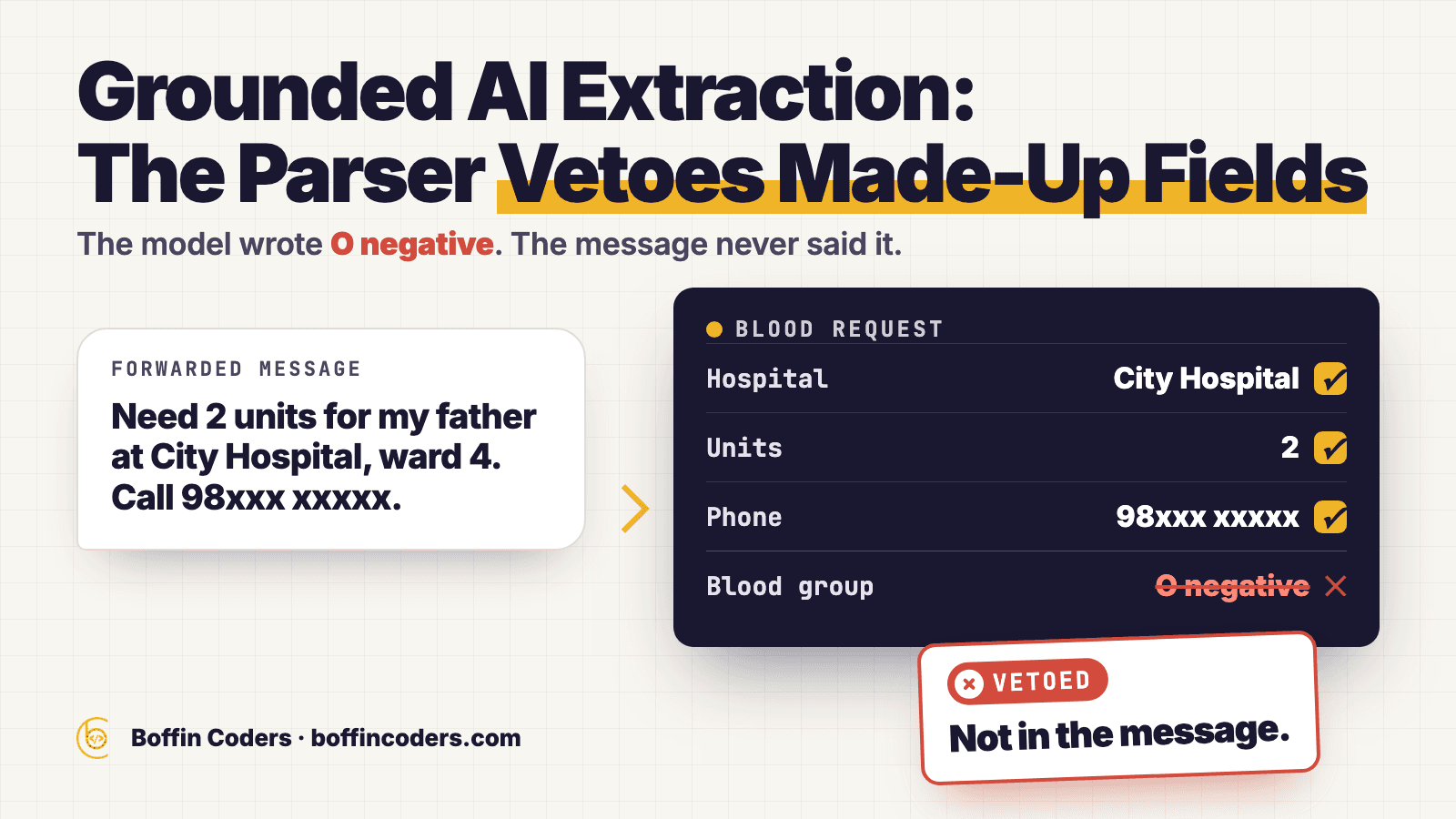
You paste a forwarded message into a form that fills itself: "Need 2 units for my father at City Hospital, ward 4. Call 98xxx xxxxx." A second later the patient, the hospital, the units and the phone number are all filled in, and so is the blood group: O negative. The message never gave a blood group. Every value on the form is valid, and one of them was made up. On a blood request, that one field decides which donors get the alert.
Illustration. Figures are invented.
Why does the model fill in fields the message never mentioned?
Because you asked it for a complete form. Give a model a JSON schema with a bloodType field and it returns a blood type, since an empty field looks like a failed answer. A schema whose blood type is an enum of real blood groups makes the answer valid. It does not make it true: "O-" passes the schema whether or not the message said it. The form is checked for its shape, and nothing checks it against the message.
Look at the example again. "City Hospital" came from the message, and you can point to the words. "2 units" came from the message too. "O negative" came from nowhere you can point to. The model produced the most likely value for a field it was told to fill.
A value is grounded when you can find the place in the input it came from. The hospital in the example is grounded. The blood group is not. A form filler that only checks the schema cannot tell the two apart, because both look the same once they are inside the JSON.
Why doesn't telling the model not to guess fix it?
Because an instruction asks the model to behave, and it cannot check that it did. The app does give the instruction: its extractor tells Gemini to "Return only facts present in the input". Most of the time the model follows it, and on the rare occasion it does not, the instruction gives you no signal. Only a check that runs after the model, in code, on the user's own text can catch it.
The second obvious fix is to drop the model and fill the form with fixed rules. The app has those rules too: a local parser on the phone reads the same text with patterns, and it never returns a blood group or a phone number that is not in the text. Patterns handle the ways of writing a request that someone thought of in advance. A request typed in a hurry is full of phrasing nobody wrote a pattern for, and that is where a model is useful. So the app runs both readers and decides between them field by field.
How does the parser veto work?
Two readers get the same text, and the merge goes field by field. A local parser on the phone reads it with fixed patterns. Gemini reads it through Firebase AI Logic and returns JSON in a fixed schema. For the two fields where a wrong value does harm, the blood group and the phone number, the model's answer is kept only when the source text backs it. Otherwise the parser's answer wins, even when that answer is empty.
- Capture the text on the phone. Speech goes through on-device speech-to-text, English as spoken in India first, then Hindi. A paste is used as it is. A photo of a requisition slip is read by on-device text recognition: Apple Vision on iOS, Google ML Kit on Android. Whatever the source, the result is one block of text, and that text is the only evidence the merge accepts.
- Read the text twice. The parser (
lib/utils/blood_request_draft_parser.dart, 802 lines) and the model (lib/utils/blood_request_ai_extractor.dart) each produce a draft of the form. The schema makes the blood group an enum, so the model can only return one of the listed groups. That controls the shape of the answer and nothing more. - Merge field by field. The model's blood group is kept only if the source text mentions it. The model's phone number is kept only if its digits appear in the source. If the model call fails for any reason, the app uses the parser's draft as it is. Hospital text found in the message pre-fills the search box of the location picker, and the requester still picks the hospital on the map.
- Ask the requester about photos. When the text came from a photo, a blood group is kept with a warning, and the field is marked for the requester to confirm before the request goes out.
This is the phone-number rule as it appears in the parser. It is an excerpt, lines 747 to 752, and the argument list is shortened to {...} here.
1// lib/utils/blood_request_draft_parser.dart:747-752
2static String? _preferGroundedPhone({...}) {
3  final digits = sourceText.replaceAll(RegExp(r'\D'), '');
4  final remote = normalizePhone(remoteNumber);
5  if (remote != null && digits.contains(remote)) return remote;
6  return normalizePhone(localNumber);
7}
It strips everything except digits from the source text, normalises the number the model returned, and keeps that number only if its digits appear in the source. Otherwise it returns the parser's number, which can be null. A null leaves the field empty, and the requester types the number in. The blood-group rule follows the same idea: the model may propose, and the source text decides. This check is where generative AI work on any form should start.
What does the veto cost?
It costs some correct answers. When a message names the blood group in a way the check does not recognise, such as an unusual spelling, the veto can drop a value the model read correctly, and the requester types it in. The design accepts that on purpose. An empty field costs the requester a few seconds. A wrong blood group sends the alert to donors who may not be able to help.
The second cost is where the text goes. Capture runs on the phone, and so does the parser. The extraction call sends the request text to Gemini through Firebase AI Logic, so the words of the request leave the device for that one call. If the call fails, for example when the phone has no signal, the requester sees the parser's draft instead.
The third cost is upkeep. Two readers are two things to keep in step. A new way of writing a blood group has to reach the check as well as the model, or the veto starts refusing correct answers that use it. Nobody notices that from the outside, because a refused value looks like an empty field.
Where does grounding break?
It breaks where the source text is itself unreliable, and the clearest case is a photo. The text from a photo of a handwritten slip is the recognition engine's reading of someone's handwriting. Checking the model against that text can mean checking one misreading against another, and a match then proves nothing. That is why a blood group from a photo is kept with a warning and marked for the requester to confirm, rather than trusted.
A second limit comes from the rule itself. The check asks whether a blood group appears in the text. It does not ask whose blood group it is. A message that says "Patient is B positive, his brother is O positive and can donate" mentions two groups, so either answer from the model passes the check, and the check cannot tell which one belongs to the patient.
The phone check has a smaller version of the same gap. It removes every non-digit from the whole message and looks for the model's number inside what is left. In "Bed 12, call 98765 43210" the digits run together as 129876543210, so a number made from the bed number and the first eight digits of the phone number would also pass, if the model ever returned one. Both limits follow from the code, and no case of either is on record.
Illustration. Figures are invented.
How do you test your own AI form filler?
Run three messages through it and watch one field: the one that would do the most harm if it were wrong. For a blood request that is the blood group. For an invoice it might be the amount, and for a booking the date. With a veto in place, each test has an expected result you can check in a minute, and a result that differs tells you exactly which part of the design is missing.
- Send a message with no value for that field. For example: "Need 2 units at City Hospital, call 98xxx xxxxx." The field should come back empty. If it comes back filled, the model is guessing and nothing stops it.
- Send a message with two values for it. For example: "Patient is B positive, his brother is O positive." See which one you get. A check based on presence accepts either, so this field needs a person to confirm it.
- Send a photo of a handwritten note. Compare the text your recognition step produced with the note itself. Where they differ, your check is comparing the model with the wrong text, and the field should be marked for a person to confirm.
Illustration. Figures are invented.
What does this design still not tell you?
The app does not yet count how often the veto fires, so nobody can say whether it stops a wrong blood group once a day or once a year, or how often it drops a right one. If you build this, count both from the first release: each time the merge refuses a model value, and each time the requester then types the same value by hand. The first count tells you what the veto protects you from, the second tells you what it costs, and without both you are choosing an empty field over a wrong one on principle alone. The principle is right for a blood request, and the next build of the app should count both.
Questions about this
Grounded AI extraction is filling a form with a model and keeping each value only if it can be found in the text the user gave. The model proposes a value, and a check in code compares it with the source. A value with nothing in the source to back it is dropped, or marked for a person to confirm.
Not answered here?
Ready to Build Something
That Actually Works?
Twenty minutes with the people who build this kind of system. Bring the site or app you are worried about, or one you have been asked to take over, and we will tell you what we would check first.