Let the AI write your outreach email. Never let it send it.
An email that has gone cannot come back. So the safe design for AI outreach is the one where the model writes, a person reads, a rulebook checks, and only then does a queue send. The model never gets the send button. Here is exactly how that is built, with every rule copied from a system that runs in production.
12 September 2026
Check it yourself. Ask the vendor: which function sends, and can the model call it?
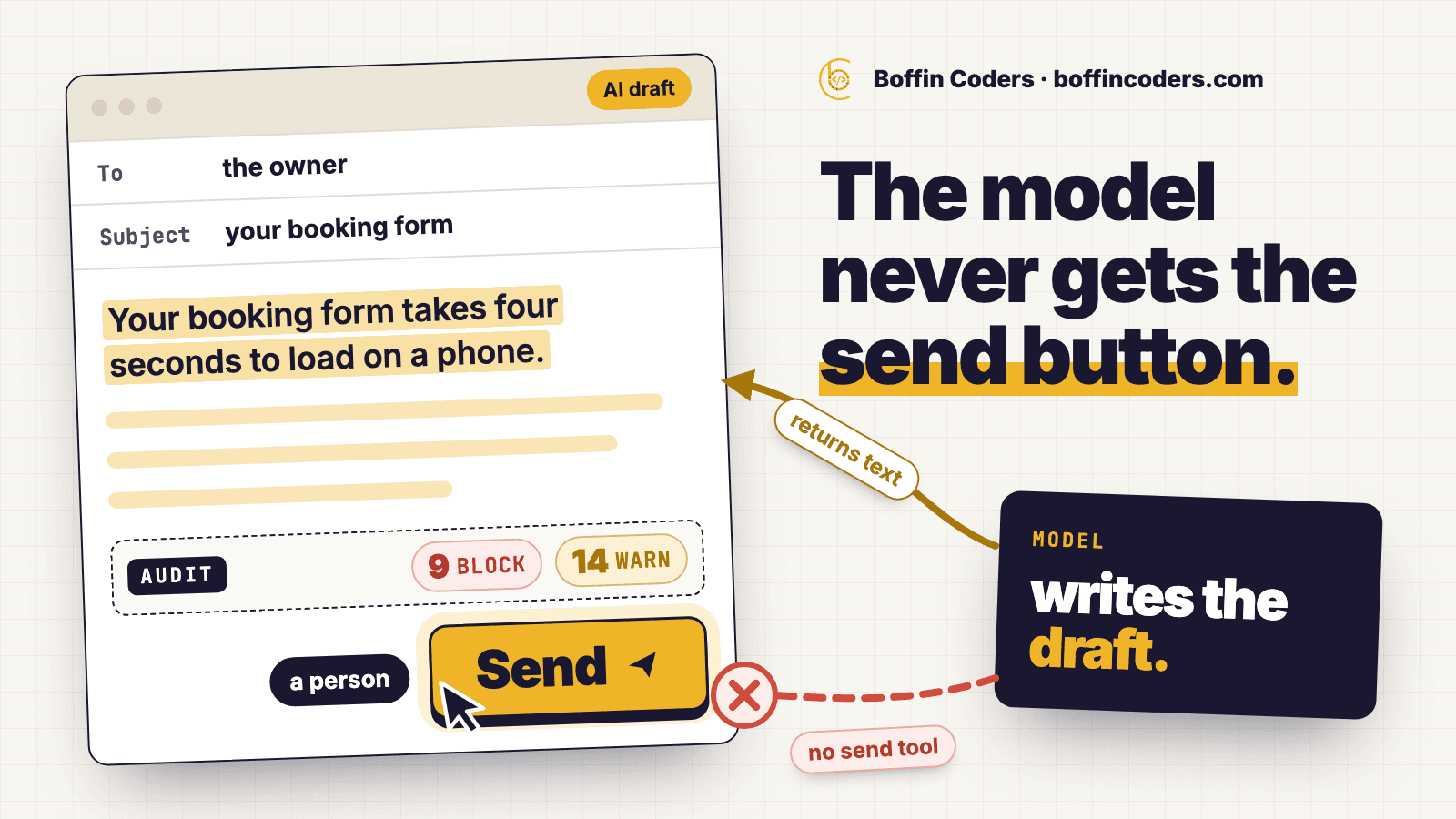
Picture this. You have added AI to your sales outreach. On Monday morning you open your sent folder and find that at 3 a.m. the system wrote to a prospect, called him by the wrong name, promised that your team is based in his city, and quoted a case study that does not exist. All of it was polite and well written. All of it has been read.
Nothing crashed. There was no error in any log. The model did what a model does - it wrote fluent text - and the system did what it was allowed to do, which was to send it. The mistake was not in the model. The mistake was in what the model was allowed to touch.
This piece explains the one design decision that makes it safe to put an AI inside a sales outreach tool, and the rulebook that has to sit between a draft and a mail server. The rules and code quoted below come from one production system - an outreach tool built for a small agency, where every email carries the sender’s own name - and they are copied from its source, not summarised. The design is not specific to that tool. It applies to any system where a model writes something that cannot be taken back.
The one decision that matters
The model is never given a way to send. It is given a prospect record, a set of voice rules, and a question: write touch one of a cold sequence. It returns text. That text lands in an editor in front of a person. That is where the model’s job ends.
This sounds obvious when written down. It is not what most “AI sales agent” products do. The usual design hands the model a set of tools - search the web, look up the company, send the email - and lets it decide the order. That is a fine design for a demo. In a live system it means the first time the model is confidently wrong, the wrong thing is already in someone’s inbox.
Here is the whole AI feature, as the send path sees it:
1// The whole AI feature, seen from the send path.
2// It returns text. It is not given a tool, a credential or a callback.
3const raw = await chat('draft', [
4  { role: 'system', content: await voiceSystemPrompt() },
5  { role: 'user', content: `Write touch ${touchNumber} of a cold outreach sequence.\n\n${prospectBrief(prospect)}` },
6], { job: 'writing' })
7
8return reply.send({
9  subject: parsed.subject,
10  bodyHtml: sanitiseEmailHtml(parsed.bodyHtml),
11  usedAi: true,
12  note: 'A draft. Read it, change it, and check the audit before sending - the tool will not send it for you.',
13})
Read the last line of that response. It is the note the interface shows under every AI draft: the tool will not send it for you. The model is not even in the same part of the codebase as the code that sends. There is no function it can call that reaches a mail server, and there is no way to add one without a person writing it.
The other half of the same stance, keeping your data away from the model’s vendor, is local speech to text on your own server.
What the model is told
A draft is only useful if it comes out close to sendable. So the voice rules are written into the system prompt, in code, and they are the same rules the human writers follow. A few of them:
1Voice rules, all mandatory:
2- Plain over impressive. Short sentences. No throat-clearing opener.
3- Banned words, never use them in any form: seamless, robust, cutting-edge,
4  leverage, enterprise-grade, solutions.
5- Never invent a claim, a metric, a client name, a case study or a testimonial.
6  If you do not have a fact, do not imply one.
7- Never imply the team is located in the recipient's country.
8- Never promise a result. Describe what was observed and what it would take to fix.
9- Under 160 words.
10- End with one low-cost question the reader can answer in a sentence.
Two of these matter more than the rest. Never invent a claim - because a model asked to be persuasive will reach for a number, and a number it made up is the one thing a reader can check. And never imply the team is located in the recipient’s country - because an offshore team writing to a British reader will drift towards sounding British, and the first time the reader works out where the sender actually is, everything else in the email becomes suspect. Saying where you are, plainly, is what makes the rest believable.
Notice also what is not in the prompt: nothing about the company’s services, prices or past clients. That comes from a settings screen, so it can change without touching code. The rules are product logic and stay in the repository. Who the company is belongs to whoever runs the tool.
The rulebook, in code
A good prompt reduces bad drafts. It does not remove them. So between the editor and the queue sits an audit: a list of rules, each with a level, each with a written reason that the interface shows next to the finding. It is one engine and it runs twice - live in the composer as you type, and again on the server when you press send. Two copies of the rules would drift apart one day, and the copy you trust is the one in front of you, so there is only one.
Let us take a made-up example. Say you found a plumbing company in Leeds whose booking form takes four seconds to load on a phone, and you want to write to the owner. You ask the tool for a draft. Here is what the audit says about a first draft that was written carelessly, and about the same email after a person has spent two minutes on it:
There are three levels, and they behave differently.
BLOCK means the send button does nothing until the problem is fixed. These are the nine findings where there is no version that is a judgement call:
1// The nine findings that cannot be clicked past.
2suppressed      Recipient is on the suppression list
3limit-zero      This mailbox has a daily send limit of 0
4limit           Daily limit reached - N of N sent from this mailbox today
5window          Outside this mailbox's send window
6subject-empty   Subject is empty
7too-short       Body is N words - under the 40-word floor
8no-unsub        No unsubscribe link in the message
9no-postal       No postal address in the message
10no-text-part    No plain-text alternative could be generated
Three of those are legal, not stylistic. A missing unsubscribe link or a missing postal address is an offence for commercial email to the UK, the EU and Australia. A recipient on the suppression list - somebody who unsubscribed, or an address that hard-bounced - is the one mistake in the whole system that a regulator can act on, which is why it is checked here and checked again later.
WARN means the email is probably a bad idea and here is why. Attachments from an unknown sender. More than three links. An image. A link shortener. A banned word - seamless, robust, cutting-edge, leverage, enterprise-grade, solutions - because those words appear in every agency email the reader has ever deleted. A body that is identical to the template, which means nobody looked at the prospect at all. And a closing with no question in it, because an email that ends in a statement asks the reader to invent the next step, and they will not.
INFO is for the person. Word count and reading time. Whether the first line names the prospect. Whether the body carries any of the specific details from the reason this prospect was chosen - the four-second form, in the example above. That last one is the honest test of a cold email: if none of the evidence you gathered reaches the message, the reader cannot tell you apart from a scraper, and later, neither can a regulator.
Why a warning needs a written reason
A warning can be overridden. But not with a click. The person has to type a reason of at least ten characters, and the reason is stored with the message. This is the part of the design that protects the system from a tired human at the end of a long day.
1// A warning is dismissed with a reason, not a click.
2export const AuditOverride = z.object({
3  ruleId: z.string(),
4  level: z.enum(['WARN']),          // BLOCK has no override type at all
5  reason: z.string().min(10).max(500),
6})
7
8// And the server does not trust the client's word for it.
9const blocks = result.findings.filter((f) => f.level === 'BLOCK')
10if (blocks.length) throw new AuditBlockedError(blocks)
11
12const openWarnings = result.findings.filter(
13  (f) => f.level === 'WARN' && !overridden.has(f.id),
14)
15if (openWarnings.length) throw new OverrideRequiredError(openWarnings)
Two things to notice. The override type only exists for WARN - there is no data structure for overriding a BLOCK, so it cannot be done by accident or by a clever client. And the server runs the audit itself and compares its own findings against the overrides. A browser that claims “all warnings dismissed” is not believed. The rules are checked where they cannot be edited.
Checked twice, seconds apart
Pressing send does not send. It writes a row to a queue. A worker reads the queue every fifteen seconds, waits a randomised delay so that ten messages do not leave in the same second like a machine, and only then opens a connection to the mail server. Immediately before it does, it repeats three checks:
1// In the worker, immediately before the SMTP handshake.
2// No UI override reaches this.
3if (await isSuppressed(prospect.email)) {
4  await cancel(doc, `${prospect.email} is on the suppression list. Nothing was sent.`)
5  return
6}
7if (!withinSendWindow(now, mailbox.sendWindow)) {
8  await requeue(doc, nextWindowOpening(now, mailbox.sendWindow))
9  return
10}
11if ((await sendsTodayFor(mailbox, now)) >= mailbox.dailySendLimit) {
12  await requeue(doc, tomorrow)
13  return
14}
15await sendEmail({ mailbox, to: prospect.email, built })
Why repeat them? Because time passes between the click and the send. Someone can unsubscribe in that gap. The daily limit can be reached by another message from the same mailbox. The send window can close. The audit at click time was right when it ran; the worker checks again because the world moved.
Look at where the model sits on that timeline. It does not. It wrote a draft into an editor before the person pressed anything, and after that it has no part in the process. That is what “never let it send” means in code: not a permission flag that could be flipped, but an absence. There is nothing to flip.
When the AI fails
The model provider goes down. The API key expires. The model returns something that is not JSON. All of these happen, and none of them may stop a person from sending an email.
1} catch (e) {
2  // AI failed. The plain template goes into the editor instead.
3  // A send is never blocked by AI, and never caused by it.
4  return reply.send({
5    ...fallback,
6    usedAi: false,
7    note: `AI failed (${errorMessage(e)}). This is the plain template instead.`,
8  })
9}
The composer opens with the plain template instead, variables filled in, and a note saying what happened. The audit runs the same either way. The rule in the source is written as one sentence: a send is never blocked by AI, and never caused by it. Both halves matter. The model is a convenience for the writer. It is not on the path that matters.
What it cost
Two models, chosen in settings and changeable without a deploy. A cheaper, faster one for triage - reading replies and sorting them - at temperature zero so the same reply is classified the same way twice. A stronger one for writing, at temperature 0.6. Every call has a 45-second timeout and every call’s token usage is logged with its purpose, so the monthly cost per draft is a query, not a guess.
The git history of the tool runs from 28 August to 4 September 2026. The audit engine is 548 lines including its tests and the explanation paragraphs. The design decision this piece is about - no send tool - cost nothing to build, because it is the absence of a feature. It cost a conversation, and that is usually where it is lost.
Where this breaks
The person is the bottleneck, by design. This system cannot send a hundred emails a day from one mailbox, and the daily limit is per mailbox so that it never will. If your plan needs volume, this design will frustrate you, and it is meant to. The documented way to scale is to add a mailbox, which means adding a real person with a real address.
The audit checks shape, not truth. It can see that the body has ninety words, one link and a closing question. It cannot see that the ninety words are wrong about the prospect’s business. A model can write a perfectly shaped email that passes every rule and is still untrue. That is why the draft lands in an editor and not in a queue, and why the INFO line about evidence exists - to nudge the reader towards checking the one thing the code cannot.
A written reason can be lazy. Ten characters is a low bar. “It is fine.” passes it. The rule is there to make the person stop for a second, not to make the override impossible, and after a few weeks the stops get shorter. The system this is drawn from has not measured how often overrides are used or how good the reasons are. That would be the next thing to instrument.
One process, one instance. The web server, the queue worker and the reply poller run in one Node process, and the deployment file says so in capital letters: exactly one instance, or two workers drain the same queue. The queue claims rows atomically so a double send is unlikely even then, but it is a constraint a reader should know before copying the design.
Check any vendor’s system
If you are buying or building an AI outreach tool, there is one question that separates the safe designs from the rest, and it takes a minute to ask. Ask to see the function that sends the email, and then ask who can call it. If the answer is “the agent decides”, the model has a send tool, and the 3 a.m. email is a matter of time. If the answer is a queue that only a person can write to, after a check that runs in code, you are looking at the design on this page.
And if you are building one yourself, start from the absence. Give the model a prospect and a rulebook and ask for text. Put a person between the text and the queue. Put the rules in one place, run them twice, and make the ones with legal weight impossible to click past. Everything else in this system - the randomised delay, the per-mailbox limit, the signed unsubscribe link - is ordinary email hygiene that any careful sender does. The only part that is about AI is the part where the AI is not allowed to do something, and that is the part worth copying. The model will get better every year. The reason to keep a person on the send button will not change.
Related on this site: why a RAG chatbot drops the rules you gave it, web application development, AI automation and hiring AI engineers.
Questions about this
Not for cold outreach. A sent email cannot be taken back, and a model will sometimes invent a claim or address the wrong person. Let the model draft into an editor, run the draft through written rules, and keep the send action for a person.
Not answered here?
Ready to Build Something
That Actually Works?
Twenty minutes with the people who build this kind of system. Bring the site or app you are worried about, or one you have been asked to take over, and we will tell you what we would check first.