Why your RAG chatbot ignores the rules you gave it
Your support bot has one rule: never promise a refund. A customer asks for a refund. The bot promises one. The rule was in the knowledge base the whole time - it just was not in the part the model was given.
10 September 2026
Check it yourself. context budget ÷ knowledge base size - usually under 30%
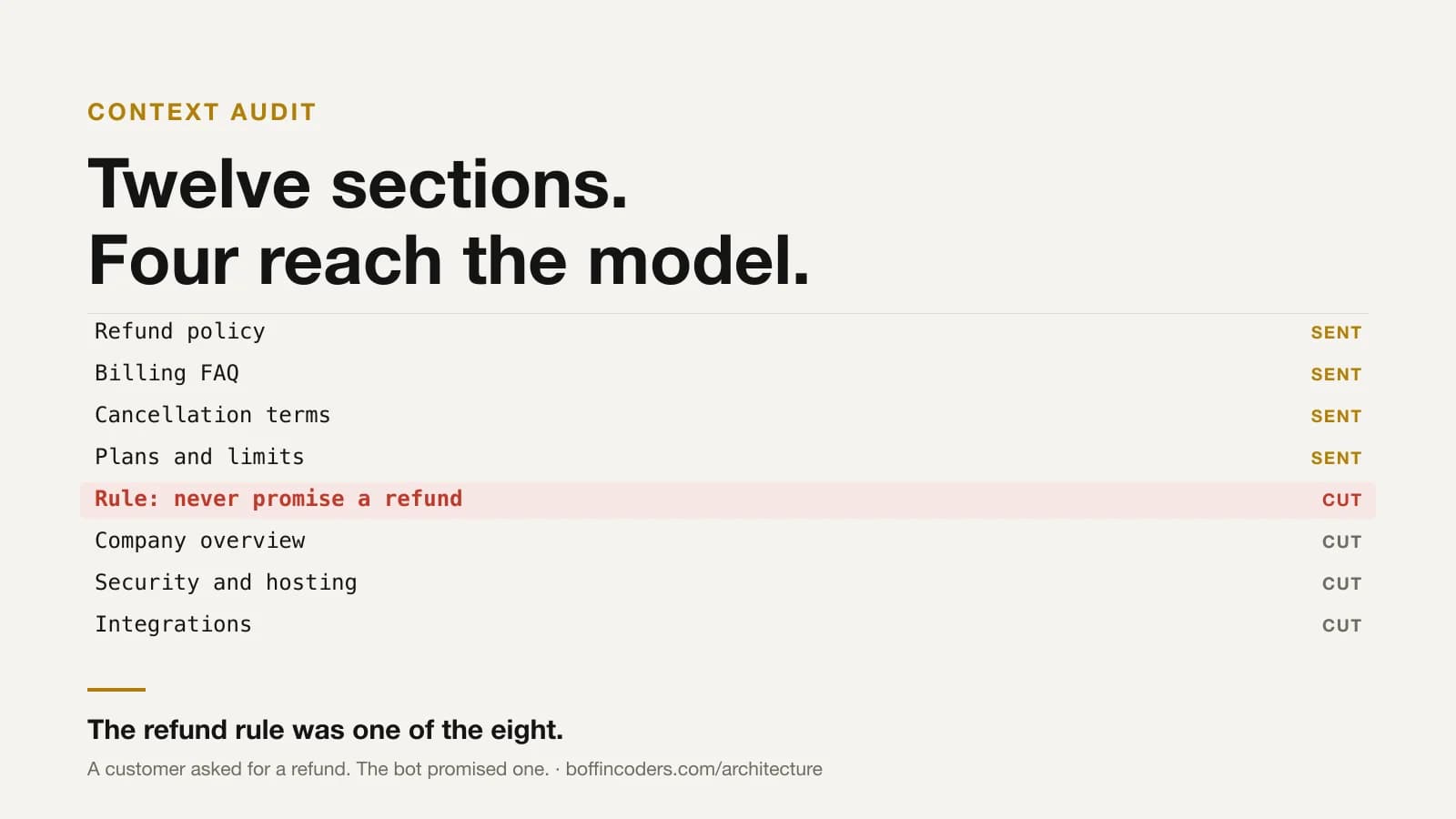
Here is a situation worth picturing before anything technical. You run a support bot. Somewhere in its knowledge base is one line: never promise a refund - refunds are decided by the billing team. A customer asks for a refund. The bot promises one. You now have a customer holding a chat transcript, and a rule that was in the file the whole time.
Nothing was jailbroken. Nobody wrote a clever prompt. The rule simply was not in the text the model received for that question, and this piece is about why that happens.
Most guides about retrieval stop at two topics. The first is chunking, which means cutting your documents into smaller pieces so that a single piece can be sent to the model. The second is embeddings, which means converting those pieces into numbers, so that a computer can measure how similar two pieces of text are. Both topics are useful and both are worth learning.
But a system that is already running in production does not usually fail at either of them. It fails somewhere else, and it fails silently. Let us go through how that happens, step by step.
Your knowledge base keeps growing. Somebody adds a new FAQ, a new policy page, a new product description. This is normal and it is a good sign. Meanwhile, a language model can only read a fixed amount of text in one request. That limit is called the context budget, and it is fixed by your provider and your plan, not by you.
At some point your knowledge base becomes bigger than that budget. From that day onward, some part of your content has to be left out of every single request. There is no way around it. The text simply does not fit.
So now something has to decide which parts get sent and which parts get dropped. This is the most important decision in your entire system, because the model can only answer using the text it actually receives. And in most systems, this decision is not made by any real selection logic. It is made by one line of code that takes the first few thousand characters of a file and throws away the rest.
Measure what your bot actually sees
Before changing anything, find out how big the problem is in your own system. You need two numbers. The first is the total size of the knowledge base you have written. The second is the size of the portion you send with each question.
1# What the model actually receives, versus what you wrote.
2wc -c KNOWLEDGE.md          # 164,098
3# and in the route:
4KNOWLEDGE_CHAR_LIMIT        # 38,000
5
6# 38,000 / 164,098 = 23%.
7# The other 77% has never been in a single request.
In the system these numbers are taken from, the result was 23 per cent. Read that again, because it is the important part. Seventy-seven per cent of everything that had been written for that assistant had never been sent to the model. Not once, for any question, by any user.
The cause was not carelessness. The provider allowed 12,000 tokens per minute. Each request was using 12,764 tokens, which is above that limit. So somebody reduced the amount of knowledge until the request fitted. Under a hard limit, that is a reasonable thing to do. The problem is that it was never revisited, and it was never called what it actually is: throwing away three quarters of your content.
Run this division on your own system before you continue reading. It takes five minutes and most teams are surprised by the answer.
Taking the first part of a file is not choosing
This single line decides what your model knows:
1// The version almost everyone ships first.
2// It is not a bug. It is a budget, spent in file order.
3return knowledge.slice(0, KNOWLEDGE_CHAR_LIMIT)
It takes the first N characters of the file and stops there. Nothing else is considered. Which sections end up inside those characters depends only on the order in which the file was assembled by your build script.
Think about what that means in practice. A visitor asks a question about video streaming. The model receives whichever pages the build script happened to write first - perhaps your company overview, your pricing page and two service pages that have nothing to do with video. The section that actually answers the question is sitting at character 140,000 of the file, and nothing in this code will ever reach it.
Notice what decides the outcome here. It is the position of the text inside the file. Something written near the top gets sent. The same text, written near the bottom, never gets sent. The question the visitor asked plays no part in it at all.
Scoring, and why not embeddings
The fix is to give each section a score against the question that was asked, and then send only the sections with the highest scores. For a knowledge base of a few hundred sections, an algorithm called BM25 does this job well.
BM25 works on a simple idea. If a section contains the words from the question many times, it is probably relevant. But that idea alone is not enough, so BM25 applies two corrections to it.
The first correction handles repetition. If a word appears twenty times instead of five, the section is not four times more relevant. So after a certain point, extra repetitions stop adding to the score.
The second correction handles length. A very long document will naturally contain more of your words, just because it contains more words in total. So BM25 divides by document length, which stops long pages from winning simply for being long.
1// Okapi BM25. Term frequency, saturated; document length, normalised.
2// k1 caps how much repetition can help. b decides how much length hurts.
3for (const term of queryTerms) {
4  const f = doc.filter((t) => t === term).length
5  if (f === 0) continue
6
7  const n = docFrequency.get(term) ?? 0
8  const idf = Math.log(1 + (docCount - n + 0.5) / (n + 0.5))
9
10  score += idf * ((f * (K1 + 1)) / (f + K1 * (1 - B + (B * doc.length) / avgLen)))
11}
That is the complete algorithm. There is nothing hidden behind it. It has been the standard baseline in information retrieval since the 1990s, it needs no model, no vector database and no API call, and over 136 sections it finishes in under a millisecond.
You may be wondering why we did not use embeddings here, since that is what most articles recommend. Embeddings compare meaning rather than words, and they are genuinely better when you have a very large number of documents - a hundred thousand or more. At that size, matching words simply stops working.
But at a few hundred sections, the list is short enough to score exactly. Adding embeddings at this size means adding a monthly bill, one more dependency in your project, and a separate index that has to be rebuilt every time your content changes. You would be paying all of that to sort a list that BM25 already sorts correctly. Add embeddings on the day you can show BM25 failing on real questions from real users, and not before that day.
BM25 does have one clear weakness, and it is worth knowing. It compares words, not meaning. If a customer types "how cheap is it", that question shares no word with a section titled "Pricing". The score will be zero. The practical fix is not complicated: write down ten or twenty synonyms for the terms your customers actually use - cheap, cost, price, budget, rate - and expand the question before scoring it. This costs nothing and closes most of the gap.
Your rules are documents too
Now back to the refund.
Your knowledge base contains rules. Never promise a refund. Never quote a price you cannot confirm. Never name another client. Say you do not know, rather than guessing. These are the most important sentences in the file, and in most systems they sit in that file as ordinary paragraphs, next to everything else.
Here is the problem. As soon as you add relevance scoring, those rules become documents like any other document in the file. They have no special status. They compete for space against product descriptions and FAQ answers, and they are judged by exactly the same measure: how many words they share with the question.
Watch what the scorer does with "can I get a refund?". Your refund policy page scores high - it is about refunds and it uses the word repeatedly. Your billing FAQ scores high for the same reason. Your cancellation terms score well too.
And the rule? Never promise a refund - refunds are decided by the billing team. Eleven words. It mentions refunds once. Against three pages that discuss refunds in detail, it ranks near the bottom. The budget fills up before it is reached, so it is not sent.
The model receives three documents explaining how refunds work, and nothing telling it who decides. It then does the reasonable thing with what it was given.
It is worth pausing here, because the first instinct is to blame the model or to rewrite the prompt. Neither of those was at fault. The rule was stored as ordinary reference material, and it lost a relevance contest to the very documents it was written to control.
There is something uncomfortable in this. The problem gets worse as your retrieval gets better. A tighter budget and a sharper scoring algorithm both push in the same direction - more space for text that matches the question, and less space for text that does not. So a carefully tuned system is more likely to drop its own rules than a careless one. Improving the retrieval, on its own, makes this failure more likely rather than less.
Pinned context and scored context
The answer is not a better scoring algorithm. You can spend a month tuning the scores and the refund rule will still lose, because the rule barely mentions refunds. It has almost no words in common with the question. No scoring method will rank it highly, and that is not a bug in the scoring.
So the answer is to stop scoring some things at all.
Divide your knowledge base into two groups. Put in the first group everything that must be present in every request, whatever the customer asks. Your prices. Your verified numbers. Every rule about what the assistant must not say - including the refund rule.
Put everything else in the second group. Product descriptions, FAQs, guides, policy pages, help articles.
Now send the first group every time, without scoring it. Score only the second group and send whatever fits in the space that is left.
1// Two categories, not one ranked list.
2const pinned = chunks.filter((c) => c.pinned)   // facts, prices, prohibitions
3const pool   = chunks.filter((c) => !c.pinned)  // everything else
4
5const selected = [...pinned]                    // never scored, never dropped
6let used = pinned.reduce((n, c) => n + c.text.length, 0)
7
8for (const { chunk, score } of scoreAgainst(question, pool)) {
9  if (score <= 0) break
10  if (used + chunk.text.length > budget) continue
11  selected.push(chunk)
12  used += chunk.text.length
13}
In the system measured here, the first group is ten sections and about 1,262 tokens. That is roughly one third of every request. That one third is now reserved, permanently, for the text that must never go missing.
Now the refund question works. The refund policy, the billing FAQ and the cancellation terms all score well and get sent, exactly as before. And the rule goes too, because it was never in the competition. The model can now see both the policy and the limit on what it may promise.
Be careful not to claim too much for this. Pinning does not make a model obey you. A model can read your rule and still ignore it. That is a different problem, and it needs different solutions - testing, evaluation, and a human check on anything expensive.
What pinning fixes is narrower than that. It fixes the case where the rule was never sent at all, so the model had no chance to follow it. That is a smaller promise than the word "guardrails" usually implies. But you can check this one yourself in a minute, by printing the text that was sent and searching it for your rule. Most guardrail claims cannot be checked that easily.
Where this breaks
Scoring only helps when there is something to find. Some questions match nothing at all.
A customer opens with "hi, can you help me?". There is nothing to score against. A customer sends a follow-up made only of pronouns - "what about that one?" - and again there is nothing. Or somebody asks about a topic your company does not cover, so no section matches because no section exists.
In all three cases every section scores zero. The model then receives only your pinned text and nothing else. That is worse than the simple version you started with, because that one at least sent something every time.
Two protections handle this, and neither takes long to build.
The first is to build the search query from the last two customer messages instead of only the latest one. Then a short follow-up like "what about that one?" still carries the subject from the message before it.
The second is to set a floor. When scoring returns very little, keep adding sections in file order until you reach a minimum amount of text. In the system measured here, a question that matches nothing still sends about 2,950 tokens, against 3,700 for a question that matches well. The floor makes sure the model is never left with almost nothing.
Pinning also has a cost, and you should keep an eye on it. Every pinned section is space the question cannot use. If your pinned group keeps growing, it will slowly squeeze out the scored content, and you will be back to sending a fixed block of text no matter what was asked.
Keeping the pinned group near one third of the budget is a reasonable target. If yours is above one half, look at what is in there. Some of it is probably reference material that somebody pinned because it felt important, not because it is a rule.
Finally, be clear about what none of this does. It does not make an assistant truthful, and it does not remove the need to test one properly. It removes one failure that was previously silent. We build retrieval-grounded assistants on the assumption that grounding is something you have to keep checking, not something you switch on once and forget about.
Check your own system
Three steps. None of them takes long.
Step one. Do the sum. Find your context budget - the amount of text you send with each question. Then find the total size of your knowledge base. Divide the first by the second. That percentage is how much of your own content the model ever sees. If it is low, everything in this article applies to you.
Step two. Look at what one question pulls. Pick any question and print the list of sections that were selected for it. Do not read the answer. Read the list. The answer will look fine either way, which is why it tells you nothing.
1$ explain "can I get a refund?"
2
3  23.56  Refund policy
4  22.13  Billing FAQ
5  22.12  Cancellation terms
6  16.08  Plans and limits
7   2.31  Rule: never promise a refund      ← not sent
8  → 3,625 tokens sent
9
10$ explain "what about that?"
11
12  → 2,950 tokens sent   (nothing scored; the floor filled it)
Step three. Test two specific questions. These two are the ones that matter.
First, think of your strictest rule. For a support bot it is usually the refund rule, or the one about cancelling a contract. Now ask the question a customer would ask when that rule applies - "can I get a refund?". Print the list. Is your rule in it?
Second, type the vaguest thing a real customer might open with. Something like "hi, I need some help". Print the list again. Did anything come back at all?
The first test tells you whether your rules are reaching the model. The second tells you what your bot does when it has nothing to work with.
Most teams get a surprise from at least one of these two, and that is exactly why it is worth doing. Neither failure can be seen from outside. A model working with half the text it needed still replies in full sentences, and it still sounds completely sure of itself.
One idea to take away. Your knowledge base holds two different kinds of text. Some of it is material the model should look at when a question calls for it. The rest is rules that must be there every time, whether they look relevant or not. Score the first kind. Never score the second.
Related on this site: why the model should draft the email but never send it, web application development, generative AI and LLM development and hiring AI engineers.
Questions about this
Often the instruction never reached the model. If your rules are stored in the same knowledge base that retrieval selects from, they compete for space with everything else. On a question where the rule matters, the rule itself may contain none of the question’s terms, so it scores low and is left out.
Not answered here?
Ready to Build Something
That Actually Works?
Twenty minutes with the people who build this kind of system. Bring the site or app you are worried about, or one you have been asked to take over, and we will tell you what we would check first.