The accounts your development team needs, and who should own them
- September 11, 2026
- 10 min read
Founder, Boffin Coders
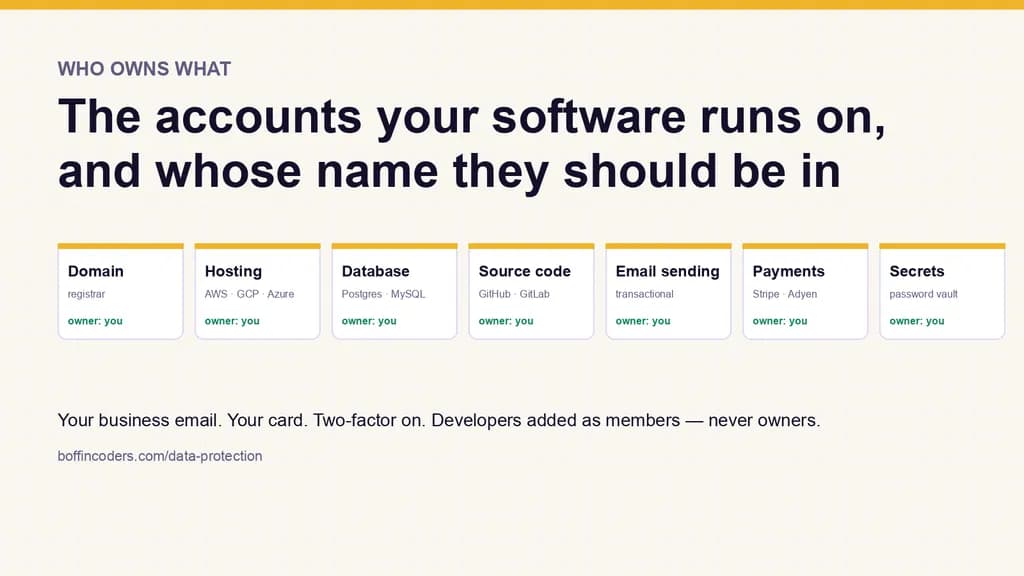
You should own every account your software runs on: the domain, the hosting, the database, the code repository, the email-sending service, the payment account and the password manager. Create each one with an email address your business controls and pay for it on your own card. Your developer, agency or white-label partner is then added to each account as a member, never as the owner, so nothing has to be handed back when the work ends.
Most of the people we build for are not technical. That is the point of hiring a developer. But it creates one problem at the very start of every project that nobody warns you about: software has to run somewhere, and that somewhere is a set of accounts. Hosting. A database. Somewhere the code lives. Email. Payments, if you take money. Each is an account with a login, a bill and an owner.
Who owns those accounts decides who owns your software. We have watched businesses discover, on the day they fall out with a developer, that the developer owns the domain, the hosting and the code, and the business owns nothing but the invoices. So we do it the other way round: you create the accounts, you own them, and we are added to them as developers. It is how we work on every project we build, and it is written into how we handle your data.
This is the list of what to create, in the order we set them up, what each one is for, and exactly what to grant us on each. Budget an afternoon. We go through it with you on a call. This page exists so you can do it at your own pace afterwards, or check what you already have.
The one rule that covers everything below
Every account is created with an email address your business controls, under your name, paid on your card. Not a developer's email. Not a personal address belonging to whoever happened to set it up. Ideally a role address - tech@yourcompany.com or similar - that survives staff changes and that you can forward.
Turn on two-factor authentication on each account as you create it. Every service below offers it, it takes a minute, and it is the single control that most reduces the chance of someone else ending up in your account. Use an authenticator app rather than SMS where the choice exists.
1. Your domain
Where you bought yourcompany.com. This is the one that must never be in anyone else's name. It is the address your customers know, and everything else points at it. If it was registered by a previous developer or agency, transfer it to your own registrar account before starting anything else. Every registrar has a transfer process. It takes a few days and usually costs about a year's renewal.
Which registrar matters far less than whose name it is in. Cloudflare, Namecheap, Google Domains' successor Squarespace, GoDaddy and the local registrars in most countries all do the job.
What we need: the ability to edit DNS records - the settings that point your domain at the hosting and the email. Most registrars let you add a user with only that permission. If yours does not, we tell you the exact records to add and you add them yourself. We never need the registrar login itself.
2. Hosting
The servers your website or application runs on. There are three families to choose between, and we will recommend one based on what you are building rather than a favourite:
- The large clouds - Amazon Web Services, Google Cloud, Microsoft Azure. Everything, at any scale, with a bill that is hard to predict and a console that takes training. Right when you already use one, when compliance demands a specific region or certification, or when the application will genuinely need to scale.
- The simpler clouds - DigitalOcean, Hetzner, Linode, Vultr. A fraction of the price, a bill you can read, a console a non-technical owner can understand. Right for most small and mid-sized applications, and what we use for our own site.
- Platforms - Vercel, Netlify, Railway, Render. No servers to manage at all. You connect the code and it deploys. Right for marketing sites and many web applications, with the trade-off that costs climb quickly past a certain traffic level.
For an EU or UK business the region matters as much as the vendor. All of the above offer European regions. Choose one, and it becomes a fact you can state in your own privacy policy.
What we need: an invitation to a team with the member or developer role, never owner. Every provider above has this: an owner can close the account and change billing. A member can create and manage servers. We do the work with the second.
3. Database
Where the application's data lives - customer records, orders, content, whatever your software is about. The choice of database is a technical decision we make with you. The common ones are PostgreSQL, MySQL and MongoDB, and any of them will be right for some projects and wrong for others.
The ownership decision is simpler. Use a managed database - one the hosting provider runs and backs up for you - from the same account as the hosting wherever possible, so it is one bill and one dashboard. Every provider in the section above offers managed versions of all three. The exception is when a specialist host is the better fit, such as MongoDB Atlas or Supabase. Then it is one more account under your email, and the same rules apply.
What we need: nothing extra. A managed database inside your hosting account is covered by the same team membership. If it is a separate service, an invitation to that project as a member.
4. Source code
The code itself lives in a repository: think of it as a folder with a complete history of every change ever made and who made it. Create an organisation - a company account, as opposed to a personal one - on GitHub, GitLab or Bitbucket. All three are free for small teams and all three work the same way for this purpose. If your developers already use one, use that.
This is the step people most often skip and most often regret. If the code lives in a developer's own account, they can remove your access, and there is nothing you can do about it. If it lives in your organisation with them as a member, the reverse is true. On our projects the repository is under the client from the first commit. There is no handover at the end because ownership was never anywhere else.
What we need: membership of the organisation with write access to the project repository. Not owner. Owners can delete the organisation. Members can push code. The role names differ slightly - GitHub calls it Write, GitLab calls it Developer, Bitbucket calls it Write - but each service documents it and each is the one we mean.
5. Email sending
If the application sends email - password resets, order confirmations, enquiry notifications - it needs a sending service. This is separate from your normal mailbox, because a normal mailbox will throttle or block an application sending hundreds of messages. Postmark, Resend, Amazon SES, SendGrid and Mailgun are the usual choices. They differ in price and in how much they help with deliverability, and we will say which fits.
Create it under your business email. It will ask you to verify your domain by adding a few DNS records, which is the step from section 1.
What we need: an API key. The service generates it. You paste it to us through the password manager in section 7. Never through email or a chat message.
6. Payments and other third-party services
Anything the application talks to that belongs to someone else: Stripe or Adyen or PayPal for payments, Google Maps, an SMS provider, an analytics property. Same rule: your account, your card, our access limited to what the work needs.
Payments deserve their own sentence. The payment account is where your money goes. It must be yours, verified in your business's name, with you as the only owner. When we integrate it we ask for a restricted API key - one that can create charges but cannot withdraw funds or change the account - and every major payment provider offers exactly that.
7. A password manager
You now have six or more accounts, and at some point you need to share credentials with us. The wrong way is email or a chat message: they sit in two inboxes forever, and one of those inboxes is not yours. The right way is a shared vault in a password manager. 1Password and Bitwarden both have team plans. Bitwarden has a free tier that is enough for this. You share a vault with us. When the project ends, you stop sharing it, and everything in it is instantly out of our reach.
This is also where the API keys from sections 5 and 6 go, and the answer to "how do I get the developer the password for X" for the rest of the project.
What "developer access" actually means
Every service above has roles, and the pattern is always the same. An owner can do anything, including deleting the account or changing who pays. A member, developer or editor can do the work. Give us the second one, everywhere.
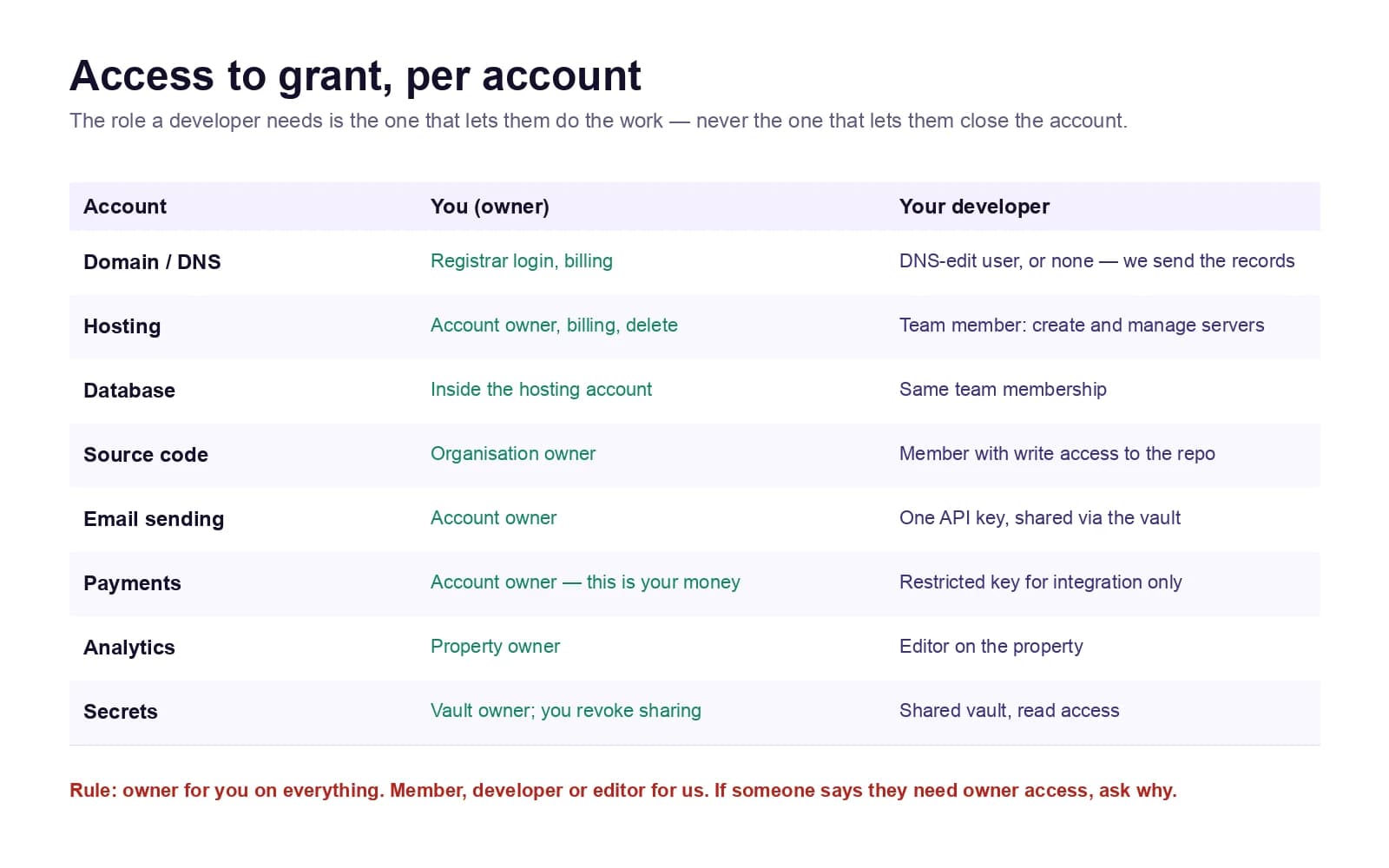
If a developer tells you they need owner access to do their job, ask what specifically they cannot do without it. There is almost always a narrower role that allows that one thing. We have not needed owner access on a client account in the time we have been doing this, and we would be suspicious of anyone who says they do.
When the engagement ends
Because everything is in your accounts, ending the engagement - whether the project is finished or you are changing developers - is a five-minute task rather than a negotiation:
- Remove us from each team. Hosting, source code, analytics, anything else from the list.
- Stop sharing the password-manager vault. One click.
- Rotate any API keys we had. Generate a new one in each service and update it in the application. The old one stops working the moment you do. If that last step needs a developer, the new developer does it as their first task.
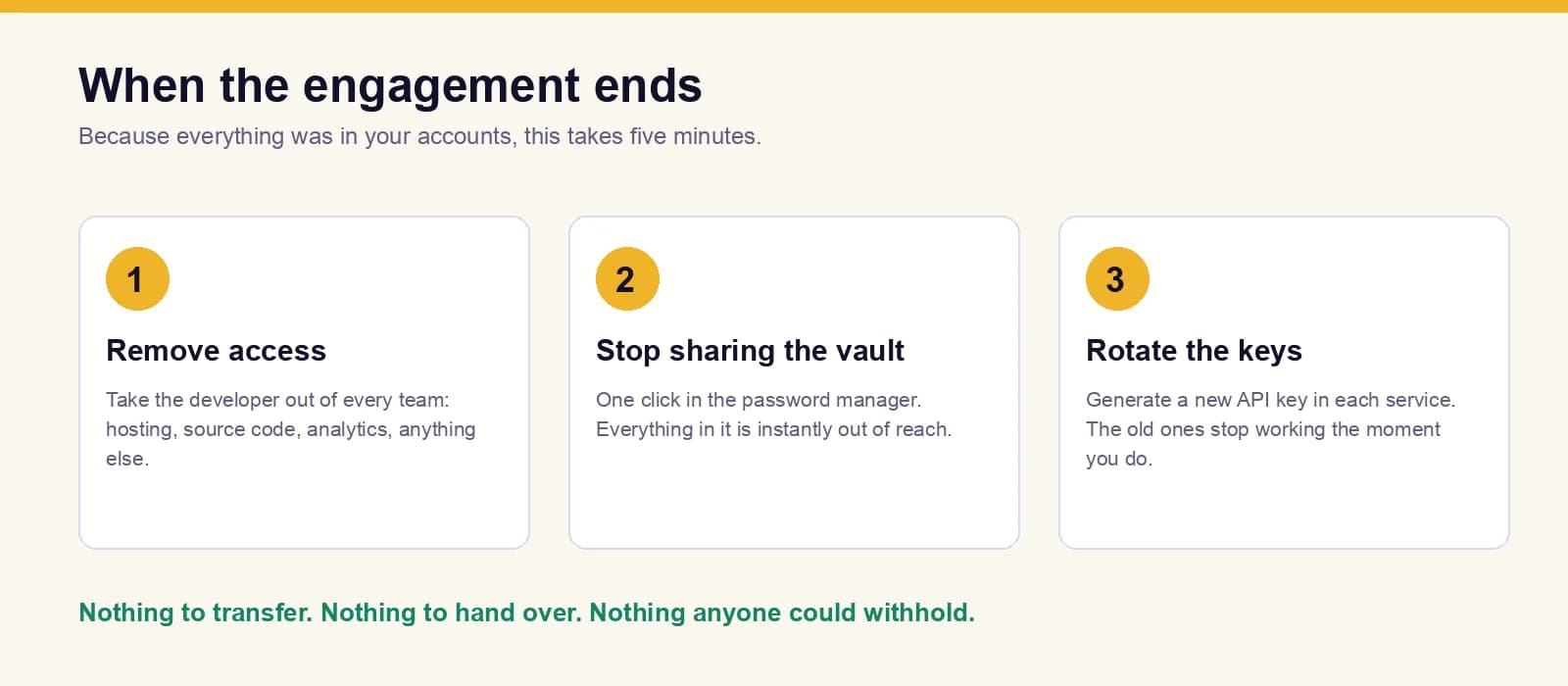
Nothing to transfer, nothing to hand over, nothing anyone could withhold. That is the entire reason for doing it this way from the start, and it is worth more than any clause in a contract.
What this costs
Nothing beyond what you would pay anyway. The accounts exist either way. The only question was whose name they were in. The password manager is the one new line, and it is free or a few dollars a month.
If you are starting a project with us, we go through this together on the first call - it is part of the scoping, not an extra. If you have an existing project and are not sure who owns what, that is worth finding out before the day you need the answer. We are happy to look with you; send us the list of what you think you have and we will tell you what is missing.
Keep reading
Manoj Sethi
Founder, Boffin Coders
Manoj founded Boffin Coders in 2017 and leads its work with agencies: white-label builds, delivery and partnerships. Manoj writes about how agencies can add development capacity without losing control of their clients.
Frequently asked questions
The business should own the hosting and domain accounts, created with an email address it controls and paid on its own card. Your developer, agency or white-label partner is added as a member, never as the owner. Then nothing has to be handed back when the work ends, and nobody can hold on to the domain your customers know.
Not answered here?
Need this built?
We build websites and apps for businesses, and work behind digital agencies as their development team. Tell us where things stand on a 20-minute call.