Your Android app asks for internet permission. You never wrote it.
You wrote one permission into your app. A library you added brought its own list, and a library that library uses brought another. The app your users install asks for six. Here is how that happens on every Android app, how to see it, and the one line that refuses what you never asked for - from an app that had told people it needed no internet, and was wrong.
4 September 2026
Check it yourself. bundletool dump manifest --bundle=app-release.aab
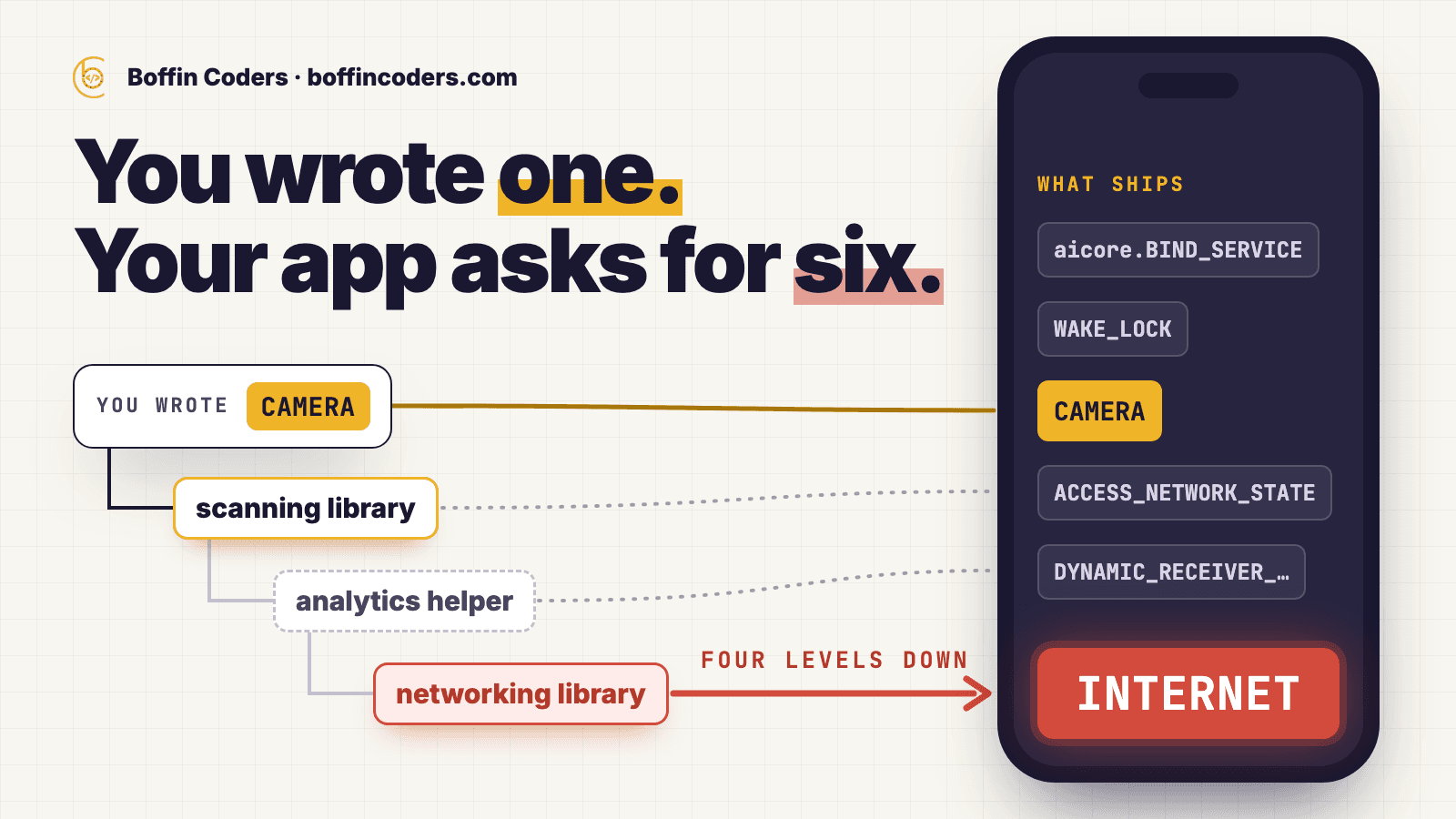
Every Android app carries a list of the things it is allowed to do - use the camera, read contacts, connect to the internet. The list is called the manifest, and the developer writes it. When you tell a customer “this app never touches the network”, that list is what you are pointing at. And the list you wrote is not the list that ships.
A notes app adds a barcode scanner
Take a small notes app. It stores everything on the phone, has no account and no server, and its manifest asks for exactly one thing: the camera, so a user can photograph a receipt into a note. The developer is proud of that. It is a selling point.
A customer asks for barcode scanning. The developer adds a well-known scanning library - one line in the dependency file - and ships an update. What she does not see is that the scanning library depends on an analytics helper, and the analytics helper depends on a networking library, and the networking library carries its own manifest with one line in it: I need internet access.
When the app is built, Android’s build tool takes the developer’s manifest and every library’s manifest and merges them into one. That merged file is the app. The notes app now asks for internet permission, and the next person who installs it sees that on the Play Store. The developer never typed it and would swear it is not there, because in her file, it is not.
Why reading your own manifest proves nothing
The obvious check is to search your own manifest for the permission. It comes back empty, and you conclude what the notes developer concluded. The real app is in a different file - the one the build produced:
1# what the developer wrote
2grep INTERNET android/app/src/main/AndroidManifest.xml
3# no match
4
5# what the build assembled
6grep INTERNET build/app/intermediates/merged_manifest/release/\
7  processReleaseMainManifest/AndroidManifest.xml
8# <uses-permission android:name="android.permission.INTERNET"/>
Opposite answers. The first file is what a developer writes. The second is what the build assembled from that file plus a fragment from every library in the app, and the second one is what becomes the app. Nobody granted network access in your file. It arrived four levels down somebody else’s.
android/app/src/main/AndroidManifest.xml · 1.0.1
CAMERA
the one permission the app requests
Refused since the first release
- READ_EXTERNAL_STORAGEtools:node="remove"
- WRITE_EXTERNAL_STORAGEtools:node="remove"
- READ_MEDIA_IMAGEStools:node="remove"
- READ_MEDIA_VIDEOtools:node="remove"
- READ_MEDIA_AUDIOtools:node="remove"
- READ_MEDIA_VISUAL_USER_SELECTEDtools:node="remove"
Refused as of 1.0.1
- INTERNETtools:node="remove"
- ACCESS_NETWORK_STATEtools:node="remove"
- WAKE_LOCKtools:node="remove"
Finding out who added what
The merge is not a mystery. The build tool writes a report of every decision it made - this permission came from that library, this one was kept, this one was refused. So “who added internet?” is a question with an exact answer, not an opinion.
In the app these figures come from, the internet permission was added by a Google data-transport library. Nobody on the team had heard of it. It was not in the dependency file. It arrived with the on-device text-recognition engine - which is to say, it arrived with the library that exists so that documents can stay on the phone. Two more permissions came from a video-player library that was in a PDF app because the recognition plugin depends on a package that depends on a video player.
google_mlkit_text_recognition 0.16.0
in our pubspec.yaml
ML Kit / Play services stack
we never asked for this
transport-backend-cct 2.3.3
we never asked for this
flutter_local_ai 0.0.16
in our pubspec.yaml
genui 0.9.2
we never asked for this
video_player 2.13.0
we never asked for this
media3 1.9.2
we never asked for this
None of this is a bug in anyone’s library. A library using other libraries is the point of a package manager. But a library can hand your app a capability, and the file you wrote will never mention it.
The one-line refusal
Android gives you a way to say no. Declare the permission in your own manifest with one extra attribute, and the merge refuses it from every library that asks:
1<!-- Contributed by ML Kit's transport stack and by media3, which arrives
2     with a video player this app never uses. Same treatment as the
3     storage permissions above. -->
4<uses-permission android:name="android.permission.INTERNET"
5    tools:node="remove" />
6<uses-permission android:name="android.permission.ACCESS_NETWORK_STATE"
7    tools:node="remove" />
8<uses-permission android:name="android.permission.WAKE_LOCK"
9    tools:node="remove" />
Read the attribute as a sentence: “whatever anyone else says, remove this.” The merger then marks the library’s request as rejected in the same report where it used to say added. Rebuilt, the merged manifest comes back clean:
1$ grep uses-permission build/app/intermediates/merged_manifest/release/\
2    processReleaseMainManifest/AndroidManifest.xml
3
4android.permission.CAMERA
5com.google.android.apps.aicore.service.BIND_SERVICE
6com.boffincoders.pdfunlocker.DYNAMIC_RECEIVER_NOT_EXPORTED_PERMISSION
7
8$ grep -c 'INTERNET\|ACCESS_NETWORK_STATE\|WAKE_LOCK' \
9    build/app/intermediates/merged_manifest/release/\
10    processReleaseMainManifest/AndroidManifest.xml
110
On Android this is a real control, not a label. A process without the internet permission is not placed in the networking group, and any attempt to open a connection fails. That is why the claim “this app cannot upload anything” is worth making - and why making it before it was true was worse than not making it at all.
What can be said honestly after that
These claims survive contact with the build:
- The app’s own code makes no network call. A search across everything the team wrote finds no HTTP client, no upload endpoint, no link opener.
- There is no analytics, crash-reporting or advertising library in the dependency list, and no Google services configuration file.
- The recognition models are inside the download, not fetched at runtime.
- Storage, media and network permissions are refused at merge time, by name, and the merger report records each refusal.
And these do not:
- That Google Play services can never touch the network. It is a separate process with its own permissions. Your app cannot; theirs is not yours to speak for.
- That the version people installed before the fix has no internet permission. It does. That is the whole reason this page exists.
- Any accuracy percentage or speed figure for the on-device recognition. Nothing of that kind has been measured.
The same question, what actually leaves the device or the server, decides whether your speech-to-text needs to send the recording at all.
Where this breaks
The next update can put it back. The refusal is a fixed list of names. A library that arrives next quarter asking for microphone access sails straight past it, and no test fails. Stripping three permissions fixes today’s build, not next quarter’s. The proper fix is a release check that reads the merged manifest, compares it with an allowed list, and fails the build on anything new - the same way a test fails on any other unexpected change. Until that exists, this is a habit, and habits are what fail quietly for a year.
Some features run outside your process. On Android, document scanning through the camera can run inside Google Play services rather than inside the app. If that component fetches something on first use, it does so with Play services’ permissions, not yours. Refusing your own internet permission proves something narrower than most readers will assume, and the honest wording is “our process cannot”, not “nothing on this phone can”.
On-device has a memory bill. A server recognises a page and throws the image away. An app that keeps everything local holds every page image in memory until the screen closes, because the user may still export from them. A long PDF will find the ceiling. Where that ceiling is has not been measured, which is a bad place to be and a true thing to say.
The app these numbers come from
The notes app is made up. The rest is not. PDF Toolkit is a document app that scans, merges, splits and recognises text entirely on the phone, published on both stores by the company that runs this site. Its homepage said the Android build carried no internet permission. On 3 September 2026 someone finally ran the check against the shipped bundle - version 1.0.0, build 14 - and it came back with six permissions. One had been written by the team. The other five came from libraries, and one of them was internet.
1<manifest ... package="com.boffincoders.pdfunlocker"
2          android:versionCode="14" android:versionName="1.0.0" ...>
3  <uses-permission android:name="android.permission.CAMERA"/>
4  <uses-permission android:name="com.google.android.apps.aicore.service.BIND_SERVICE"/>
5  <uses-permission android:name="android.permission.ACCESS_NETWORK_STATE"/>
6  <uses-permission android:name="android.permission.WAKE_LOCK"/>
7  <uses-permission android:name="com.boffincoders.pdfunlocker.DYNAMIC_RECEIVER_NOT_EXPORTED_PERMISSION"/>
8  <uses-permission android:name="android.permission.INTERNET"/>
The refusal above went into version 1.0.1, build 15, the next day. The merged manifest now carries three permissions and none of them is network: the camera, an optional binding to Android’s on-device AI service, and a signature permission no app can grant itself. The homepage claim was corrected the same day. The recognition engine that caused all this - about 16 MB of models and native code inside a 45 MB download - is still there, because it is the reason a scanned page never has to be posted anywhere.
Check your own app
None of this needs to be taken on trust, and the useful result is not what somebody else shipped - it is what you did. With a release bundle and the Android build tools:
1# 1. What a bundle declares. Check the versionCode it prints:
2#    14 is the build with INTERNET, 15 is the build without.
3bundletool dump manifest --bundle=app-release.aab
4
5# 2. What the developer wrote, versus what was assembled
6grep INTERNET android/app/src/main/AndroidManifest.xml
7grep INTERNET build/app/intermediates/merged_manifest/release/\
8  processReleaseMainManifest/AndroidManifest.xml
9
10# 3. Which library asked for it, and whether it was refused
11grep -A5 'uses-permission#android.permission.INTERNET' \
12  build/app/outputs/logs/manifest-merger-release-report.txt
13
14# 4. That the recognition models really are in the download
15unzip -l app-release.aab | grep -E 'mlkit-google-ocr-models|ocr_pipeline'
Run the first one against your own app before you run it against anyone else’s. Most teams have never looked. Then take whatever the list says and put it next to what your store listing and your sales deck claim, because those two documents are supposed to agree, and the only way to know is to read the file the build produced rather than the one you remember writing. Every privacy promise an app makes rests on that file. It costs one command to read it, and it costs a customer to find out you never did.
Related on this site: keeping an AI away from the send button, the PDF Toolkit app page, mobile app development and hiring Flutter developers.
Questions about this
Every library in your app carries its own small manifest, and the build merges all of them with yours. A permission can arrive from a library that a library you added depends on. The file you wrote never mentions it. The merged file the user installs does.
Not answered here?
Work we’ve delivered, and what we’ve written
Apps built the same way - on the phone, on both stores, with the permission list checked.
More apps we have built, our own and for clients, are in the mobile app portfolio.
Ready to Build Something
That Actually Works?
Twenty minutes with the people who build this kind of system. Bring the site or app you are worried about, or one you have been asked to take over, and we will tell you what we would check first.