Does Your Firm Need an Accountant Client Portal?
- October 31, 2026
- 9 min read

React and Node.js Developer
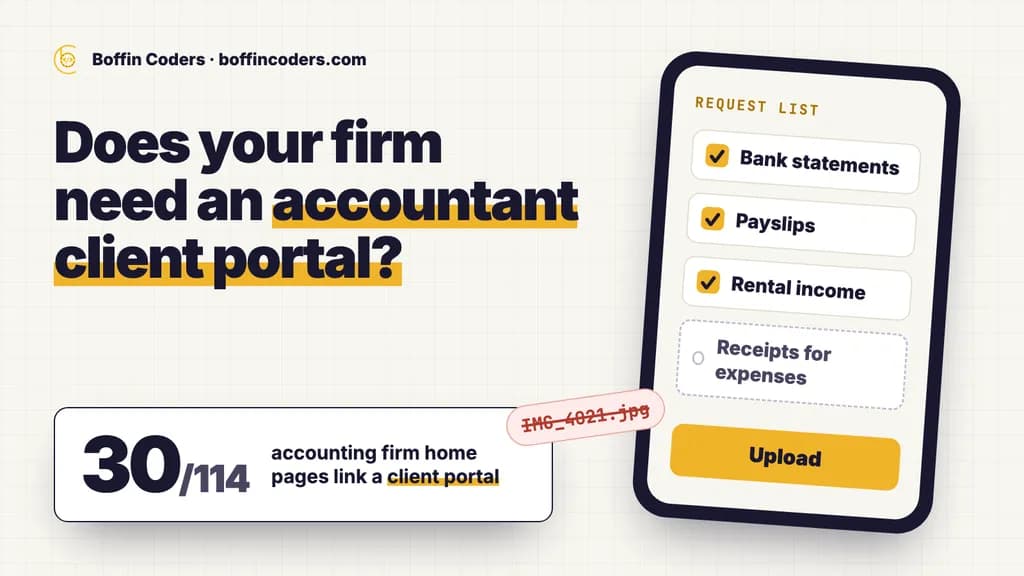
An accountant client portal is a secure website where your clients upload documents, sign forms and see what you still need from them, instead of sending files by email or WhatsApp. You need one when your team chases the same papers every season, searches inboxes for attachments or cannot see which clients have sent everything. A firm with a few clients and simple affairs can manage without one. Start with the portal inside your practice software, and build your own only when your process does not fit it.
On 29 October 2026 we opened the websites of 142 accounting firms that Google Maps lists for "accountant" in eight cities across the US, the UK, Canada and Australia. Of the 114 home pages we could read, 30 link a client portal or a secure upload, and 81 show no portal, login or upload link at all. In the US about half of the firms link one. In Australia, 2 of 30 do.
What does an accountant client portal do?
A portal gives each client one private place for everything that passes between you and them. The client signs in with an email address and a code, sees a list of what you need, and uploads it. Your team sees the same list from the other side, with every file stored against the right client and the right year.
Most portals do five jobs:
Job | By email and WhatsApp | In a portal |
|---|---|---|
Collecting documents | Attachments spread across staff inboxes and phones | Each file lands in the client's folder for the right year |
Asking for what is missing | Someone writes the same reminder again and again | The client sees a checklist, and reminders go out until it is done |
Signing | Print, sign, scan and send back, or a separate signing service | The client signs the engagement letter or the return in the same place |
Messages | Questions buried in long threads with the wrong subject line | Each message sits with the job it is about |
Status | The client phones to ask how far you have got | The client can see whether the job is waiting on them or on you |
Secure upload instead of attachments
A client who emails a bank statement leaves a copy in their sent folder, in your inbox and in every inbox it is forwarded to. A file uploaded through a portal is stored once, against the client, and the only email anyone receives is a note that something new has arrived. When a member of staff leaves, the client files stay in the portal, where the rest of the team can find them.
Document requests that chase themselves
Chasing is the job a portal takes off your team. You set up a request list for each client once, such as bank statements for the year, payslips, rental income and receipts for expenses, and copy it forward each year. The portal reminds the client until every item is ticked, so your team only steps in for the clients who are really stuck.
Signatures, messages and status in one place
Engagement letters, authority forms and finished returns can be signed inside the portal, on a phone. Questions about a return stay attached to that return. When a client can see that a job is waiting for their documents, they have less reason to phone and ask.
How many accounting firms offer a client portal?
About one in four, in the eight cities we checked. We took the Google Maps results for "accountant" in Chicago, Dallas, Manchester, Leeds, Toronto, Calgary, Melbourne and Brisbane, 20 listings per city, and fetched the website each listing links to. 142 firms had a website of their own, and 114 home pages could be read without running scripts. We counted a firm as offering a portal when its home page links to a client portal, a client login or client area, or a secure document upload.
Market | Cities | Home pages read | Link a client portal |
|---|---|---|---|
US | Chicago, Dallas | 23 | 12 |
Canada | Toronto, Calgary | 32 | 9 |
UK | Manchester, Leeds | 29 | 7 |
Australia | Melbourne, Brisbane | 30 | 2 |
All eight cities | 114 | 30 |
Across the eight cities, 81 of the 114 firms show no portal, login or upload link at all, so a new client's first instruction from them is still to email the documents. Three more show only a plain Log in or Sign in link.
Of the 30 portal links, 13 send the client straight to an address on another company's domain, the portal provider's. The other 17 stay on the firm's own web address, as a page or as a portal address under the firm's own name. A client asked to upload a passport and bank statements to an address they have never seen has good reason to hesitate, and a sign-in page under your own web address answers that question before they ask it.
Some firms send the portal link only after a client signs up, so the count measures what a prospective client sees when they compare firms. That comparison is the moment a portal can help you win the work.
Do you need a client portal, or is email enough?
A client portal for accounting firms is worth it when collecting documents takes your team more time than the work itself. These signs say you have reached that point:
- Your team sends the same reminder emails to the same clients every season.
- Files arrive as phone photos in WhatsApp, with names like
IMG_4021.jpg, and someone renames and files each one. - A client sends a document twice because nobody can find the first copy.
- You cannot tell, without opening a spreadsheet, which clients have sent everything.
- Engagement letters go out as attachments and come back weeks later, if they come back at all.
- A member of staff left, and client files were in their inbox.
When email is still enough
Email works when you have a small number of clients with simple affairs who send everything in one go, and one person handles all of them. A shared mailbox with clear folder names and a checklist in your practice software can serve a firm like that for years. Add a portal before you add staff, because every new person adds another inbox that holds client files.
Should you use your practice software's portal or build your own?
Check the software you already pay for first. Many practice management products include an accounting client portal, and switching it on costs little. Build your own when the way your firm works does not fit the portal you are given.
Question | Portal inside your practice software | A portal built for your firm |
|---|---|---|
How fast can you start? | Days, once you set up the request lists | Weeks, because it is designed and built for you |
How do you pay? | A subscription, often per user each month | A one-off build, then hosting and upkeep |
Does it fit your process? | You fit your process to its screens | It follows the steps your firm already uses |
Whose name and address do clients see? | Often the provider's, sometimes with your logo | Yours, on your own domain |
Can it connect your other systems? | Only the connections the provider offers | Whatever your ledger, signing and payment tools allow |
Who holds the data and the account? | The provider, under its terms | You, when the accounts are in the firm's name |
A portal built for your firm earns its cost in four cases:
- You offer services the standard portal cannot model, such as bookkeeping, payroll and advisory for the same client, each with its own requests and deadlines.
- Your clients share a pattern, such as landlords with many properties or contractors with many receipts, and a request list built for that pattern cuts the back and forth.
- You want the portal inside your own website, under your brand, with one sign-in for everything a client does with you.
- You need it to work with several systems at once, for example your practice software, your ledger and your signing tool.
If none of these is true, the built-in portal is the cheaper answer. Whichever you choose, keep the main account in the firm's name, for the same reasons that decide who should own the hosting and domain accounts of your website.
What makes a secure client portal for accountants?
Clients send you passports, bank statements and salary details, so check these seven things before you trust any secure client portal for accountants, bought or built:
- Two-step sign-in for everyone. Clients and staff confirm each sign-in with a code, so a stolen password alone does not open the account.
- Each client sees only their own files. A business owner sees the business folder and their personal folder, and nothing that belongs to another client.
- Staff access by role. A junior bookkeeper does not need every client's payroll.
- A record of who opened what. The portal logs each upload, download and signature with a name and a time.
- Emails that carry no documents. A notification says a file is waiting and links to the portal, so the file itself never travels by email.
- Links that expire. A download link sent to a client stops working after a set time.
- Your own retention rules. You decide how long files stay, and you can export everything if you ever leave the provider.
Once the portal is live, reply to any emailed document with the upload link, so the firm does not run two systems side by side.
How do you get clients to use the portal?
Clients use a portal when it is easier for them than email, so make it easy from the first day.
- Launch outside your busiest weeks. Switch the portal on when your team has time to answer questions, and move your regular clients across before the next deadline season.
- Send one link, everywhere. Put the sign-in link in your engagement letter, your email signature and the header of your website, where clients look for it. If the site itself is due for a rebuild, accountant website design covers what else it should show.
- Write the request list in the client's words. "Bank statements for every account, for the whole year" gets a better answer than a form code.
- Make the phone the first option. Many clients photograph receipts instead of scanning them, so the upload has to work from a phone camera.
- Let reminders do the chasing. Turn on automatic reminders, and only call the clients who still have gaps after the second one.
- Help the clients who will not switch. For a client who only uses paper or email, a member of staff uploads on their behalf, so the file still ends up in one place.
Where should you start?
Count how many hours your team spent chasing documents last season, and how many clients still owe you something today. If both numbers are small, a tidy mailbox and a checklist will do. When they are large, switch on the portal your practice software offers and move your regular clients across before the next busy season. A portal built for your firm makes sense when your process does not fit that one, or when you want it under your own name and address. If you would rather have one designed around how your firm works, we build customer portals and the web applications behind them, and on the first call we will tell you whether the portal you already pay for covers what you need.
Keep reading
Atul
React and Node.js Developer
Atul builds web applications with React on the front end and Node.js on the back end, including APIs and integrations. Atul writes about building web apps that stay fast and maintainable as they grow.
Frequently asked questions
An accountant client portal is usually safer than email for client documents, because each file is stored once, behind a sign-in with a code, and only the client and the staff who need it can open it. An email attachment sits in several inboxes for years and can be forwarded by mistake. Check that the portal you choose has two-step sign-in, per-client access and a log of who opened what.
Not answered here?
Need this built?
We build websites and apps for businesses, and work behind digital agencies as their development team. Tell us where things stand on a 20-minute call.