What Is Meta-ExternalAgent, and How Do You Block It Without Breaking Link Previews?
- October 27, 2026
- 8 min read

SEO and AI Search Specialist
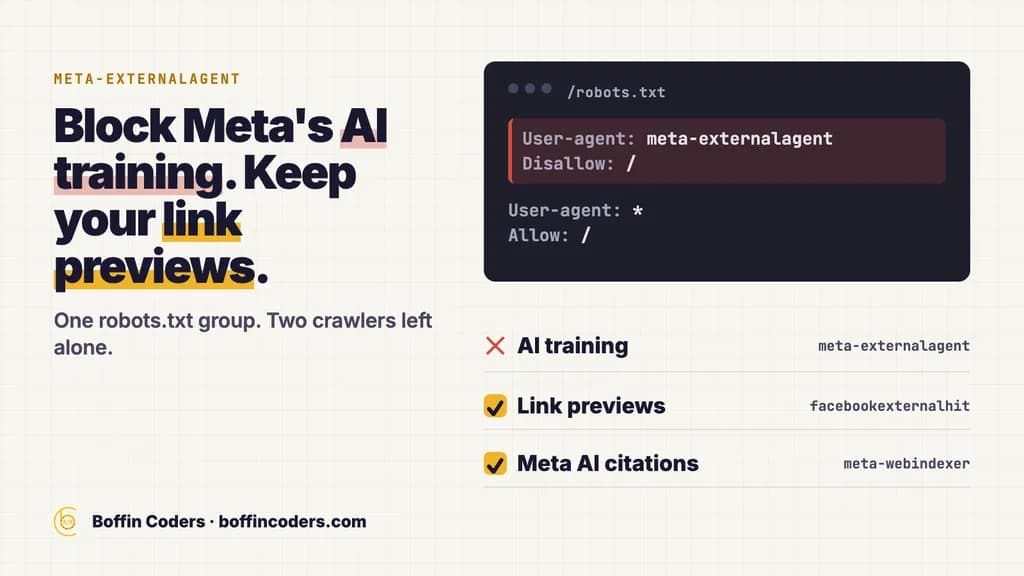
Meta-ExternalAgent is the crawler Meta uses to train its AI models and to index content for its products. You can block it with two lines in robots.txt, and your link previews keep working, because previews come from a different crawler, FacebookExternalHit. Block Meta-ExternalAgent if you do not want your pages used for training. Leave FacebookExternalHit alone. Make a separate choice about Meta-WebIndexer, the crawler that lets Meta AI cite and link your pages.
Most sites have not made that choice yet. We read the robots.txt files of the 1,000 most popular domains on the web on 25 October 2026. Of the 482 that serve one, 67 block Meta-ExternalAgent by name. Another 30 block OpenAI's training crawler, GPTBot, by name and never mention Meta's.
What is Meta-ExternalAgent?
Meta-ExternalAgent is a web crawler run by Meta, the company behind Facebook, Instagram and WhatsApp. Meta's own crawler page says it collects pages to train foundation AI models and to index content directly for Meta's products. In your server's access log it shows up with a user agent that starts like this:
1meta-externalagent/1.1It reads robots.txt and follows it. Meta's crawler page names only two of its crawlers that may skip robots.txt rules, and Meta-ExternalAgent is not one of them. So a robots.txt rule is the right tool here, and it costs nothing to add.
Which Meta crawler does what?
Meta runs five named crawlers, and each one has its own job. Blocking the wrong one is the usual mistake. A rule meant to stop AI training that lists every Meta bot also switches off the preview card your link gets when someone shares it on Facebook, Instagram or Messenger.
Crawler | What Meta uses it for | Follows robots.txt? | Should a business block it? |
|---|---|---|---|
FacebookExternalHit | Fetches the title, description and image for the preview when someone shares your page | Yes, but may skip it for security and integrity checks | No, unless you want no previews at all |
Meta-WebIndexer | Improves Meta AI search results and lets Meta AI cite and link your pages | Yes | Only if you want to stay out of Meta AI answers |
Meta-ExternalAgent | Trains foundation AI models and indexes content for Meta's products | Yes | Yes, if your content is what you sell |
Meta-ExternalAds | Improves advertising and other business products | Yes | Read the terms section below first |
Meta-ExternalFetcher | Fetches a single link when a person asks Meta AI to, agent tasks included | May skip it | A rule may not stop it |
Meta names only FacebookExternalHit and Meta-ExternalFetcher as crawlers that may bypass robots.txt. The other three follow it.
Does FacebookExternalHit follow robots.txt?
FacebookExternalHit follows robots.txt for normal fetches. Meta's page says it may bypass the file during security or integrity checks, such as a scan for malware. If you block FacebookExternalHit, your links lose their title, description and thumbnail when people share them on Meta's apps, and few businesses want that.
Meta also lists what the preview crawler needs from your server:
- gzip and deflate encoding switched on
- Open Graph tags inside the first 1 MB of the page
- a page that loads within a few seconds
- a response that either honours the Range header the crawler sends or ignores it completely
What is Meta-WebIndexer?
Meta-WebIndexer is the crawler behind Meta AI's search answers. Meta says that allowing it helps Meta AI cite and link your content in its responses. It is the Meta crawler closest to search, so blocking it gives up that route into Meta AI's answers.
OpenAI splits its crawlers the same way. Its documentation says GPTBot gathers content that may be used to train its models, while OAI-SearchBot decides which sites appear in ChatGPT search, and each can be allowed or blocked on its own. If AI answers matter to your business, the steps for getting cited by ChatGPT start with keeping that search crawler allowed.
How do you block Meta-ExternalAgent in robots.txt?
You block Meta-ExternalAgent by giving it its own group in the robots.txt file at the root of your domain, the file a browser shows at /robots.txt on your site. Your CMS, hosting panel or SEO plugin will have a place to edit it.
- Open your robots.txt and check what is already there, so a new rule does not clash with an old one.
- Add a group for the crawler:
1User-agent: meta-externalagent
2Disallow: /- Keep the other crawlers out of that group. Do not add
facebookexternalhitormeta-webindexerto it. A group applies only to the crawlers it names. - Wait a day before you judge it. Meta's page says its crawlers may cache robots.txt for up to 24 hours.
To keep training away from part of the site only, such as a members area, allow the rest and disallow that folder. Meta's own example uses this shape:
1User-agent: meta-externalagent
2Allow: /
3Disallow: /members/
How do you block Meta AI without breaking link previews?
To block Meta AI training and Meta AI search without breaking link previews, give Meta-ExternalAgent and Meta-WebIndexer their own groups and leave FacebookExternalHit out of the file. With everything else open, the file looks like this:
1User-agent: meta-externalagent
2Disallow: /
3
4User-agent: meta-webindexer
5Disallow: /
6
7User-agent: *
8Allow: /
Watch the wildcard. The robots.txt standard, RFC 9309, says a crawler obeys the group that names it, and falls back to the * group only when no group names it. So a User-agent: * group with Disallow: / blocks every Meta crawler you have not named, previews included. In our check, 42 of the 482 files close the whole site to every crawler that way.
Should you block Meta-ExternalAgent?
Block Meta-ExternalAgent when your pages are what you sell: paid articles, original research, course material, a dataset you built by hand. Training takes that work into a model and sends no visitor back. For most business websites the case is weaker. Service pages, prices and guides were written to be read and found, and there is less in them to protect.
Our suggestion for a typical business site:
Job | Crawler | Suggested choice |
|---|---|---|
Link previews on Facebook, Instagram and Messenger | FacebookExternalHit | Allow |
Being cited and linked in Meta AI answers | Meta-WebIndexer | Allow |
Training Meta's AI models | Meta-ExternalAgent | Block if the content is your product, otherwise your call |
Remember that robots.txt is a request. Meta says its crawlers follow it, apart from the two exceptions above, but nothing in the file can force a crawler to obey. A rule on your web server that refuses requests carrying the meta-externalagent user agent is the firmer block, and your host or developer can add one.
What do the top 1,000 sites do about Meta's crawlers?
We took the Tranco list of the 1,000 most popular domains, a research ranking published daily (the list of 24 October 2026), and read each domain's robots.txt on 25 October 2026. 482 served one. The rest returned no robots.txt to our request: many are content delivery networks, DNS services and app back ends with no website to crawl, and a few large sites refused the request.
What the robots.txt does | Sites, of 482 |
|---|---|
Blocks Meta-ExternalAgent by name, everywhere | 67 |
Blocks Meta-ExternalAgent on part of the site | 15 |
Blocks Meta-WebIndexer by name, everywhere | 22 |
Blocks FacebookExternalHit by name, everywhere | 0 |
Names FacebookExternalHit to allow it | 23 |
Mentions Meta-ExternalAds at all | 9 |
Blocks OpenAI's GPTBot by name, everywhere | 82 |
Blocks GPTBot by name, never mentions Meta-ExternalAgent | 30 |
Closes the whole site to every crawler with a wildcard | 42 |
Not one of these sites blocks FacebookExternalHit everywhere, even among the strictest about AI. The 21 sites that block both Meta-ExternalAgent and Meta-WebIndexer have chosen to stay out of Meta AI entirely. The 30 that stop GPTBot and say nothing about Meta show the more common gap: a robots.txt written for one AI company and never updated for the next.
How do you check the block is working?
- Read the live file. Open
/robots.txton your domain in a browser and confirm the group is there, with the name spelledmeta-externalagent. - Search your access log a day later. On a Linux server running nginx, a search like this lists the latest requests (the log path depends on your server):
1grep -i "meta-externalagent" /var/log/nginx/access.log | tail -20Requests for /robots.txt itself are expected. Requests for your pages should stop.
- Test a shared link. Paste a page address into Meta's Sharing Debugger and check that the title and image still appear.
Meta's crawler page also gives a command that imitates the preview crawler. Run it against your own address after any server rule change, to be sure previews still load:
1curl -v --compressed -H "Range: bytes=0-524288" -H "Connection: close" -A "facebookexternalhit/1.1 (+http://www.facebook.com/externalhit_uatext.php)" "https://example.com/"What if Meta-ExternalAgent sends too many requests?
When the trouble is the crawler's traffic rather than training, you can limit it without a full block. Disallow the paths it has no reason to crawl, such as internal search results, filter combinations and calendar pages that go on forever, and keep the rest open. If your server still struggles, a rate limit on that user agent at the web server or firewall slows the crawler without closing the site.
What do Meta's new Commercial Terms change?
Meta has published updated Commercial Terms that take effect on 20 November 2026. They apply when a business uses Meta's products for business purposes, such as running ads, managing a Page or using Meta Business Suite. The update adds a clause in which the business authorises Meta's automated software to crawl the sites associated with its products or services, and to pull updates from them, to build and maintain Meta's advertising and business products.
The terms name no crawler. On Meta's crawler page, the description of Meta-ExternalAds uses similar words about advertising and business products, while Meta-ExternalAgent, the training crawler, is a separate entry. If your business advertises on Meta, read the new clause with whoever looks after your contracts before you decide what to do about Meta-ExternalAds.
If you would rather have robots.txt, server rules and AI crawler access set up for you across the site, that work sits inside what our technical SEO agency does every month.
Keep reading
Santosh Kumari
SEO and AI Search Specialist
Santosh Kumari works on technical SEO and AI search visibility, from site fixes to the structured data and page formats that AI answers quote. Santosh Kumari writes about practical changes that help search engines and AI understand a page.
Frequently asked questions
Meta-ExternalAgent is the web crawler Meta uses to train its foundation AI models and to index content directly for its products. It shows up in server logs as meta-externalagent/1.1. It follows robots.txt, so a site owner who does not want pages used for training can block it with a Disallow rule in its own group, without touching link previews.
Not answered here?
Need this built?
We build websites and apps for businesses, and work behind digital agencies as their development team. Tell us where things stand on a 20-minute call.