How to Get Your Business on ChatGPT With Business Hub
- November 13, 2026
- 9 min read

SEO and AI Search Lead
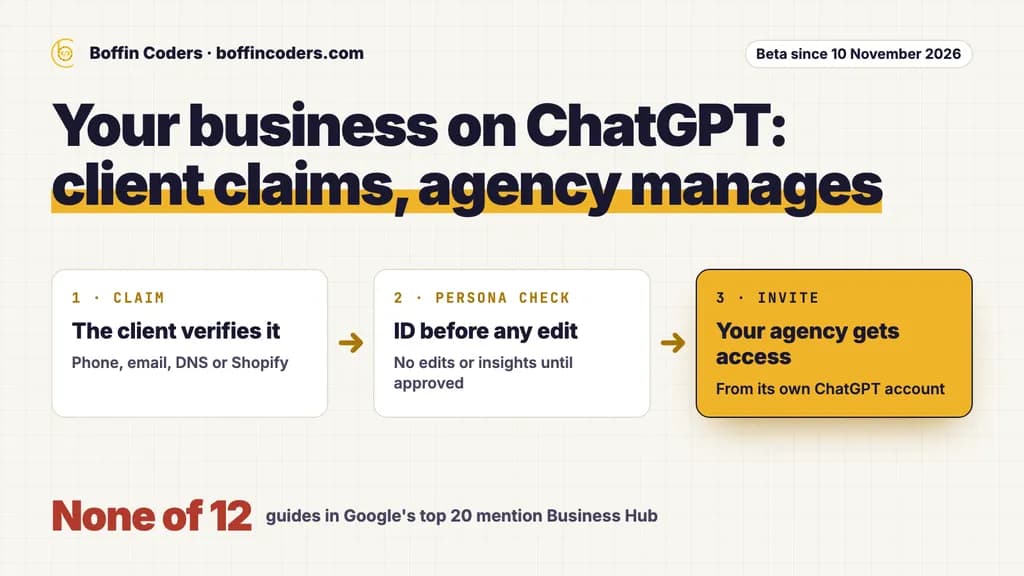
How to get your business on ChatGPT now has an official answer: claim it in Business Hub, which OpenAI opened in beta on 10 November 2026. Open Business Hub from the ChatGPT sidebar, find the business and verify it by business phone, business email, a DNS record or Shopify. Then pass an identity check with Persona before you can edit details or see insights. If you run an agency, let each client claim their own business and then grant you access, so the client keeps control.
Search how to get my business on ChatGPT, and most guides have not caught up yet. We read the 12 business guides we could open in Google's top 20 results for this question in the US and the UK on 11 November, the day after the launch. None of the 12 mentions Business Hub, a claim inside ChatGPT, the identity check or agency access. Nine tell you to collect reviews, eight to keep a Google Business Profile and three to claim Bing Places. That advice still counts, as the last two sections show. It is just no longer the whole answer. Google's own AI Overview for the same question already cites OpenAI's pages.
What does ChatGPT Business Hub let a business change?
ChatGPT Business Hub lets a verified business manage the details ChatGPT shows about it and see how people find it there. You do not need an ads account or an enterprise agreement to claim a business, and claiming, advertising and publishing an agent are separate steps.
Once a claim and the identity check are approved, you can:
- update the website, the description, the product or service category, the logo, the delivery policy and the return policy, and add a cover photo
- connect a product feed with prices and availability, as a CSV file or from a Shopify store
- read insights: how often ChatGPT mentions the business, how many people click through to the website, and the topics of the answers that cite it
- build a Business Agent, if the business qualifies
A Business Agent is a separate, labelled chat inside ChatGPT that answers questions from the product and policy information you give it. At launch it is open to eligible ecommerce and online service businesses in the US with a website. It cannot take a booking, complete a purchase or check an order. It explains and links to the website, where the customer acts. A business can also sponsor its agent and use it as the landing point for ChatGPT ads, and those placements are labelled as sponsored.
OpenAI says 1.2 billion people use ChatGPT each week, in its launch post. That reach is why your clients will ask you about it.
How do you claim your business on ChatGPT, step by step?
You claim your business on ChatGPT from the sidebar in six steps, and the one you cannot speed up is OpenAI's review. OpenAI's setup guide lists them:
- Sign in to ChatGPT and open Business Hub from the sidebar.
- Search for the business by name and select the listing that matches it.
- Confirm the account that will manage it. This account becomes the admin, so pick it with care.
- Verify with one of the methods ChatGPT shows you.
- Wait for OpenAI's review. It emails a decision or asks for more information.
- Complete the Persona check. Until it is approved you cannot publish changes, view insights or create an agent.
Method | What it needs | Who holds it when an agency runs the work |
|---|---|---|
Business phone | A code by text message or automated call to the number shown | The client, on the business line |
Business email | A code sent to the email address linked to the business | The client, or whoever reads that inbox |
Website domain | A TXT record added to the domain's DNS settings | Often the agency or the host, if they run the DNS |
Shopify store | A sign-in to the store being claimed | The store owner or a staff account |
The Persona check may ask for a government-issued ID, business registration information and proof that the person can represent the business. The business name, address and any registration or tax number must match the official records. A mismatch is the first thing OpenAI's guide tells you to fix when a check fails. The blue verified badge appears only after Persona approves. Claiming alone does not add it.
Plan for a wait. OpenAI says availability depends on where a business is and what kind of business it is.
If someone else has already claimed the business, open its profile, choose the more options menu, then Dispute ownership, and verify with Persona.
Who should claim a client's ChatGPT business profile?
The client should claim it, and then add the agency. Business Hub supports exactly that. The admin who claimed a business can add teammates and grant an agency access to manage the business or its agent, and each person signs in with their own ChatGPT account.
Three things make the client the right admin:
- The identity check is personal. Persona asks for ID and proof of authority. That is the owner's paperwork, and an agency should not hold it.
- The admin decides who gets in. If your agency claims the profile, the client needs your account to reach their own ChatGPT business profile. That gets awkward the day the work ends.
- A published profile is hard to undo. OpenAI Support cannot delete, unpublish or hide a published profile as part of an ownership request, and a dispute goes back through Persona.
It is the same rule as who should own the hosting and domain accounts: the business owns the account, and the agency gets a seat. OpenAI's guide also says not to forward a personal claim invitation to give someone access.
Your part comes before the claim. Check that the client's business name and address match their official records, because the Persona check needs them to. If you run the client's DNS, add the TXT record while the client is on the call. Then the client sends you the agency invitation from inside Business Hub.
What can an agency manage once the client grants access?
With access, an agency can run the profile day to day: the business details, the product feed, the Business Agent where there is one, and the monthly insights. OpenAI reviews and publishes every change to the details, so an edit can take time to show in a listing or an answer.
The insights cover the past 28 days. Read the definitions before you report a number to a client:
Insight | What counts | What to watch |
|---|---|---|
Mentions, online business | ChatGPT references the business's website | The brand name alone does not count |
Mentions, local business | ChatGPT shows a result for that location | It counts even if nobody opens the listing |
Website clicks | People clicking through to the website | The same 28-day window |
Discovery topics | Themes in answers that mentioned or cited the business | Groups of answers, never individual prompts |
A blank metric does not mean zero. It can mean the activity is below OpenAI's reporting threshold or the data is still being collected. Businesses never see people's conversations, including chats with their own agent.
For a Business Agent, review the information it uses, write its instructions within OpenAI's agent policy, and test it with a question customers really ask, such as "Can I return an item I bought on sale?" If the answer is wrong, fix the information and test again before you publish.
If an agency invitation is blocked, check whether the business was claimed in a ChatGPT workspace, where invitees may need to be members of that workspace. OpenAI Support can check the options.
Which businesses can claim today, and which have to wait?
Online businesses can claim where ChatGPT is available and verification is supported, while local shops and restaurants can only claim an existing US listing for now. Before you promise this to every client, sort your list:
Client | Claim a profile | Business Agent |
|---|---|---|
Online shop in the US | Yes | Yes, if its category is eligible |
Online service business in the US | Yes | Yes, if its category is eligible |
Online business outside the US | Yes, where ChatGPT is available and verification is supported | Not yet |
Local shop or restaurant in the US | Only its existing listing | Only if it qualifies as an ecommerce business |
Local shop or restaurant outside the US | Not yet | No |
Other local businesses | Depends on location and type, so search Business Hub | Only as an online service business in the US |
Groups need extra care. Each distinct brand is managed on its own, and there is no central view across a parent company's brands and locations. Claiming the main brand does not claim its locations. Companies that already work with an OpenAI representative, as enterprise customers or advertisers, can claim through that person instead.
Is claiming the whole answer to how to get your business on ChatGPT?
No. A claim lets you correct what ChatGPT holds about a business, but it does not decide whether ChatGPT recommends it. OpenAI's guide says claiming does not guarantee more visibility or give you control over ChatGPT's own recommendations, and that advertising does not change those answers either.
The terms go further. Claiming does not give you exclusive control of the ChatGPT business listing, and OpenAI may add to, edit or replace your information using other sources. So the other sources still decide a lot: a website ChatGPT's search crawler can read, the same name, address and phone on every listing, recent reviews, and pages that answer the questions buyers ask. That is the work the 12 guides describe, and it is covered in how to get cited by ChatGPT.
One more line in the terms matters to your clients' front desk. By using Business Hub, a business agrees that OpenAI's AI assistant may phone it on behalf of ChatGPT users, with an opt-out. Tell the client before they claim, so the staff who answer the phone are not surprised.
How does a ChatGPT profile fit into a client's monthly SEO work?
It fits as four small tasks inside the retainer you already run, not as a new service line:
- Keep the details in step. When a client changes hours, a phone number or an address on their website and Google Business Profile, change Business Hub the same week.
- Read the insights once a month. The window is 28 days, so a monthly read misses nothing. Log mentions, clicks and topics beside the Google numbers.
- Turn discovery topics into pages. A topic where the client is mentioned but thin on detail is a page to write or improve on their site.
- Test the agent after every policy change. A new return policy on the website and an old one in the agent is the kind of mistake a customer screenshots.
None of this needs a new hire, and each task leaves something you can show the client that month. If you already sell white label AI SEO, this is the most concrete part of it to show a client.
If you would rather a partner did this monthly work under your agency's name, with the results sent to you each month for your own report, see how our white label SEO for agencies works.
Keep reading
Pinkal Rana
SEO and AI Search Lead
Pinkal leads search strategy at Boffin Coders, from classic SEO to how brands get named in AI answers on Google, ChatGPT and Perplexity (AEO and GEO). Pinkal writes about what actually gets a business cited by AI search, using data from real checks.
Frequently asked questions
No. A ChatGPT business listing and a Google Business Profile are separate, and a business should keep both. ChatGPT may also use other sources when it answers questions about a business, and claiming does not give you exclusive control of the listing. Keep the name, address, phone and hours the same on both, and on the website, so every source tells the same story.
Not answered here?
Need this built?
We build websites and apps for businesses, and work behind digital agencies as their development team. Tell us where things stand on a 20-minute call.