Why Is My Website Not Showing Up on Google?
- October 30, 2026
- 9 min read

SEO and AI Search Specialist
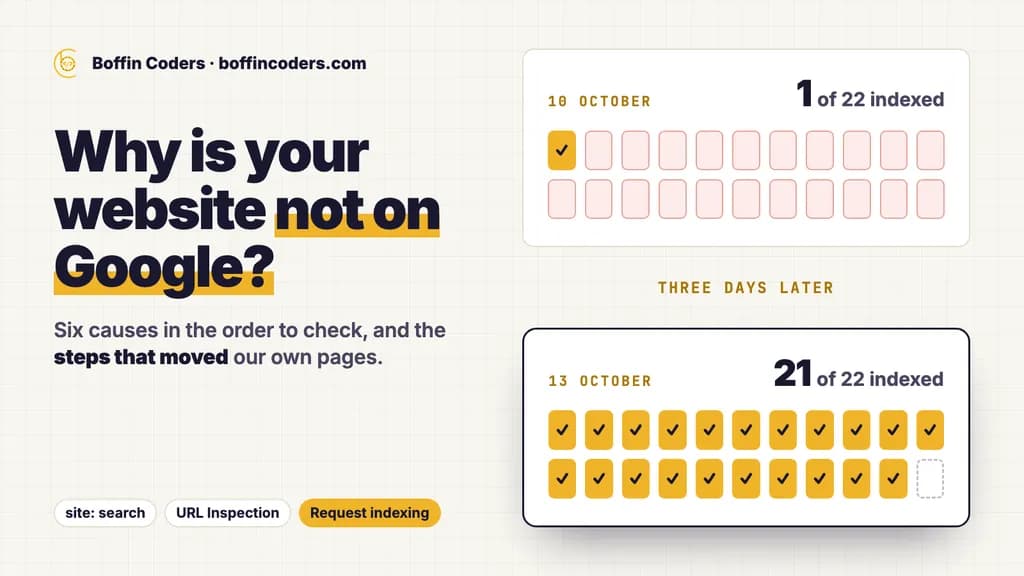
If your website is not showing up on Google, one of six things is usually behind it. Google has not found the site yet, has found it but not crawled it, is blocked from it, crawled it and chose to leave it out, holds it back with a penalty or security issue, or has indexed it but ranks it too low to see. A site: search and Search Console's URL Inspection tool tell you which one in minutes. Most new sites need links from pages Google already visits.
We had this problem on our own site. On 10 October 2026, 21 of the 22 new pages we had published for agencies and for our services were missing from Google. Search Console showed 19 of them as Discovered - currently not indexed and 2 as URL is unknown to Google. By 13 October, 21 of the 22 were in the index, and they still were when we checked again on 28 October. Below are the causes in the order worth checking, then the steps that moved our pages and the one page that did not.
Is your website really missing, or just ranking low?
Start here, because many owners who believe their site is missing are looking at the wrong thing. Google's own help page makes the same point: a page is often in the index but sits too low in the results to find, or the search you typed hides it.
Do these three checks before you change anything:
- Search for your domain with the site operator. Type
site:yourdomain.cominto Google. Results mean at least part of your site is in the index. For one page, searchsite:yourdomain.com/page-address. - Turn off SafeSearch and try another device. Filters and device differences can hide a page that is there.
- Search for your business name in quotes. A new business with a common name can be in the index and still sit pages deep.
The site: search is only a quick first check. Google says an indexed page may not show up for a site: query. The reliable answer comes from the URL Inspection tool in Search Console, which reports Google's own status for one address. Our guide on how to tell whether Google indexed a page walks through both checks and what each answer means.
If your pages are in the index and simply rank low, you have a ranking problem, and the indexing fixes below will not help much. If they are missing, read on.
Why is my website not showing up on Google? The six causes
Each cause leaves a different trace in Search Console.
Cause | What Search Console shows | The fix |
|---|---|---|
Google has not found the page |
| Link the page from pages Google already crawls, add it to your sitemap, request indexing |
Google found it but has not crawled it |
| Stronger internal links, then an indexing request |
Something blocks Google | A | Remove the block, then request indexing |
Google crawled it and left it out |
| Make the page more useful and more distinct before anything else |
A penalty or a security issue | An entry in the Manual actions or Security issues report | Fix what the report names, then ask for a review |
It is indexed but ranks low |
| Ranking work: content, links and authority |
On a new site the first two causes are the likeliest, and they were the whole story for our 21 pages. Check the third straight after a launch: a setting from the test version of a site, such as a password or a noindex tag, is easy to leave switched on.
What did we change when 21 of our pages were missing?
The 21 pages were new: five service pages and twelve market pages for agencies, three of our own service pages and one long technical article. Google knew about most of them from our sitemap. It had not crawled them. Our page for agencies, the hub that linked to all 17 agency pages, had been last crawled by Google on 20 September, weeks before the new pages existed. So the copy of the hub that Google had seen did not link to them yet.
We did two things.
- We asked Google to index the pages, ten a day. In Search Console's URL Inspection tool, each address that showed
URL is not on Googlegot a Request indexing click. Google keeps a quota for these requests, so we sent the ten most important first. - We linked the pages from pages Google crawls often. The site footer, which appears on every page including the home page, got a row of links to all 17 agency pages. Each hiring page for a technology got one sentence linking the agency page for its kind of work.
The record, from Search Console's URL Inspection tool:
Check | Pages of the 22 in Google's index | What it showed |
|---|---|---|
10 October, early morning | 1 | 19 |
10 October, later that morning | 11 | All ten pages from the first day's requests crawled and indexed |
13 October | 21 | Every page except one service page |
28 October | 21 | The same 21 indexed, the last one still |
The ten requested pages were crawled within the same morning. Google promises no such speed, so do not plan on it. Several of the pages now appear in search results, which a page outside the index never can.
What if Google crawled the page and still left it out?
One page did not move. Google crawled our service page on AI that answers from your own documents on 10 October and did not add it to the index. Its status has stayed Crawled - currently not indexed since then.
Google's description of that status says the page "may or may not be indexed in the future", and that there is no need to resubmit it. More requests will not change the answer. Google has seen the page and decided it is not worth a place in the index for now.
The page itself has to change:
- Make it answer a question no other page on your site answers. Two pages that say much the same thing compete, and Google often keeps one.
- Add what only you can say: a real example, a number from your own work, a clear price or process.
- Link to it from your strongest related pages, with words that say what the page is about.
- Check that it is the canonical version. The URL Inspection tool shows which address Google treats as the main one.
Then wait for Google to crawl it again.
How do you get a website to show up on Google?
For a new site, or a new section of an existing one, follow this order:
- Verify the site in Search Console. It shows Google's own status for every address on your site.
- Submit a sitemap. Many hosting services create and submit one for you. Google treats it as the list of pages you want crawled.
- Link every page from somewhere Google already visits. Your home page, your main menu or your footer. Google finds new pages by following links from pages it knows, so a page reachable only from a page Google rarely crawls waits a long time.
- Remove anything that blocks Google. A
noindextag, a password on a staging site, or aDisallowrule inrobots.txt. One trap: ifrobots.txtblocks a page, Google never reads itsnoindextag, and the address can still show up when other sites link to it. - Request indexing for your most important pages. One at a time, through the URL Inspection tool. The quota means you choose the pages that earn money first.
- Wait at least a week before you assume a problem. Google's help page asks for that much time after a sitemap or an indexing request.
Google also says it does not accept payment to crawl a site more often or to rank it higher. Anyone who sells a promise of indexing is selling something Google does not offer.
Could a penalty or a block be hiding your website?
These causes are rarer, and Search Console reports each one directly.
A manual action or a security issue
Open the Manual actions and Security issues reports in Search Console. A manual action means a human reviewer at Google has decided that pages on your site break its spam policies, and it can lower those pages or remove them entirely. A security issue, such as a hacked page, can do the same and can also put a warning in front of visitors. Each report names what is wrong, and once you have fixed it you ask Google for a review from the same report.
A domain you bought or inherited
Google warns that a domain bought from someone else may carry a manual action from its earlier owner. The history in the same two reports shows it.
A move that went wrong
If you moved to a new domain, rebuilt the site or switched to https, pages that ranked before can drop when old addresses are not sent to the new ones with 301 redirects. A redirect map made before the move keeps every address that matters. Our website migration services page explains how we plan one.
How long does it take for a new website to show up on Google?
Google's answer is anywhere from a day or two to a few weeks, depending on many factors, and it says not every page it finds will be crawled or indexed. Its help page asks you to allow at least a week after a sitemap or an indexing request before you assume something is wrong.
Our own record sits inside that range. The pages we requested first were crawled the same morning, and all but one of the rest followed within three days. The page that stayed out has sat in the same state for 18 days since its crawl, which points to its content. Give Google a week, make sure every page is linked and unblocked, and judge each page by its status in Search Console rather than by how long you have waited.
If you would rather have someone find what is hiding your pages and fix it, our technical SEO agency work covers exactly that.
Keep reading
Santosh Kumari
SEO and AI Search Specialist
Santosh Kumari works on technical SEO and AI search visibility, from site fixes to the structured data and page formats that AI answers quote. Santosh Kumari writes about practical changes that help search engines and AI understand a page.
Frequently asked questions
To check if your website is on Google, search Google for your domain with the site operator in front of it and look for results. For one page, add its path after the domain. A result means the page is indexed, but Google says an indexed page does not always show in that search, so confirm with the URL Inspection tool in Search Console, which reports Google's own status for the address.
Not answered here?
Need this built?
We build websites and apps for businesses, and work behind digital agencies as their development team. Tell us where things stand on a 20-minute call.