SEO Client Reporting: What Should a Monthly Report Show?
- November 21, 2026
- 9 min read

SEO and AI Search Lead
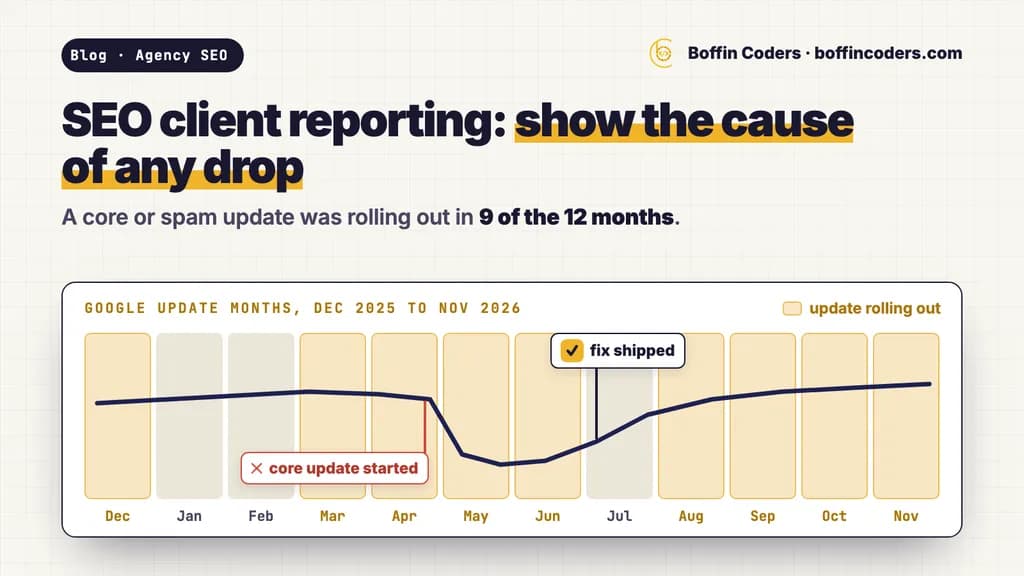
SEO client reporting works when the monthly report answers the three questions your client really has: did search bring them business, what did the work change, and what happens next. So lead with calls, forms or sales from organic search. Then show clicks and impressions from Search Console, split into branded and non-branded searches, the work shipped with a link to each change, the cause of any drop with Google's own dates as evidence, and next month's plan. All of it fits on one page.
Most months, a Google update is part of that story. When we read Google's Search Status Dashboard on 19 November 2026, a core or spam update had been rolling out in 9 of the 12 months from December 2025 to November 2026. So "it was the update" fits almost any dip, and a client who hears it every quarter stops believing it. The report has to show the dates and the checks behind the claim.
What should SEO client reporting include each month?
A monthly SEO report should lead with business results from organic search, then the search data that explains them, then the work and the plan. Keep the order the same every month, so your client learns where to look and spots a change at once.
Part of the report | What it shows your client | Where the number comes from |
|---|---|---|
Business results | Calls, form fills, bookings or sales from organic search | Your client's analytics key events, or their own booking and sales records |
Search visibility | Clicks and impressions against last month and the same month last year | Search Console Performance report |
New customers finding them | Clicks from people who did not search the business name | Search Console branded queries filter, set to non-branded |
Pages that moved | The pages that gained or lost the most clicks | Search Console Pages tab, sorted by clicks difference |
AI search | How often the site was shown in AI Overviews and AI Mode | Search Console generative AI performance report |
Work shipped | Each change made this month, with a link to it | Your task list, or your partner's monthly results |
Context | Google updates, site changes and seasonal dips, with dates | Search Status Dashboard and Search Console annotations |
Next month | The two or three jobs that come next, and why | Your plan |
Average position for the whole site rarely earns a place near the top. Google's own guide to traffic drops says you shouldn't focus too much on absolute position, and it calls impressions and clicks the measure of success. Position helps one query at a time, when you explain why a page moved.
How often does a Google update land in a monthly report?
Most months. Google's Search Status Dashboard listed nine ranking updates between December 2025 and November 2026: four core updates, four spam updates and one Discover update. A core or spam update was rolling out in 9 of those 12 months, and the three finished core updates took 12 to 18 days each.
We read the dashboard's own record on 19 November 2026 and put every ranking update in one table.
Update | Started | Finished | Days |
|---|---|---|---|
December 2025 core update | 11 Dec 2025 | 29 Dec 2025 | 18 |
February 2026 Discover update | 5 Feb 2026 | 27 Feb 2026 | 22 |
March 2026 spam update | 24 Mar 2026 | 25 Mar 2026 | 1 |
March 2026 core update | 27 Mar 2026 | 8 Apr 2026 | 12 |
May 2026 core update | 21 May 2026 | 2 Jun 2026 | 12 |
June 2026 spam update | 24 Jun 2026 | 26 Jun 2026 | 2 |
August 2026 spam update | 18 Aug 2026 | 21 Aug 2026 | 3 |
September 2026 spam update | 24 Sep 2026 | 8 Oct 2026 | 14 |
November 2026 core update | 10 Nov 2026 | Not finished on 19 Nov 2026 | Up to 14, by Google's note |
On the same day we read the 13 sites in the US top 20 for "seo client reporting". Nine sell reporting or tracking software, or rank tools that do. Five mention Google updates, and four give wording for explaining a drop to a client. None of the 13 mentions the Search Status Dashboard, the Page indexing report, Google Trends or Search Console's own annotations, and those are the places that help you tell whether an update caused a drop at all.
How do you explain an SEO traffic drop to a client?
Find the cause before you write a word to the client. Then tell them in three parts: what moved, what the evidence shows, and what you will do and when you will know more. Google's own guides give the checks, and they fit a monthly report in this order.
- Match the dates. Open the Search Status Dashboard and note the start and end of any update near the drop. A drop that began before the update started has another cause.
- Wait for the rollout to end. Google's guide to core updates recommends waiting at least a full week after a core update completes, then comparing that week with the week before the rollout started.
- Rule out the site. Check the Page indexing report and Crawl stats for a jump in errors, then the Security issues and Manual actions reports. A stray noindex tag or a server fault can look like an update on a traffic chart.
- Check demand. Set the Performance report to the last 16 months to see whether the same dip happened last year. Then look up the top queries in Google Trends to see whether fewer people searched.
- Split the searches. Use the branded queries filter. A fall in branded clicks points to demand for the business itself. Ranking changes from an update tend to show more in the non-branded clicks, because people who search the business name usually find its own pages at the top.
- Size the loss. Google's guide to debugging traffic drops separates a small drop, such as position 2 to 4, from a large one, such as position 4 to 29. After a small drop it advises against big changes to pages that still perform well.
What should the client read while an update is still rolling out?
A short holding note works better than a guess. Name the update and its start date, say what has moved so far, and give the date your full answer will come. For example: "Google began its November 2026 core update on 10 November and said it may take up to two weeks. Clicks to your service pages have fallen since it started. We will compare the full week after it ends with the week before it began, and send you the result with what we plan to change."
For a shop client, add one line on the pages that sell in their busy weeks: whether those pages moved, and what you are watching on them.
What can Search Console add to a client report now?
Three newer features do much of the explaining: annotations on the chart, a filter that splits branded from non-branded searches, and a report of impressions in AI Overviews and AI Mode.
Annotations
Search Console added custom annotations to its performance reports in November 2025. An owner or full user adds a note of up to 120 characters on a chosen date, with up to 200 notes per property. Everyone with access to the property sees them, and notes older than 500 days are deleted. They show under any filter, but not in comparison mode. Mark each change you ship and the start and end of each update, and the chart you paste into the report carries its own explanation. Google treats the notes as business data shared with every user, so keep names, phone numbers and addresses out of them.
Branded and non-branded queries
The branded queries filter splits a site's searches into those that use the business name, or one of its own products, and everything else. Google classifies them with an AI-assisted system rather than a word list, and says some queries may be misidentified. Only top-level properties with enough searches get it. Since 16 November 2026 the Search Analytics API offers the same split through brandedClassification, so a reporting sheet or dashboard can pull it every month without a keyword list.
AI Overviews and AI Mode
The generative AI performance report shows how often links to the site appeared in AI Overviews and AI Mode, by page, country, device and date. Since 31 August 2026 it covers all websites. For most clients one line is enough: whether their pages are shown in AI answers, and which ones.
Who writes a white label SEO report?
You do. In white label SEO the partner does the work and sends you the results, and your agency writes the report your client reads, in your words and under your brand.
White label SEO reporting often means software that puts your logo on a dashboard. That is the simple part, and 9 of the 13 sites we read for "seo client reporting" sell or rank that kind of software. The part a client pays for is the judgement inside the report: why a page moved and what that means for their business. That judgement stays with your agency, and so does the client relationship.
This is how white label SEO runs at Boffin Coders. Each month your agency gets the results in a spreadsheet: what shipped, with a link to each change, what moved in Search Console and the plan for next month. You turn it into your white label SEO report. We never send a report to your client, and we never contact your client unless you ask. Our longest clients have stayed with us since 2017.
Give the partner its own Search Console user rather than a shared login. A full user can add annotations, so each change they ship appears on your chart. A restricted user can only view them. The rest of the split, from account ownership to the agreement, is in our guide to seo outsourcing, and what the work costs per client is in white label SEO pricing.
What does a one-page SEO report look like?
One page, five blocks, the same order every month. Your client should be able to read it in five minutes and repeat the main point to their own team.
- One line on calls, forms or sales from organic search, against last month and the same month last year.
- Three numbers: non-branded clicks, total impressions, and impressions in AI Overviews and AI Mode.
- What shipped: three to six changes, each with a link to the page or the work.
- What moved and why: the two or three pages that changed most, each with its cause and the evidence for it, such as the update's dates or a fixed indexing error.
- Next month: two or three jobs, each tied to a result your client wants.
Under the five blocks, paste the Search Console chart with your annotations on it. A dip with "core update started" and "fix shipped" marked on the chart needs far less explaining than a paragraph does.
If your agency would rather have the monthly SEO work done and receive results you can report from, see how white label SEO for agencies runs with us, with the invoice after you have seen the month's work.
Keep reading
Pinkal Rana
SEO and AI Search Lead
Pinkal leads search strategy at Boffin Coders, from classic SEO to how brands get named in AI answers on Google, ChatGPT and Perplexity (AEO and GEO). Pinkal writes about what actually gets a business cited by AI search, using data from real checks.
Frequently asked questions
SEO client reporting is the monthly summary an agency sends a client about their search results. It shows business results from organic search first, then clicks and impressions from Search Console, the work done with a link to each change, the cause of any drop with its evidence, and the plan for next month. A good one fits on a single page.
Not answered here?
Need this built?
We build websites and apps for businesses, and work behind digital agencies as their development team. Tell us where things stand on a 20-minute call.