AI for accountants and bookkeepers Month end goes on chasing client paperwork and typing it in. Have it collected, read and chased for you.
Client documents arrive in one place by email, upload link or phone photo, each one is read into your books with the original attached, reminders chase what is missing and what is unpaid, and routine client emails are drafted for an accountant to approve. Boffin Coders sets it up on the practice and accounting software your firm already uses.
- Client documents in one place
- Read into your books and checked
- An accountant approves every email
- On your firm's own accounts
Why does month end still go on chasing and retyping paperwork?
Much of month end goes on work that needs no accountant. You chase clients for the same documents by email, then by text, then by phone. Receipts arrive as photos, PDFs and paper, and someone types figures that are already printed on the page. Then come the fee reminders nobody had time to send and the new enquiry that waited too long. AI for accountants helps most here, in the collecting, reading and chasing, so your hours go on the work clients pay for and an accountant still checks every figure and approves every email.
The same client, asked three times
You emailed for the bank statements, then texted, then rang. They arrive the day before you need them, as a photo of a screen taken on a phone.
Receipts in every shape
Photos taken at an angle, PDFs from supplier systems, a bag of paper at the end of the year. Each one in a different place, and none of them named.
Typing what is already written
Someone in the practice opens each invoice and receipt and types the supplier, the date and the totals into the books, when the figures are already on the page.
Your own fees, chased by hand
An invoice for your own work sits unpaid for weeks because nobody had time to send a polite reminder, and then a second one.
The enquiry you meant to answer
A new client rang while you were with another one, or emailed in the busiest week of the year. By the time you replied, they had found someone else.
The same email, written again
What to send, when it is due, how to upload it, what the fee covers. Partners write the same answers to the same questions every week, each one from scratch.
All of this is fixable, on the software your practice already uses.
Client documents, reminders and drafted emails are set up on your own accounts and connected to the books you keep today, tested with you on real client paperwork, and you see it working before you pay.
What can AI do for an accounting firm, and what should it not do?
AI is good at the repeated work around accounting: collecting client documents in one place, reading invoices and receipts into the books with the original attached, chasing missing paperwork and unpaid fees, and drafting routine client emails from your own templates. It should not give tax or accounting advice, make a judgement on a client's figures, or send anything to a client without an accountant reading it first. It works best as a fast assistant on the admin, with every decision left to a person. Boffin Coders sets it up on your firm's own accounts.
Collecting and reading
Receipts, supplier invoices and statements gathered from email, uploads and phone photos, then read into the fields your books need. Work your team could write down as rules, done many times a month.
Chasing and drafting
Reminders for missing documents and unpaid fees, and routine client emails drafted from the letters you already send. An accountant reads each draft and decides whether it goes.
Advice and judgement
Tax or accounting advice, a view on a client's position, or what a client should do next. Anything a client relies on as the firm's advice is written or approved by an accountant, the same as today.
Sending on its own
No drafted email leaves the practice unread. The only messages that go out by themselves are the reminders and the text after a missed call, in wording you approved once.
It suits a bookkeeper working alone as much as a practice with several partners and a team for each group of clients. There is no new software for your team to learn: documents and drafts arrive where you already work, and like all our AI automation work, it runs on accounts in your name.
Every client document collected and read. An accountant approves what leaves.
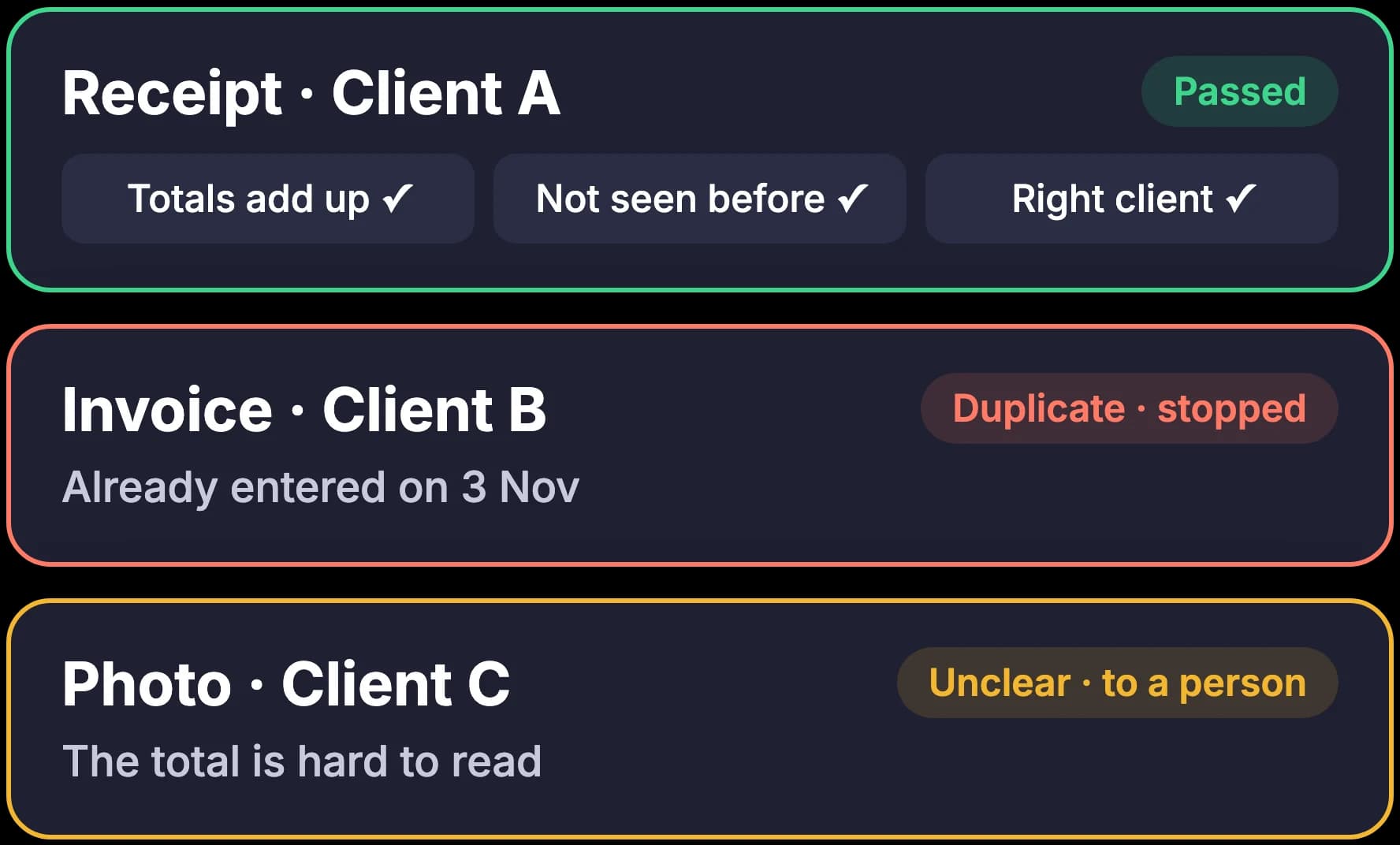
Each client document, whether it arrives by email, through an upload link or as a phone photo, starts the same six steps. It lands in one place, filed against the right client. It is read, and the supplier, the dates, the totals and the tax are pulled out and checked. Anything unclear goes to a person with the question marked. Reminders chase what is still missing, a routine client email is drafted for an accountant to approve, and everything is entered into your practice and accounting software, with one list each week. Boffin Coders builds the whole chain on accounts you own.
Two steps use AI, run privately for your firm. The reading step turns a photo or a PDF into text and picks out the figures your books need, and it marks anything it is unsure of instead of guessing. The drafting step uses a language model, the same kind of AI behind the chat assistants people know, given only your own templates, your past letters and the details on the client's file. Every draft waits in your inbox or your practice software, and nothing is sent until an accountant has read it.
- 1
Paperwork arrives in one place
By email, upload link or phone photo
- Forwarded email
- Upload link
- Phone photo
- 2
Each document read and checked
The figures pulled out, the sums checked
- Client
- A café, client 14
- Supplier
- Food supplier
- Date
- 3 Nov
- Total
- 412.60
- Tax
- 68.77
- 3
Anything unclear goes to a person
The question marked, nothing guessed
- Receipt 7: total blurred
- Sent to the client manager
- 4
Reminders for what is missing
By text or email, from your deadline calendar
Hi Sam, we still need your October bank statement. You can upload it here in a minute: yourfirm.com/upload
- 5
A client email drafted for approval
Waiting in your inbox, never sent by itself
Thank you for sending your October receipts.
Two items are still missing, listed below.
Waiting for an accountant to approve
- 6
Into your practice and accounting software
The original attached, and one list each week
- Xero
- QuickBooks
- Sage
Entered with the original, nothing sent unread
What happens to a client document between the phone photo and the books?
A receipt a client photographs on their phone is filed, read and checked before anyone at the firm opens it, and by the end of the week it sits in the books with the original attached. The film starts with a month end of chasing clients and retyping paperwork, then follows the steps that replace it: documents arriving in one place, each one read and checked, reminders for what is missing and unpaid, a client email an accountant approves, and the weekly list from your practice software. Boffin Coders sets up this same chain for every practice it works with.
- A month end of chasing clients and retyping paperwork.
- Client documents arrive in one place, by email, upload or photo.
- Each one is read and checked, and anything unclear goes to a person.
- Reminders chase missing documents and unpaid fees.
- Routine client emails are drafted for an accountant to approve.
- Everything is entered into your practice and accounting software, with one list each week.
Want this on your clients' paperwork?
We connect it to your inbox, your calendar of deadlines and your accounting software, run real documents through it with you and show it working first. Our invoice comes after.
What does AI for accountants look like once it is set up in your practice?
AI for accountants, set up properly, is six connected parts, and you choose the ones you need. Most practices start with client documents and reminders, because that is where month end goes, then add the client portal, the drafting assistant and replies to missed calls. AI for accounting firms set up this way is accounting automation that sits behind the software your team already uses, so nobody learns a new screen. Boffin Coders builds and connects each part on accounts in your name.
Client documents in one place
Each client gets an email address and an upload link, and a phone photo works too. Supplier invoices and receipts are read into the books with the original attached, the way our invoice processing automation works, and a person checks anything unclear.
Reminders for documents and fees
Clients hear by text or email when a document is missing or your fee is unpaid, timed from your own calendar of deadlines, with a second reminder for anyone who has not answered.
A portal for each client
One place where a client uploads documents, sees what is still needed and sends you a message, in place of long email threads. More on what a client portal should do for a practice.
A private drafting assistant
An AI assistant over your own templates and past letters drafts routine client emails and engagement letters. An accountant reads, edits and approves each one before it is sent.
Missed calls answered by text
A new client who rings while you are busy gets a text within seconds and a short form to say what they need. It runs on your existing number, and the detail is on our missed call text back page.
Connected to the software you use
Xero, QuickBooks, Sage or the practice and accounting software you run, connected so documents, clients and reminders pass between them and nothing is typed twice.
For the practice website itself, see how we build websites for accountants and law firms: your people, your services in plain words and the enquiry one tap away.
How are client documents collected and read into the books?
Every client sends paperwork the way they find easiest, and all of it lands in one place. Each client has their own email address and upload link, and a photo taken on a phone counts as a document. The reading step pulls out the supplier, the date, the totals and the tax, checks the sums and looks for duplicates, then files each one against the right client. This is AI for bookkeeping in plain terms: the typing goes, and a person checks anything unclear. Boffin Coders sets the fields and the checks with you.
An address for each client
Clients forward invoices and receipts to their own address, so every document is filed against the right client before anyone at the practice opens it.
An upload link and a phone photo
A link that works on any phone, for statements and receipts that are not in an email. A photo of a paper receipt is read the same way as a PDF.
The figures pulled out
Supplier, invoice number, dates, totals and tax, read from layouts it has never seen and checked against each other, so a total that does not add up is caught.
A person where it is unclear
A blurred total, a new supplier or a possible duplicate goes to a person with the question marked. Nothing is guessed, and the original stays attached to the entry.
Bank statements and other client paperwork can be collected the same way and filed against the client, ready for an accountant to look at. Which documents are read into the books, and which are only filed, is agreed with you on the first call.
How do reminders chase missing documents and unpaid fees?
Reminders run from your own calendar of client deadlines and from the list of what each client still owes you, in documents or in fees. A client who has not sent their statements hears by text or email, with a link to upload them, and hears again a few days later if nothing arrives. An unpaid fee gets a polite reminder in wording you approved, then a second one. Every reminder stops the moment the document or the payment comes in. Boffin Coders writes the timings and the wording with you.
Missing documents
Each client's list of what is still needed, built from your deadline calendar, and a reminder with an upload link for whatever has not arrived.
Unpaid fees
A reminder when your invoice falls due and another if it stays unpaid, in your words, sent from your own email or number.
Stops by itself
When the document is uploaded or the payment is recorded, the reminders for it stop, so nobody is chased for something they already sent.
One record for everyone
One list of who has been reminded, about what and when, so anyone in the practice can answer a client who rings to ask.
Reminders go by text or email from your own accounts, in wording you approve once. The same setup sends text reminders before client meetings, so a review meeting is not missed either.
What does a private AI accounting assistant draft, and who approves it?
The AI accounting assistant we set up is a drafting aid that works only from your firm's own templates, engagement letters and the past emails you choose to give it. It writes routine client emails, such as requests for documents, replies to common questions and covering notes, and engagement letters from your standard wording, and leaves each one as a draft. An accountant reads it, changes what needs changing and sends it. It gives no tax or accounting advice and sends nothing by itself. Boffin Coders sets it up inside your own accounts.
Your templates, your words
It writes from the emails and letters you already send, so a draft reads like your practice. Your letters are looked up when it drafts, and never used to train a model.
A draft, never a send
Every draft waits in your inbox or your practice software. The assistant has no way to send it, so nothing leaves the practice unread.
An accountant approves
The accountant who looks after the client reads each draft, edits it and sends it. The client details it drew on sit beside the draft, so checking it is quick.
Routine emails only
Document requests, replies to common questions, covering notes and engagement letters in your own wording. Advice and anything on a client's figures stay with the accountant.
We run our own sales email on the same rule: the model writes each email into an editor with no way to send it, and a person reads every one first. The assistant on this website answers only from our own pages, the same pattern pointed at your templates.
Do you need more AI tools for accountants, or the software you have, connected?
Most practices already pay for accounting software, a practice management tool, email and a calendar, and many of those now include some AI of their own. Adding another subscription for each task leaves your team with more screens and the same retyping between them. The setup we build connects the AI tools for accountants you already have, adds the reading, reminders and drafting where they fall short, and passes everything between them so nothing is typed twice. Boffin Coders checks what your software can do before suggesting anything new.
Your accounting software
Bills, receipts and clients entered into Xero, QuickBooks, Sage or the system you run, as long as it lets other software add to it. The original document sits on each entry.
Your practice software
Client records, deadlines and tasks read from the practice management tool you already use, so reminders follow the dates your team keeps today.
Your inbox and calendar
Documents and drafts arrive in the email you already work in, and the reminders follow the calendar where your deadlines live.
One list each week
One email at the start of the week: documents received, documents still missing, fees unpaid, drafts waiting for approval and anything nobody has looked at yet.
Where your accounting software already reads receipts well for a single business, we will say so and switch that on, instead of building something new. The setup earns its place when many clients, many formats and several people are involved.
What does your practice need to get this running?
You need the inbox client documents land in, your calendar of deadlines, access to your accounting and practice software, and a handful of the emails and letters you send most. Boffin Coders sets up document collection and reading first, because that is where month end goes, then the reminders, the drafting assistant and the client portal, and runs real client paperwork through each part with you before it goes live. The first parts are usually running within one to two weeks, and you can switch any of it off at any time.
A 20-minute call
How client paperwork reaches you today, the software you use, who looks after which clients, and where the hours go.
Documents and reading
An address and an upload link for each client, and the fields and checks for the documents you handle most.
Reminders
Timings from your deadline calendar, and wording for missing documents and unpaid fees, approved by you.
The drafting assistant
Your templates and engagement letters loaded, and its drafts checked against what your accountants would send.
Tested together
Real client documents run through every part with you, and it goes live when you are happy. Our invoice comes after.
What you need, in plain words: access to the inbox documents reach, your calendar, your accounting and practice software, and the templates you are happy for the assistant to use. There is nothing to install on your computers, and your clients change nothing, except that sending you paperwork gets easier.
How is your clients' financial data kept confidential?
Client confidentiality is the first thing a practice asks about, and the setup is built around it. Everything runs on accounts in your firm's name, the work is covered by a confidentiality agreement signed before it starts, and your clients' documents and figures are never used to train a model. A person approves everything that leaves the firm: fixed wording such as the reminders is approved once, and every drafted email is read by an accountant before it goes. Boffin Coders builds it this way for every practice.
Your own accounts
The AI service, the storage, the email address and the text messages are opened in your firm's name. You can see, change or close every one.
A confidentiality agreement
Signed before we see a single client document, on your paper if you have one, and covering everyone at Boffin Coders who works on the setup.
Never used to train a model
The AI service runs under terms that keep your data out of model training, and the assistant looks up your templates only when it drafts.
A person approves what leaves
The reminders use wording you approve once. Every drafted email is read and sent by an accountant. Nothing goes out in words nobody at the firm approved.
Stored where you choose
Client documents and drafts are stored in the region you choose, in your own cloud account, or on a server your firm owns.
Access you control
You decide who at the firm sees which clients, and you can remove anyone's access, ours included, at any time.
Resell these systems to your clients
Your agency can resell these systems to its own clients. Boffin Coders does the setup on each client's own accounts, under your agency's name, and never contacts your client unless you ask. You see the work running before you pay, and we sign a confidentiality agreement before we start. It is part of our white-label AI work, on the same terms as our web, app, design and SEO work. What you charge your client is your call.
Under your name
You sell, present and hand over the work as your agency's own. Our name is not on anything your client sees.
On your client's own accounts
Every account the work runs on is opened in your client's name, such as their phone number, calendar or accounting tool, so your client owns each one and you can see them all.
We never contact your client
We work through you and never contact your client unless you ask. A confidentiality agreement is signed before any work starts.
You see it working before you pay
We set up and test on your client's accounts first. You see the work running, then we invoice, never up front.
Before your practice sets this up
What bookkeepers, partners and practice managers ask before they connect their inbox, their software and their templates.
No. AI takes the typing and the chasing: collecting client documents, reading receipts and invoices into the books, sending reminders and drafting routine emails. Judgement on a client's figures, tax and accounting advice and the relationship with each client stay with the accountant. Set up well, it frees hours for the work clients pay for.
Not answered here?
Work we’ve delivered, and what we’ve written
Want month end spent on the work clients pay for?
Twenty minutes with the person who would set it up. Bring how client paperwork reaches your practice today, the software you use and where the hours go. You leave knowing which parts would help first, and what a setup for your practice involves.