On-Device AI: Which App Features Can Run on the Phone?
- November 12, 2026
- 8 min read

Flutter Developer
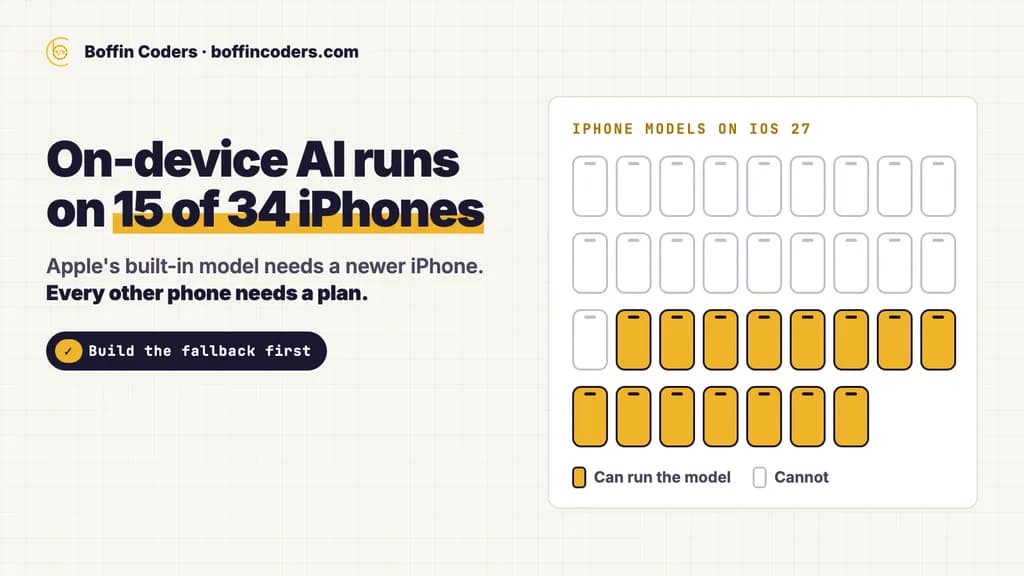
On-device AI means the model runs on the phone itself. The photo, voice or text it works on stays on the device, the feature works offline, and each use costs no server fee. Today it suits short jobs: reading text in a photo, summarising a message, tidying a draft, sorting what a user types. Reach is the limit. Apple's built-in model runs only on newer iPhones, and Google's on a list of newer Android phones, so every on-device feature needs a plan for every other phone.
Which phones can run on-device AI today?
Only newer ones, and Apple and Google each keep their own list. We read both lists on 10 November 2026. Apple's on-device model runs on 15 of the 34 iPhone models that take iOS 27, by our count of Apple's own device list: the iPhone 15 Pro and 15 Pro Max, the iPhone 16 models and every model after them, the iPhone Air and the iPhone Duo. Google lists 98 phones from 14 makers for its on-device summarising, proofreading, rewriting and image description tasks. Samsung's entries are the Galaxy S25 and S26 lines and its Z foldables. No Galaxy A model is on the list.
iPhone | Android | |
|---|---|---|
The built-in model | Apple's on-device foundation model, part of Apple Intelligence | Gemini Nano, run by the AICore system service |
How your app reaches it | Apple's Foundation Models framework | ML Kit's GenAI APIs |
Phones that can run it | 15 of the 34 iPhone models on iOS 27 | 98 phones from 14 makers on Google's task list |
What else it needs | Apple Intelligence turned on, up to 8 GB of storage (up to 14 GB on the newest models), a supported language | Availability varies with the phone's memory, its Android version and AICore updates |
So the phones your own users carry decide how many of them see the feature. Your store consoles show which phones those are. Look there before you plan anything.
What can on-device AI do inside an app?
Two kinds of on-device AI sit in apps today, and they reach very different numbers of phones.
The first kind is the task model: a small model trained for one job. ML Kit, Google's on-device library for Android and iOS apps, reads text in images, scans barcodes, detects faces, labels images, identifies a language, translates text and suggests short replies. Google says ML Kit's processing happens on the device, so it is fast enough for live camera input, it works offline, and the images and text can stay on the phone.
The second kind is generative: a small language model that writes. Through ML Kit's GenAI APIs, Gemini Nano summarises an article or a chat as a bulleted list, proofreads, rewrites a short message in another tone, describes an image and answers your own prompts. Apple says its on-device models do well at summarisation, entity extraction, text and image understanding, refining text, dialogue for games and creative writing.
Job in your app | Task model | Built-in language model |
|---|---|---|
Read the text in a photo of a receipt | ML Kit text recognition | Image description gives a short description of the picture |
Scan a barcode or QR code | ML Kit barcode scanning | Not the tool for this job |
Pull names, dates and amounts out of text | ML Kit entity extraction (Beta) | Apple lists entity extraction |
Summarise a long note or chat | Not in the task set | Summarisation, as a bulleted list on Android |
Fix the grammar of a draft | Not in the task set | Proofreading |
Change the tone of a message | Not in the task set | Rewriting |
When a task model can do the job, use it. It does not depend on the built-in language model, so it is not held to Apple's or Google's short lists of phones.
How big is an on-device LLM, and how does it reach the phone?
When the built-in model does not fit the job, you can ship your own on-device LLM, an open large language model packaged for phones. Then file size becomes the problem. On 10 November 2026 we read the ten most downloaded text models in the LiteRT community collection on Hugging Face. LiteRT is Google's on-device machine learning framework, and the collection packages open models to run with it. The smallest file any of the ten offers is 343 MB. Nine of the ten start above 500 MB, and the most downloaded, Gemma 4 E2B, starts at about 2 GB.
Model | Smallest model file |
|---|---|
Gemma 4 E2B | 2,004 MB |
Gemma 4 E4B | 2,964 MB |
Qwen2.5 1.5B Instruct | 1,567 MB |
DeepSeek R1 Distill Qwen 1.5B | 1,807 MB |
Qwen3 0.6B | 343 MB |
Phi-4 mini instruct | 3,871 MB |
Qwen3 1.7B | 977 MB |
Gemma 4 12B | 5,986 MB |
Gemma 4 31B | 19,218 MB |
Qwen2.5 0.5B Instruct | 513 MB |
Files that size do not go in your app's main download. Google Play caps an app's base module at 500 MB and each asset pack at 1.5 GB, measured on the compressed download, and it warns people on mobile data about any app above 200 MB. An iPhone app can be up to 4 GB uncompressed, and Apple points larger files to Background Assets, which it can host for you. So the model reaches the phone after install, as an asset pack or a download on first use, and the feature waits until it arrives.
It also takes space. Apple Intelligence itself needs up to 8 GB of storage on most eligible iPhones, and up to 14 GB on the newest. The Play Console tracks how many of your users have less than 2 GB free, and what share of your uninstalls comes from those phones.
A model too big for a phone belongs on a server. If the data must still stay with you, you can host your own LLM on a server you control.
Does on-device AI cost less than a cloud API?
Per use, yes. Google says its on-device GenAI APIs add no server cost for each call, and the same holds for any model that runs on the phone: the user's phone does the work. A cloud model charges for every request, so its bill grows with every user who taps the button.
The cost moves to the build. Each platform has its own model and its own API, so the feature is written twice, in Swift and in Kotlin, or once behind a cross-platform layer that calls both. Every phone that cannot run the model needs a second path. The input is short, too. Apple's technical note gives its on-device model a context window of 4,096 tokens per session, input and answer together. At Apple's rule of three to four characters a token in English, that is about 12,000 to 16,000 characters.
Cost line | On the phone | In the cloud |
|---|---|---|
Each request | No server fee | Billed by the provider for each request |
Build | Two platform APIs plus a fallback path | One API for both platforms |
Without a signal | Works offline | Stops working |
Long input | 4,096 tokens per session on Apple's model | More room: Apple's documentation points here when you need more reasoning or context |
Testing | Every model version and the oldest phone you support | The model version you pick on the provider's side |
The two can share the work. Run the short, private step on the phone and send only the hard cases to a server model, with the user's knowledge.
Is on-device AI more private?
The AI step is. Google says that with its GenAI APIs the input, the processing and the output stay on the device. That changes what you declare in the stores. Google Play says data your app processes only on the phone, never sent off it, does not need to be disclosed in the Data safety form. Apple defines "collect" as sending data off the device and keeping it longer than the request needs.
The rest of your app still counts. Analytics, crash reports and a cloud fallback can each send the same text off the phone. Check each of those paths before you call the feature private.
When the model is too big for a phone and the data must still stay with you, a server you control is the third option. A system we built for a coaching institute works this way: speech-to-text runs on the institute's own server, and teachers approve every AI-drafted grade. The setup is written up as local speech to text on your own server.
How do you add on-device AI to an existing app?
Start small, and plan first for the phones that cannot run it.
- Pick one short job. A summary, a proofread or reading a receipt fits. A long chat or a big document does not fit Apple's 4,096-token window.
- Check the model before you show the feature. Apple's framework says why the model is unavailable: the device is not eligible, Apple Intelligence is off, or the model is not ready yet. Show the button only when the model can run.
- Build the fallback first. Decide what every other phone gets: a cloud model, a simpler task model, or no button at all.
- Run it while the app is open. On Android, GenAI calls work only when your app is in the foreground, and Google limits how many calls each app makes. A busy answer means wait, then try again with a longer delay each time.
- Test on more than one model version. Apple's documentation lists three versions of its on-device model across iOS 26 and iOS 27, and Google says different Gemini Nano versions can give different output for the same prompt. Keep a fixed set of test inputs and run them after each system update.
- Update your store privacy answers to match where the data now goes.
A Flutter app reaches both models through platform code: Swift on iOS and Kotlin on Android, called from Dart through platform channels or bindings that Pigeon generates. One screen in your app can then serve both platforms, and a dedicated Flutter development team can build both sides and the fallback together.
If you would rather have the feature built for you, mobile app development services cover the on-device step, the fallback and the store privacy forms.
Keep reading
Varinder Singh
Flutter Developer
Varinder Singh builds cross-platform mobile apps in Flutter for iOS and Android, from first screen to store release. Varinder writes about shipping Flutter apps that pass store review and stay easy to maintain.
Frequently asked questions
On-device AI is a model that runs on the phone itself rather than on a server. The text, photo or voice it works on stays on the device, the feature works without a signal, and each use costs no server fee. In apps today it covers jobs such as reading text in a photo, summarising a message, proofreading a draft or rewriting a short message in another tone.
Not answered here?
Need this built?
We build websites and apps for businesses, and work behind digital agencies as their development team. Tell us where things stand on a 20-minute call.