Flutter vs React Native: Which Should You Choose for Your App?
- October 28, 2026
- 9 min read

Flutter Developer
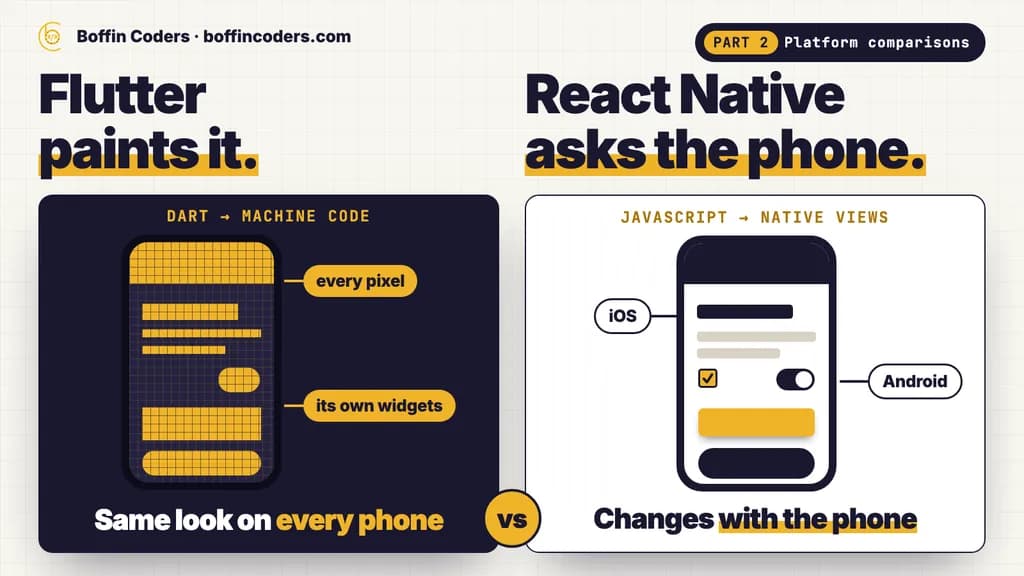
Flutter vs React Native comes down to how each one draws your app. Flutter compiles your Dart code to machine code and paints every pixel itself, so the app looks the same on every phone. React Native runs your JavaScript and asks iOS and Android to draw their own controls. Choose Flutter when design and animation matter most and no React team exists yet. Choose React Native when your team already writes React for the web.
Both build one app for iPhone and Android from one codebase, and both are free and open source, so neither is a wrong answer. The difference shows after launch: in how the app behaves when Apple or Google restyles the phone, in who you can hire, and in how often each one asks for an upgrade. We counted that last one from both projects' own release records. The numbers are below, with a comparison table and the cases where each one is the better pick.
What is the difference between Flutter and React Native?
Flutter is a UI toolkit written in Dart. For a release build, Flutter's architectural overview explains, the app is compiled directly to machine code for ARM or Intel processors, or to JavaScript or WebAssembly for the web. Flutter does not use the phone's own buttons and text fields. It draws its own with Impeller, a rendering engine that ships inside your app.
React Native lets developers who know React build native apps. You write components in JavaScript or TypeScript, and at runtime, as React Native's guide to core components puts it, React Native creates the matching Android and iOS views for them. A <Text> in your code becomes a real iOS or Android text view on the phone.
Does Flutter use native components?
No. Flutter paints its own widgets, including the ones made to look like iOS or Android controls. That is why a Flutter screen looks the same on an older Android phone and a new iPhone. Because the engine ships with the app, Flutter's documentation notes that an app can take rendering improvements by updating Flutter, even on a phone that never gets a new Android version.
The other side of it: when Apple or Google restyles its system controls, a React Native app's buttons and switches change with the phone, while a Flutter app keeps its own look until its widgets are updated. Some products want that consistency. Others want to feel exactly like the platform they run on.
Which language does each one use?
Flutter uses Dart. Few developers know Dart before they start with Flutter, but it is a typed language that reads much like TypeScript, Java or C#, and the whole toolkit, from layout to animation, is written in it.
React Native uses JavaScript or TypeScript with React, the same skills as a React website. A team that already builds React for the web can share people, habits and some code with the app, such as validation rules and the calls to your API. The screens themselves are usually written twice, because a website's HTML elements do not exist in React Native.
Which is faster, Flutter or React Native?
For most business apps (forms, lists, maps, bookings and payments) both are fast enough, and what users notice is how well the app is built: images sized for the screen, lists that load in pages, and no heavy work running while someone scrolls.
Flutter has the edge where the app draws a lot itself, such as custom charts or a branded design that matches neither platform. Its release code runs as machine code and its own engine draws every frame, so nothing is handed to the platform's views and back.
React Native's New Architecture fixed an old weakness. Its overview describes synchronous access to layout, so a tooltip can be measured and placed in the same frame instead of visibly jumping into place. Where React Native still needs care is animation, which should run on the native side rather than in JavaScript, and long lists, which need a list component that only renders the rows on screen.
Which is easier to keep up to date after launch?
Upgrades are the running cost that a first quote rarely shows. We read both projects' own release records for October 2025 to October 2026. Flutter shipped four new stable versions in that year, 3.38, 3.41, 3.44 and 3.47, about one every three months, and 40 stable releases counting the patches. React Native shipped six new versions, 0.83 to 0.88, about one every two months, and its releases page says the team maintains only the latest three. A React Native version is therefore out of support about six months after it ships.
Neither number is a reason to pick one framework over the other. It is a line in the budget. Plan an upgrade about every three months on Flutter, and one every two months, or a larger jump twice a year, on React Native. Test each one on real phones before it reaches the store.
What usually breaks in an upgrade?
Mostly the packages around the framework, not your own code. A Flutter app depends on packages from pub.dev, and a React Native app on libraries from npm, and many of those wrap native iOS and Android code. When the framework moves, a package whose maintainer has not caught up holds the whole upgrade back.
Before you choose a package for payments, maps, the camera or sign-in, check three things on its page: when it was last released, whether it supports the framework's current version, and how many open issues mention the latest iOS or Android release. A package that fails all three is often more work than writing the feature yourself.
What does each cost to build and run?
Both are free and open source, React Native under the MIT licence and Flutter under a BSD licence, so the framework costs nothing. The money goes on development time, the Apple and Google developer accounts and the backend your app talks to, and those barely differ between the two.
Flutter | React Native | |
|---|---|---|
Licence | Free, open source (BSD) | Free, open source (MIT) |
Cost to build | Flutter developers, from US$20 an hour on our rate card | React Native developers, from US$20 an hour on our rate card |
Cost to run | The store accounts and your backend. The framework adds nothing | The store accounts and your backend. The framework adds nothing |
Who edits the content | Developers for the screens, editors through your backend or CMS | Developers for the screens, editors through your backend or CMS |
Upgrades | A new stable version about every three months | A new version about every two months, the latest three supported |
Where it limits you | Phone features without a package need a little native code. Web builds suit apps behind a login more than pages that must rank | Phone features without a library need native modules. Upgrades come more often |
When to change | When you need each platform's own controls everywhere, or one React team for web and app | When the design needs more custom drawing and animation than the platform views give easily |
The bigger cost difference is the team you already have. Two React developers who can also build the app are cheaper than adding a Flutter developer, and a Flutter developer who builds both phones alone is cheaper than two native developers.
Is Flutter or React Native better for a first version of your app?
Pick the one your developers already know. If nobody on the team writes React, Flutter is usually quicker to a polished first version: one language, one set of widgets that look the same on both phones, and fewer outside pieces to choose and keep up to date.
If your web product is already built in React, React Native lets the same people build the app, and that saving outweighs any difference between the frameworks. A first version is also the cheapest moment to choose, because nothing has been built twice yet.
Can you move a React Native app to Flutter later?
Yes, but it is a rewrite of the app, not a port. The two use different languages and draw screens in different ways, so the screens and the code inside the app are rebuilt. What stays is everything outside it: your backend, your API, your users' accounts and the store listings.
A safe order for the move:
- Keep the backend and its API exactly as they are, so the old and new apps can run side by side.
- Rebuild the screens in Flutter, starting with the ones users open most, and match each one against the old app before moving on.
- Publish under the same bundle ID and package name, signed with the same keys, so the stores deliver the Flutter version as an update and nobody has to reinstall.
- Release to a small share of users first with a staged rollout on Google Play and a phased release on the App Store, then widen it once the crash reports show no new problems.
The same order works in the other direction, from Flutter to React Native.
Flutter vs React Native: which should you choose?
Match the framework to your product and to the people who will keep it running. If the app's design is part of what you sell, or nobody on the team writes React, Flutter gives you one toolkit and the same screens on every phone. If your company already builds in React, React Native turns those skills into an app.
Your project | Choose |
|---|---|
An app whose design and animation set it apart | Flutter |
A new app with no React developers behind it | Flutter |
One codebase for phones, desktop and a logged-in web app | Flutter |
An app built by a team that already writes React for the web | React Native |
An app that should use each platform's own controls everywhere | React Native |
If you would rather have it built for you, you can hire Flutter developers for an app that has to look the same everywhere, or hire React Native developers when your team already works in React, and interview each one before they start.
Keep reading
Varinder Singh
Flutter Developer
Varinder Singh builds cross-platform mobile apps in Flutter for iOS and Android, from first screen to store release. Varinder writes about shipping Flutter apps that pass store review and stay easy to maintain.
Frequently asked questions
Flutter is not better in every case. Flutter suits apps whose design and animation matter most, and teams starting without React, because it compiles to machine code and draws every pixel itself. React Native suits teams that already write React for the web, and apps that should use each platform's own controls. Both build iPhone and Android apps from one codebase, and both are free.
Not answered here?
Need this built?
We build websites and apps for businesses, and work behind digital agencies as their development team. Tell us where things stand on a 20-minute call.