WordPress vs Wix: Which Should You Choose for Your Website?
- October 28, 2026
- 7 min read

WordPress and Shopify Developer
Choose Wix when you want a business website live quickly, edited by your own team, with hosting, security and updates handled for you. Choose WordPress when the site has to grow through plugins, hold years of content, or move to any host you pick. Underneath, the split is ownership: a Wix site runs only on Wix's servers, while WordPress is free software that you install, own and keep up to date yourself, or through your developer.
Both run good business websites. Below are the costs and limits side by side, what we found when we checked which parts of a Wix site can leave Wix, and a short way to decide.
What is the difference between WordPress and Wix?
Wix is a website builder, a host and a domain registrar in one account. You drag sections and elements onto a page in the Wix editor, add Wix's own business apps for a store, bookings or a blog, and publish. Wix's help center says the site is served from Wix's content delivery network and that Wix runs the software updates for you. The same article says a Wix site cannot be hosted anywhere else, because it depends on Wix's own technology to work, although the content you build belongs to you.
WordPress is open source software, licensed under the GPLv2, that runs on PHP and a MySQL or MariaDB database. WordPress.org says it powers over 43% of the sites on the web. You install it on hosting you choose, add a theme for the design and plugins for features, and every file and every row of the database stays yours.
Is Wix easier than WordPress?
For a first website, yes. Wix has no server to set up and no software to install, and its editor shows the page exactly as visitors will see it. WordPress asks for more decisions at the start: the host, the theme and the plugins. Once a WordPress site is built well, editing a page or a post is just as easy in its block editor. The gap shows up later, when you want something the builder does not offer.
Can you add custom features to each one?
On Wix, you add features through Wix's own apps, apps from its app market, and custom code on Wix's developer platform. You work inside what Wix exposes. On WordPress, over 76,000 free plugins cover most needs, and a developer can write custom PHP for the rest, because the whole codebase is open.
How much do WordPress and Wix cost?
Wix has a free plan that shows Wix branding and uses a wixsite.com address. To connect your own domain and remove the branding, you need a Premium plan: Light, Core, Business or Business Elite on Wix's pricing page, read on 21 October 2026. That page says prices and currency vary by location, so check the figure for your country there. What changes between plans is the same everywhere: Light comes with 2 GB of storage, Core adds online payments and basic ecommerce with 50 GB, Business has 100 GB, and Business Elite has unlimited storage. Most yearly plans include a voucher for a free domain for one year.
WordPress itself is free. You pay for hosting, a domain, any premium theme or plugins, and someone's time for updates every month.
The build is usually the larger cost on both. If you hire a developer through us, WordPress and Wix developers both start from US$12 an hour.
WordPress | Wix | |
|---|---|---|
The software | Free and open source (GPLv2) | A hosted website builder |
Cost to run | Hosting, domain, paid plugins and update time | A yearly or monthly Premium plan, priced by country |
Hosting and updates | Your host's job and yours | Included, run by Wix |
Adding features | Over 76,000 free plugins and custom PHP | Wix apps, app market apps and Wix's developer platform |
Storage | Whatever your hosting plan gives you | 2 GB on Light up to unlimited on Business Elite |
Leaving | Copy the files and the database to any host | CMS and products as CSV, while the site stays on Wix |
Can you take your website with you if you leave Wix?
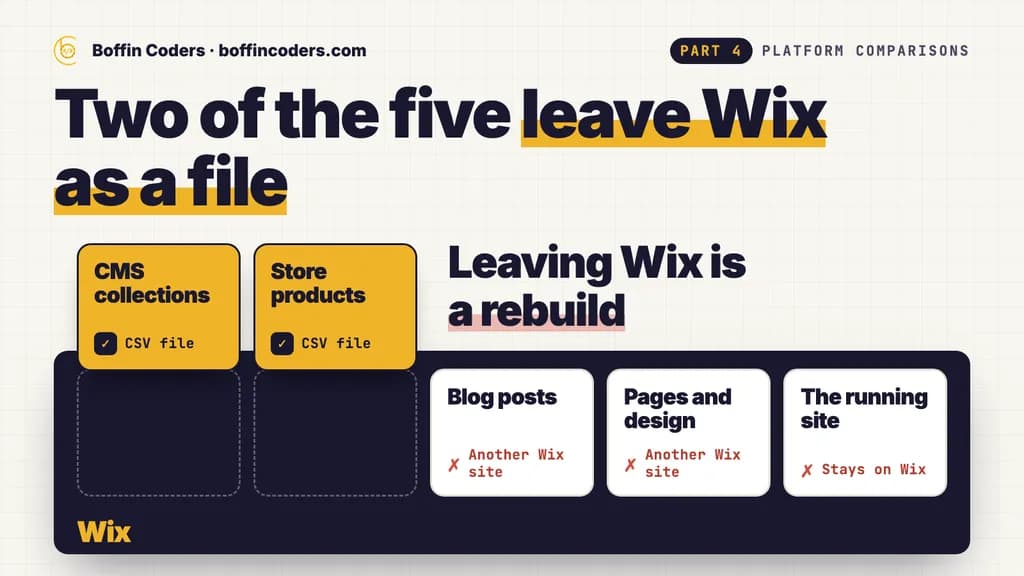
This is the question to settle before you build, because it decides what a future move costs. We read Wix's own help center on 21 October 2026 and checked five parts of a typical business site.
Part of the site | Can it leave Wix as a file? |
|---|---|
CMS collections | |
Store products | |
Blog posts | No: published posts import into another Wix site in the same Wix account |
Pages and design | No: pages copy to another Wix Editor site, and Wix's business apps and third-party apps cannot be copied |
The running site | No: it must stay on Wix's servers |
Two of the five leave Wix as a file, and both are spreadsheets. The design, the pages and the blog move only to another Wix site. None of that is a reason to avoid Wix, but it means leaving Wix is a rebuild: the new site is designed again, and the posts are moved over by hand or by a developer's script.
On WordPress, leaving is a copy. The files and the database go to any other host, and the site runs there as it did before. On either platform, keep your domain at a registrar you control: Wix's help center confirms you can buy and manage the domain with another provider and connect it to a Wix site.
Which is easier to keep secure and up to date?
Wix, by design. The platform, the hosting and the security patches are Wix's job, and nothing on your side needs updating. On WordPress, the core software, the theme and every plugin need updates, and someone has to own them. WordPress's own release archive shows a little more than one core update a month over the last year on its newest version line, before a single plugin update is counted.
That workload is the real price of WordPress's freedom. A WordPress site needs a monthly routine: a backup, the updates, then a check of the pages that bring in enquiries or sales.
How do SEO and redirects compare?
Both let you set the title and meta description of every page, choose the URL of each page and post, and submit a sitemap to Google. Rankings come from the content, the speed of the pages and the links pointing to them, not from the platform's name.
The differences sit in the details. On Wix, 301 redirects are set in the URL Redirect Manager: they work only on a connected custom domain, a site can hold up to 5,000 of them, and a blog post whose URL changes needs its redirect added by hand. On WordPress, redirects come from a plugin or the server itself, with no cap beyond what the server can carry.
When is Wix the better choice?
- A business that needs a professional site soon and has no developer on hand.
- An owner or a small team who wants to edit every page themselves and never think about hosting.
- A brochure site, a portfolio or a booking site that fits inside Wix's own apps.
- A business that would rather pay one platform bill than manage a host, plugins and updates.
When is WordPress the better choice?
- A site that will keep growing, with features that plugins already provide, such as memberships, multilingual content or a WooCommerce shop.
- A content library, such as a long-running blog or a resource section, with many authors and years of posts.
- A business that wants its code and data on a host it chooses, and the freedom to change host or developer at any time.
- A site that has to connect to other systems through custom code.
WordPress vs Wix: which should you choose?
Choose by how long you expect the site to grow. If you want to launch fast and keep things simple, Wix handles the hosting and updates and lets your team edit everything. If the site is a long-term asset that will add features and content for years, WordPress gives you ownership and room to grow, and a monthly update routine is the cost of that.
Your website | Choose |
|---|---|
A site you want live soon, with no developer | Wix |
A team that wants no hosting or updates to manage | Wix |
A site that needs many plugins or a WooCommerce shop | WordPress |
A large content library with many authors | WordPress |
Code and data on a host you choose | WordPress |
If you would rather have it built for you, you can hire WordPress developers for a site you own outright, or hire Wix developers for a site your team runs in the Wix editor, and interview each one before they start.
Keep reading
Santosh K Sharma
WordPress and Shopify Developer
Santosh K Sharma builds and maintains WordPress and Shopify sites, from theme and plugin work to store migrations and performance fixes. Santosh K Sharma writes about keeping client sites fast, current and easy to manage.
Frequently asked questions
WordPress is not better in every case. It suits sites that will grow through plugins, hold a large content library, or need code and data you can move to any host. Wix suits businesses that want a site live quickly, edited by their own team, with hosting, security and updates handled by Wix. Both can run a fast business website with good SEO.
Not answered here?
Need this built?
We build websites and apps for businesses, and work behind digital agencies as their development team. Tell us where things stand on a 20-minute call.