Framer vs Webflow: Which Should You Choose for Your Website?
- October 28, 2026
- 9 min read

Webflow Developer
Choose Framer when your website is a design-led marketing site that a designer builds and your team edits on the page. Choose Webflow when the site needs a store, a documented code export, or the class-by-class control of HTML and CSS that a developer expects. Both host the site for you, so the deciding questions are what the site has to do and what you can take with you if you leave.
Either one can carry a serious business website. The plan prices and limits below come from each vendor's own pricing page. After them come the two help centres' answers on taking your site elsewhere, set side by side.
What is the difference between Framer and Webflow?
Both are visual website builders that host the sites they build, so neither asks you to run a server or install updates. They start from different places.
Framer starts from the design canvas. A designer lays out responsive pages visually, and Framer's AI agents can create CMS collections, fill them with sample content and build detail pages from a prompt, using monthly credits that come with each paid plan. Your team then edits text and CMS items on the page itself, from any device. Framer's hosting page lists automatic SSL on every plan, a global CDN, protection against network attacks, and publishes that can be rolled back to an earlier version in seconds.
Webflow starts from the structure of the page. The Webflow Designer is a visual front end for HTML and CSS, so a developer works with classes, layout and breakpoints much as they would in code. Editors change text, images and CMS items in the browser with the layout locked. Webflow's hosting page says there are no updates to run and no packages to install, with SSL, a CDN, DDoS protection and automatic backups on every site plan.
Is Framer easier than Webflow?
For a designer, usually yes. Framer works like a design tool, and a designer can publish a finished marketing site without thinking in CSS classes. Webflow asks more of the person building because its Designer follows the rules of HTML and CSS. That same structure is what keeps a large Webflow site orderly when a developer has to change it a year later. For the people who only edit content, both are easy once the site is built.
Which is better for animation?
Both have animation built in. Webflow's Interactions editor builds animations visually on a timeline and, according to its pricing page, runs on GSAP. Framer runs its transitions on Motion, which its hosting page describes as GPU-accelerated. The real choice is who builds it: Framer suits a designer animating inside the layout, and Webflow suits someone who wants each step on a timeline.
How much do Framer and Webflow cost?
Both charge per site, plus a fee for each extra person who edits it. On Framer's pricing page, read on 21 October 2026 with yearly billing, Basic is US$10 a month with 2 CMS collections and 1,000 CMS items, and Pro is US$30 a month with 10 collections, 2,500 items, staging and site redirects. An extra editor who designs and publishes costs US$20 a month, a content editor US$10 a month, and viewers are free.
On Webflow's pricing page, read the same day, the Basic site plan is US$15 a month billed yearly for a site without a CMS, and Premium, the plan with the CMS, is US$25 a month billed yearly. A full seat for designing costs US$39 a month and a limited seat for editing content US$15 a month, both billed yearly.
So for a site with a blog, Framer's cheapest plan with a CMS is US$10 a month against Webflow's US$25, and each extra person costs less on Framer as well. A store changes the sum: Webflow sells ecommerce plans with products and checkout, and Framer's pricing page lists no store plan.
The build costs more than either plan. If you hire a developer through us, Framer developers and Webflow developers both start from US$15 an hour.
Framer | Webflow | |
|---|---|---|
Starts from | The design canvas | The structure of HTML and CSS |
Cheapest plan with a CMS | Basic, US$10 a month billed yearly | Premium, US$25 a month billed yearly |
Plan without a CMS | None, every paid plan has one | Basic, US$15 a month billed yearly |
Extra people | US$20 a month per editor, US$10 per content editor | US$39 a month per full seat, US$15 per limited seat, billed yearly |
Hosting and security | Included: SSL, CDN, attack protection, rollbacks | Included: SSL, CDN, DDoS protection, backups |
Store | No store plan on the pricing page | Ecommerce plans with checkout |
Leaving | The help articles disagree on HTML export, CMS out as CSV or JSON | HTML and CSS export, CMS as CSV |
Can you take your website with you if you leave?
This is the clearest difference we found. We read both help centres on 21 October 2026 and listed which parts of a site leave each platform as files.
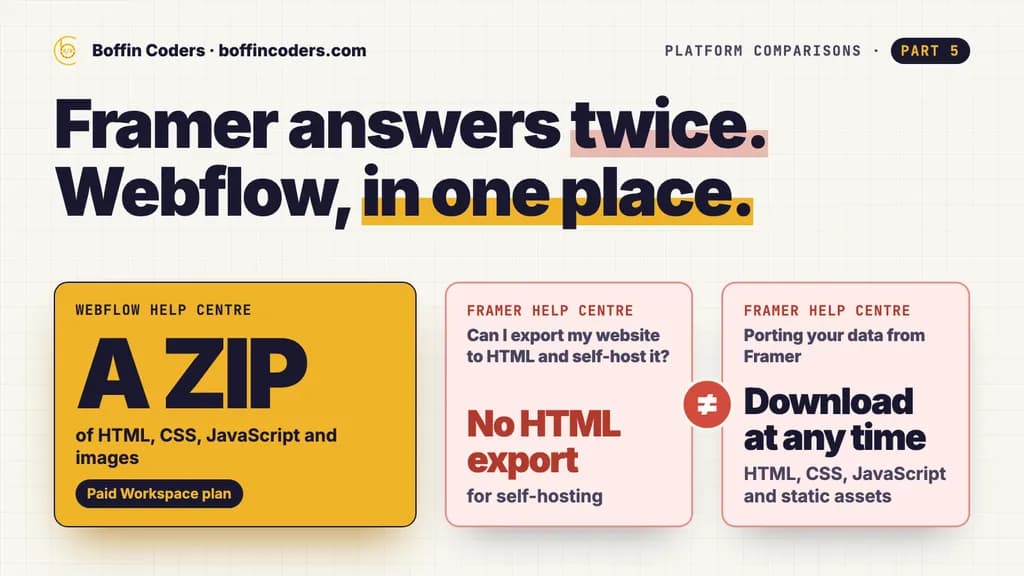
Webflow answers in one place. Its code export article says a paid Workspace plan downloads the site's HTML, CSS, JavaScript and images as a ZIP, then lists what stays behind: CMS content, user accounts, ecommerce, code components and localised content. Forms and site search stop working on the exported copy, and Collection lists show their empty state. CMS Collections, products and user accounts download separately as CSV.
Framer answers twice. Its article Can I export my website to HTML and self-host it? says Framer does not offer HTML export for self-hosting, because pre-rendering, image resizing, font subsetting and server-side rendering run on Framer's own infrastructure. Its article Porting your data from Framer says every Framer site is published as standard HTML, CSS, JavaScript and static assets that you can download at any time and move to any host. The porting article adds that CMS content leaves through plugins as CSV or JSON.
Part of the site | Framer, per its help centre | Webflow, per its help centre |
|---|---|---|
Pages, styles, scripts and images | Two answers: no HTML export for self-hosting in one article, download at any time in the other | Exported as a ZIP on a paid Workspace plan |
CMS content | CSV or JSON, through plugins | CSV |
Forms, site search and CMS lists on another host | Not covered by either article | Stop working |
Store products and user accounts | No store plan | CSV |
If owning a copy of the site matters to you, get Framer's answer in writing before you build, and plan as if the site stays on Framer hosting until you have it. With Webflow, expect the export to give you the design and the static pages, and expect the CMS content to travel as CSV into whatever comes next. On either platform, a site that leaves its builder is rebuilt around its content, not copied.
What are the limits on each plan?
Framer writes its limits per plan. Basic allows 30 pages and 50 GB of bandwidth a month, served from 20 CDN locations. Pro allows 150 pages, 100 GB and over 300 locations, and grows with paid add-ons up to 700 pages, 40 CMS collections, 40,000 CMS items and 2 TB of bandwidth. Framer's pricing page says a site may go over its bandwidth limit for one month, with an email asking you to upgrade.
Webflow's Basic plan allows 300 static pages and 10 GB of bandwidth a month, and the Premium card offers bandwidth from 50 GB up to 2.5 TB a month. Its pricing page says two consecutive months over the bandwidth limit trigger an automatic plan upgrade. Webflow's ecommerce plans carry their own product limits, from 500 to 15,000 items.
Thirty designed pages fill quickly on a service site with a page for each service and each location, so count your pages before you pick Framer's Basic plan.
When is Framer the better choice?
- A marketing site, launch page or portfolio where the design is the message and a designer builds it.
- A team that edits text and CMS items often, on the page and from a phone.
- A blog or a set of case studies that fits inside 1,000 to 2,500 CMS items, where US$10 a month with a CMS matters.
- A site you are happy to keep on Framer hosting for as long as it runs.
When is Webflow the better choice?
- A site with a store: Webflow's ecommerce plans include products and checkout.
- A team with a developer who wants semantic HTML and CSS, custom code and code components.
- A business that wants a documented export of its design and static pages, with its CMS content as CSV.
- An agency handing a finished site to a client who edits it in the browser with the layout locked.
How do you move between Framer and Webflow?
Moving is a rebuild in either direction, because neither platform imports the other's design. A safe order for the move:
- List every URL on the old site before anything changes, and mark the pages that get search traffic.
- Rebuild the design on the new platform and set up CMS collections that match your content types and fields.
- Move the content by exporting Webflow Collections as CSV, or Framer CMS content as CSV or JSON through a plugin, then import it into the new CMS and check images, links and formatting on each template.
- Add a 301 redirect from every old URL that changes, and keep the same URLs wherever you can. On Framer, site redirects come with Pro, not Basic.
- Switch the domain and watch Search Console for errors in the first weeks.
If the site already ranks, our website migration service follows this order with the URL list checked before and after launch.
Framer vs Webflow: which should you choose?
Match the platform to what the site has to do and who will run it. For a design-led marketing site that your team edits often and expects to keep on its builder's hosting, Framer costs less to run and is built the way designers already work. When the site needs a store, developer-level control or an export you can plan around, Webflow costs more per seat and gives you those things.
Your website | Choose |
|---|---|
A design-led marketing site or portfolio | Framer |
A blog or case studies on the cheapest plan with a CMS | Framer |
A store with products and checkout | Webflow |
A developer who wants control of the HTML and CSS | Webflow |
A documented export of pages and CMS content | Webflow |
When you want a developer to build it, you can hire Framer developers for a design-led site your team edits on the page, or hire Webflow developers for a site with a store or custom code. You interview each one before they start.
Keep reading
Anital
Webflow Developer
Anital builds marketing sites in Webflow that teams can edit themselves, from Figma designs to CMS collections and interactions. Anital writes about getting the most out of Webflow, and knowing when a site has outgrown it.
Frequently asked questions
Neither is better in every case. Framer suits design-led marketing sites that a designer builds and a team edits on the page, and its plans with a CMS cost less. Webflow suits sites that need a store, developer control of the HTML and CSS, or a documented code export. Both host the site, handle security and support good SEO.
Not answered here?
Need this built?
We build websites and apps for businesses, and work behind digital agencies as their development team. Tell us where things stand on a 20-minute call.