Best Headless CMS: How to Choose the Right One for Your Website
- October 28, 2026
- 8 min read

React and Node.js Developer
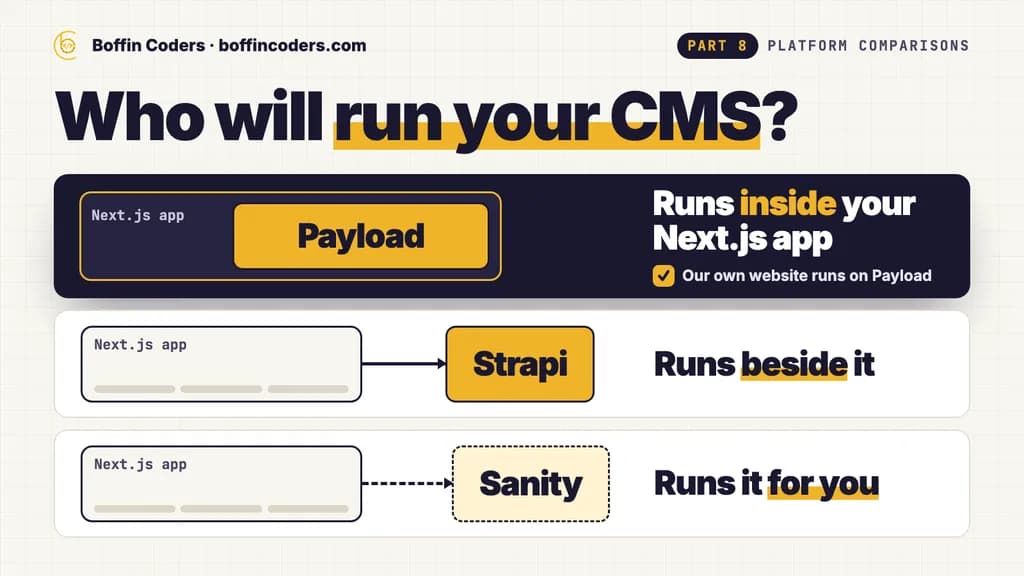
The best headless CMS is the one whose hosting, database and price fit the team that will run it. Choose Payload when your site is built in Next.js and your developers want the content model in code, inside the same app. Choose Strapi when you want an open-source CMS with its own admin app, on a SQL database you host or on Strapi Cloud. Choose a hosted CMS such as Sanity when nobody on your side should run a server or a database.
Our own website runs on Payload. Below is what a headless CMS changes, the three compared side by side on the prices each vendor publishes, and what running this site on Payload has shown us.
What is a headless CMS?
A headless CMS stores your content and hands it out through an API, usually REST or GraphQL, without deciding how any page looks. Your developers build the front end separately, often in Next.js, and that front end asks the CMS for content when it builds or renders a page. The same content can feed a website and a mobile app at once. Editors still get an admin panel to write, upload images and publish. What they lose by default is the theme: every page design is code your team owns.
Headless CMS vs traditional CMS: what changes?
A traditional CMS such as WordPress keeps the content, the design and the page rendering in one system. You install a theme, add plugins, and the CMS serves the finished pages. A headless CMS does only the first part. That split lets your developers build any front end they like, and gives you one content source for every channel. In return, the front end, its hosting and features such as draft preview become a build your team owns.
Traditional CMS | Headless CMS | |
|---|---|---|
Who renders the pages | The CMS, through a theme | Your own front end, such as a Next.js app |
Design changes | Theme settings and plugins | Code in the front end |
Preview of a draft page | Built in | Set up for each project |
What you host | One system | The CMS and the front end, sometimes in one app |
How do you choose a headless CMS?
Five questions settle most choices, and they are worth asking in this order.
- Who will run it? A self-hosted CMS runs on your server with your database. A hosted CMS is run by the vendor, and you pay by seats, projects or usage.
- Which database does your team already know? Strapi 5 runs on SQL databases only, Payload runs on MongoDB, Postgres or SQLite, and a hosted CMS keeps the database for you.
- Where should the content model live? In code, reviewed like any other change, or in an admin screen where someone can add a field without a developer.
- How does the price grow? Count the editors, the projects and the volume of content you expect in two years, then read each plan against those numbers.
- How would you leave? With a self-hosted CMS the database is already yours. With a hosted one, read how its export works before you commit.
How do Payload, Strapi and Sanity compare?
Payload calls itself the Next.js fullstack framework. You install it into a new or an existing Next.js app, and one TypeScript config gives you the admin panel, REST and GraphQL APIs, authentication, access control, file storage and live preview. It is open source under the MIT licence and runs on MongoDB, Postgres or SQLite. The content model is code in your repository.
Strapi is an open-source Node.js CMS with its own admin panel, where content types can be built in the Content-Type Builder. The Community Edition is MIT licensed. Its database documentation lists PostgreSQL, MySQL, MariaDB and SQLite for Strapi 5, and no MongoDB or other NoSQL database, which only Strapi version 3 supported. You host it yourself or pay for Strapi Cloud.
Sanity is a hosted service. Sanity runs the content database, so there is no CMS server or database for you to look after, and the plan counts seats, documents and API requests.
Payload | Strapi | Sanity | |
|---|---|---|---|
The software | Open source, MIT licence | Open source, MIT licence for the Community Edition | A hosted service |
Who runs it | You, inside your Next.js app | You, or Strapi Cloud | Sanity |
Databases | MongoDB, Postgres or SQLite | PostgreSQL, MySQL, MariaDB or SQLite | Run by Sanity |
Content model | TypeScript config in your code | Content-Type Builder in the admin | Set up in your Sanity project |
Free to start | Free to self-host | Free Community plan | Free plan, up to 20 seats and 10,000 documents |
First paid plan | No public price | US$45 a month self-hosted, or US$35 a project a month on Strapi Cloud | US$15 per seat a month |
What does a headless CMS cost?
These are the prices each vendor published when we read their pages on 23 October 2026. Strapi's self-hosted plans start with a free Community plan. Growth costs US$45 a month with 3 users included, then US$15 a month for each extra user, and adds live preview, releases and 14 days of content history. Strapi Cloud starts at US$35 per project a month, and that Starter plan sleeps when idle and has no backups. Pro, at US$90 a month, stays on and takes weekly backups.
Sanity's Free plan covers up to 20 seats and 10,000 documents. Growth costs US$15 per seat a month, for up to 50 seats and 25,000 documents, and you pay as you go above the quota.
Payload is free and open source to self-host. Its website offers enterprise features through a sales demo, and we found no public plan price. On Payload or a self-hosted Strapi, you pay for the server and the database instead of a plan.
The build is usually the larger cost on all three. If you hire a developer through us, Payload CMS and Strapi developers both start from US$18 an hour.
What is it like to run a website on Payload CMS?
We can answer this one from our own site. As of October 2026, boffincoders.com runs on Payload 3 inside its Next.js 16 app, on MongoDB, with 23 collections and 2 globals. User roles live in the config too: a collection can be read-only for one role or hidden from another, set in code rather than in admin settings.
Two things stood out. The first is the database. We added four collections in October, and none of them needed a migration file. Payload's database guide describes this as the MongoDB trade-off: no schema changes to keep production and staging databases in step. A team that wants the database to enforce the structure would pick Postgres and write migrations.
The second is the deploy. Because Payload lives inside the Next.js app, the admin panel, the API and the website build and restart as one. A failed build must never replace the running site, so our deploy builds into a separate folder, swaps it in only when the build succeeds, and keeps the previous build for a rollback. On Strapi or Sanity the CMS runs apart from the website, and the two deploy separately.
When is Payload the better choice?
- Your website is built in Next.js, or will be.
- Your developers want the content model, access rules and hooks in TypeScript, reviewed in pull requests.
- You want the admin, the API and the website in one app with one deploy.
- You want MongoDB, or Postgres with migrations, on hosting you choose.
When is Strapi the better choice?
- Your team already runs Node.js services and a PostgreSQL or MySQL database.
- Someone should be able to add content types in the admin, through the Content-Type Builder.
- The CMS should run apart from the front end, with a website and a mobile app reading the same API.
- You may want hosting handed over later, because Strapi Cloud runs the same CMS for you.
When is a hosted CMS such as Sanity the better choice?
- Nobody on your side should run a server, a database or backups for the CMS.
- You have many editors, and a price per seat suits the budget better than paying for hosting.
- Your content fits the plan's document and request quotas, or the budget allows paying above them.
Best headless CMS: which should you choose?
Start from who will run it and which database your team knows. If the site is a Next.js build and your developers want everything in code, Payload keeps the CMS inside the app. If you want a separate open-source CMS on a SQL database, with paid plans when you need more users and live preview, Strapi fits. If you want no CMS servers at all, a hosted service such as Sanity charges by seat instead.
Your project | Choose |
|---|---|
A Next.js site, with the content model in code | Payload |
One app and one deploy for the admin and the website | Payload |
MongoDB as the database | Payload |
A separate CMS on PostgreSQL or MySQL | Strapi |
Content types added in an admin screen | Strapi |
No CMS server or database to run | Sanity |
If you would rather have it built for you, you can hire Payload CMS developers for a Next.js site with the CMS inside it, or hire Strapi developers for a CMS that runs on its own, and interview each one before they start.
Keep reading
Atul
React and Node.js Developer
Atul builds web applications with React on the front end and Node.js on the back end, including APIs and integrations. Atul writes about building web apps that stay fast and maintainable as they grow.
Frequently asked questions
No single headless CMS is best for every site. Payload suits Next.js sites whose developers want the content model in TypeScript inside the same app. Strapi suits teams that want a separate open-source CMS on PostgreSQL, MySQL, MariaDB or SQLite. A hosted service such as Sanity suits teams that do not want to run a server or a database. Start from who will run it and which database your team already knows.
Not answered here?
Need this built?
We build websites and apps for businesses, and work behind digital agencies as their development team. Tell us where things stand on a 20-minute call.