Next.js vs React: Which One Should You Use for Your Website or App?
- October 28, 2026
- 10 min read

React and Node.js Developer
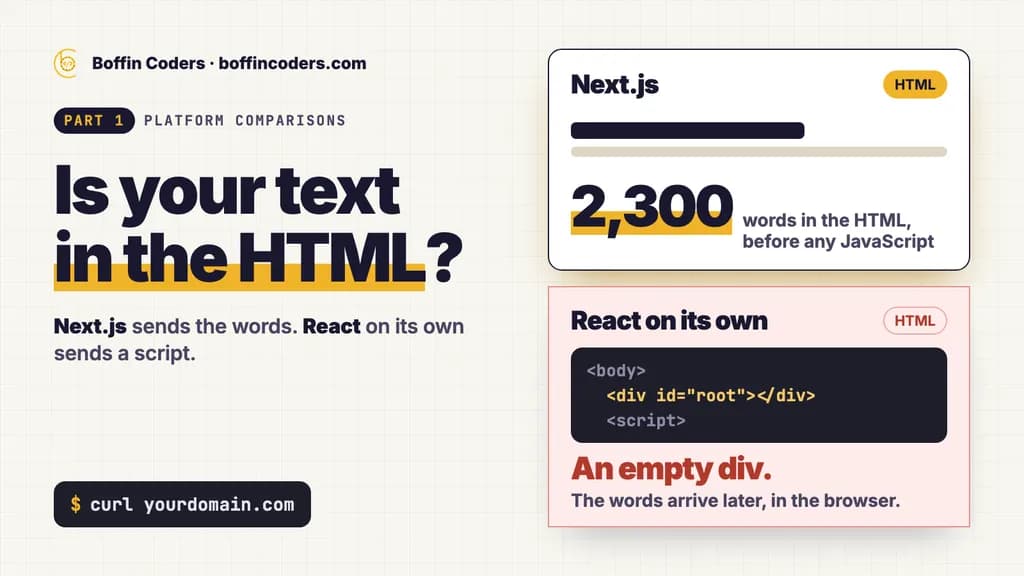
Next.js vs React is a choice between React on its own and React inside a framework, because Next.js is built on React. React is the library that draws your interface. Next.js wraps it with pages, routing and rendering on the server. Choose Next.js for a public website that has to be found on Google and in AI answers. Choose React on its own for an app behind a login, where search engines never look.
React's own documentation now tells you to start a new app or website with a framework, and the first framework it lists is Next.js. That changes the question most people are really asking, which is whether the extra framework is worth it for their project. The sections below answer it with a comparison table, a check you can run on your own site in a minute, and the cases where plain React is still the better pick.
What is the difference between Next.js and React?
React is a JavaScript library for building interfaces out of components: a button, a form, a pricing table. It works out what the screen should show and updates it when something changes. It does not decide how your pages get their addresses, how data reaches them, or where the HTML is made. Those choices are left to you and the tools you add.
Next.js makes those choices for you. Each folder in its app directory becomes a page with its own address, and pages and layouts are rendered on the server by default. The same project also holds route handlers for forms and APIs, image and font handling, and the titles and descriptions each page needs. Underneath, every component is still React, so a React developer can read a Next.js codebase from the first day.
Is Next.js a framework or a library?
Next.js is a framework and React is a library. The difference is who is in charge. You call a library when you need it, and it does one job. A framework calls your code: it sets the folder structure, the build, the routing and the rendering, and you fill in the parts. So comparing the two really means comparing React plus the tools you pick yourself with React plus the tools Next.js has already picked and wired together.
Does React recommend Next.js?
Yes. React's guide to creating an app recommends starting a new app or website with a framework, and Next.js with its App Router is the first one on that page. The same guide keeps a second route: building from scratch with a build tool such as Vite, Parcel or Rsbuild, for apps the frameworks do not suit or for learning how React works. It also points out that these frameworks can run as a plain browser app or a static site, and add server rendering one route at a time.
Which is better for SEO, Next.js or React?
For SEO, Next.js is the safer choice, because the text of each page is already in the HTML before any JavaScript runs. A React app built the default way sends an almost empty page and fills it in inside the browser. Search engines can still index that, but only after an extra step, and every extra step is a place where things can go wrong without you noticing.
You can see the difference with one command. We fetched one of our own pages, /hire/nextjs-developers, which runs on Next.js 16 and React 19 on a server we manage, using curl, which downloads the HTML and runs no JavaScript at all. The HTML held about 2,300 words of the page's text, the H1 included. Then we read the index.html that Vite's React starter template creates. Its body is one empty <div id="root"></div> and a single script tag. Every word a visitor sees on that kind of app is added later, in the browser.
Run the same check on any page of your own site:
1curl -s https://yourdomain.com/your-page | grep -c "a sentence from your page"Pick a plain sentence with no link or apostrophe in it, because the HTML may encode those characters. A number above 0 means the text is in the HTML. A 0 on a page where you can see that sentence in your browser means the page is built in the browser.
Can Google index a React app?
Yes, Google can index a React app that renders in the browser. Google's guide to JavaScript SEO describes three phases, crawling, rendering and indexing, and says a page can wait in the rendering queue for seconds or longer. The same guide still calls server-side rendering or pre-rendering a great idea, because it is faster for users and crawlers and not every bot can run JavaScript. The real risk is silent failure: a script error, a blocked file or a slow API can leave a crawler with a blank page while the site looks fine to you.
When should you use React without Next.js?
Use React on its own when search engines will never see the screens: the app lives behind a login, and the people using it arrive from a bookmark or an email, not a search. Typical cases:
- a dashboard or admin panel for your team
- a booking or quoting tool inside a customer portal
- an internal tool that replaces a shared spreadsheet
- a widget that sits inside another website
For these, server rendering adds little, and a React app built with Vite is simpler to host. The finished build is a folder of static files that any web server, storage bucket or CDN can serve. You pick the router, the data fetching and the state tools yourself. That is more freedom and more decisions, and each choice is one more dependency someone has to keep up to date.
Is React still worth learning and hiring for?
Yes. React is the base layer under every React framework, Next.js included, so time spent on React is never lost when a project moves to Next.js later. What has changed is the default for new public sites, not the value of React itself. A team that knows React well can pick up Next.js. A team that only knows one framework's habits will struggle more when the project needs something that framework does not do.
What does each one cost to build and run?
Both are free and open source under the MIT licence, so the framework itself costs nothing. The money goes on development time and hosting, and the two differ more on hosting than on build cost.
Next.js | React on its own, built with Vite | |
|---|---|---|
Licence | Free, open source (MIT) | Free, open source (MIT) |
Cost to build | React developers who know the framework, from US$18 an hour on our rate card | React developers, from US$18 an hour on our rate card |
Cost to run | A host that runs Node.js or Docker, your own server, or a static export without server features | Static files on any web server, storage bucket or CDN |
Who edits the content | Editors in a CMS admin, with pages rendered on the server | Usually developers, or a CMS that the browser reads from |
Search engines | Page text in the HTML by default | Text added in the browser unless you add pre-rendering |
Where it limits you | Its conventions, and the work each major version upgrade asks for | You choose and maintain the router, data fetching and build yourself |
When to change | Rarely. If you stop needing server features, a static export runs without a server | When public pages need search traffic, or the first screen loads blank and slow |
The site you are reading runs the Next.js column in practice. Payload, the CMS, sits inside the same Next.js app, so editors change pages and posts in its admin and Next.js renders them on the server. Major versions are the cost that shows up later: moving a site from version 15 to 16 means renamed files, removed commands and new defaults to check, as our guide on how to upgrade Next.js sets out step by step.
Is Next.js harder to learn than React?
Next.js asks a React developer to learn a handful of extra ideas, and one of them is new to most people: the split between server and client components. In Next.js, pages and layouts are server components unless you say otherwise. They can read a database or a file directly and send finished HTML, but they cannot hold state, handle clicks or use browser features such as localStorage.
A component that needs those starts with this line:
1'use client'Where you put that line matters. The Next.js documentation explains that once a file is marked this way, everything it imports and the components it renders go into the browser's bundle as well. Put it at the top of a layout and most of the page becomes browser code again, which throws away much of what the framework gives you. The usual fix is to keep the line on the small interactive parts, such as a menu, a form or a filter, and leave the rest on the server.
The other new ideas are smaller: routes made from folders, the metadata each page exports, and caching rules for data fetched on the server. None of them changes how you write a component.
Can you move a React app to Next.js later?
Yes, and you can do it in stages. Both use the same components, so most of your React code moves across as it is: buttons, forms, tables and custom hooks. What changes is the shell around them. Routing moves from a router library into folders, data loading moves from effects in the browser to server components where that makes sense, and anything that touches window or localStorage gets the 'use client' line.
A safe order for the move:
- Start a Next.js app beside the old one and move the public pages first, the ones that need search traffic.
- Leave the logged-in app as it is until the public side is live and indexed.
- Move the app screens one route at a time, as client components at first, then move data loading to the server where it helps.
- Redirect any address that changes with a single 301 from the old URL to the new one, so links and rankings carry over.
Because a Next.js app can also run as a plain browser app, step 3 can stay client-side for as long as you like. Nothing forces the whole app onto the server at once.
Next.js or React: which should you choose?
Match the tool to who has to find the screens. If strangers find you through search or AI answers, the text has to be in the HTML, and Next.js does that by default. If only signed-in users ever see the screens, plain React is lighter to host and has fewer moving parts.
Your project | Choose |
|---|---|
A business website, blog, shop or landing pages that must rank | Next.js |
A site whose pages change often and are edited by people who do not code | Next.js with a CMS |
A dashboard, admin panel or internal tool behind a login | React with Vite |
A widget embedded in another website | React |
A public website plus a logged-in app | Next.js, with the app screens as client components or kept as a separate React app |
If you would rather have it built for you, you can hire Next.js developers for a website that has to rank, or hire React developers for an app behind a login, and interview them before they start.
Keep reading
Atul
React and Node.js Developer
Atul builds web applications with React on the front end and Node.js on the back end, including APIs and integrations. Atul writes about building web apps that stay fast and maintainable as they grow.
Frequently asked questions
Next.js is not better than React, because Next.js is React with a framework around it. Next.js is the better choice for public websites that need search traffic, since each page arrives as finished HTML. React on its own, built with Vite, is often the simpler choice for dashboards, portals and internal tools behind a login, where search engines never look.
Not answered here?
Need this built?
We build websites and apps for businesses, and work behind digital agencies as their development team. Tell us where things stand on a 20-minute call.