Webflow vs WordPress: Which Should You Choose for Your Website?
- October 28, 2026
- 7 min read

Webflow Developer
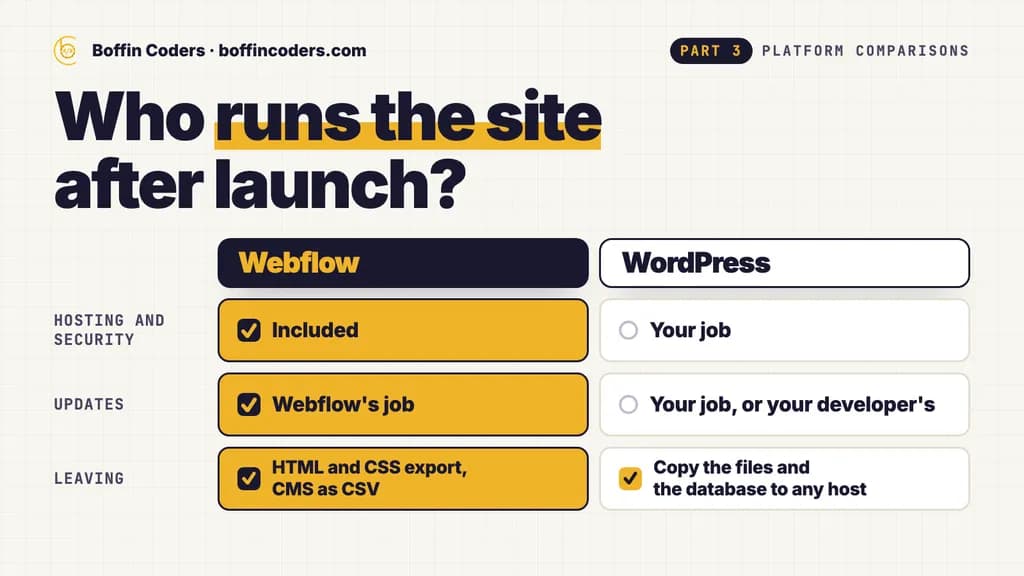
Choose Webflow when your website is a marketing site whose design matters and nobody on your team wants to run updates. Choose WordPress when the site needs many plugins, a large content library, or code and data you can move to any host. The rest of the difference is who runs the site after launch: Webflow hosts it and keeps the platform patched, while WordPress is free software that you install on hosting you pick and keep up to date yourself, or through your developer.
Neither is a wrong answer for a business website. Below are the costs and limits side by side, what we counted in WordPress's own release records for the last year, and a safe order for moving from one to the other.
What is the difference between Webflow and WordPress?
Webflow is a visual website builder and a host in one. A designer lays out pages in the Webflow Designer, which writes real HTML and CSS, and your team then edits text, images and CMS items in the browser without touching the layout. Webflow's hosting page says there are no updates to run and no packages to install: SSL, a global CDN, DDoS protection and automatic backups come with every site plan.
WordPress is open source software built on PHP and a MySQL or MariaDB database, licensed under the GPLv2, and WordPress.org says it runs over 43% of all sites on the web. You download it free, install it on a host, then pick a theme and plugins. Its requirements page asks the host for PHP 8.3 or greater, MySQL 8.0 or MariaDB 10.11 or greater, and HTTPS.
Is Webflow easier than WordPress?
For editing content, both are easy once the site is built. For building the site, Webflow needs someone who understands layout, classes and responsive design, because the Designer is a visual front end for CSS. WordPress needs the right theme and plugins chosen up front, and custom PHP when a theme does not fit. So the easier one depends on where your hard part sits: design points to Webflow, functionality points to WordPress.
Can you own your code on each one?
On WordPress, yes. The files and the database are yours, and you can move them to any host. On Webflow, code export gives you the HTML, CSS, JavaScript and images on a paid Workspace plan, but CMS content, ecommerce, forms and site search do not work in the exported files. Your Collections can be downloaded as CSV. In practice, a Webflow site that uses the CMS stays on Webflow hosting.
How much do Webflow and WordPress cost?
Webflow charges per site and per seat. On Webflow's pricing page, read on 21 October 2026, the Basic site plan is US$15 a month billed yearly for a site without a CMS, and Premium, the plan with the CMS, is US$25 a month billed yearly. Seats are separate: a full seat for designing costs US$39 a month and a limited seat for editing content US$15 a month, both billed yearly, while the freelancer and agency Workspace plans include free client seats for each site.
WordPress itself costs nothing. You pay for hosting, a domain, any paid theme or plugins, and someone's time for updates. Hosting ranges too widely to quote one figure, from shared plans to managed WordPress hosting.
The build is the bigger number on both. If you hire a developer through us, Webflow developers start from US$15 an hour and WordPress developers from US$12 an hour.
Webflow | WordPress | |
|---|---|---|
The software | A hosted platform | Free and open source (GPLv2) |
Cost to run | Site plan from US$15 a month billed yearly, US$25 with the CMS, plus seats | Hosting, domain, paid plugins and update time |
Hosting and security | Included: SSL, CDN, DDoS protection, backups | Your host's and your own job |
Who edits content | Editors in the browser, with the layout locked | Editors in the block editor, with the layout open to themes and plugins |
Adding features | Apps, custom code and the CMS API | Over 76,000 free plugins and custom PHP |
Limits | Plan caps on pages, CMS items and bandwidth | What your server can carry |
Leaving | HTML and CSS export, CMS as CSV | Copy the files and the database to any host |
Which is easier to keep secure and up to date?
This is where the two differ most after launch. On Webflow, the platform is Webflow's job: its hosting page says it monitors for new vulnerabilities and deploys updates automatically. On WordPress, updates are your job, or your developer's, for the core software, the theme and every plugin.
We read WordPress's own records for the year from 21 October 2025 to 21 October 2026. The release archive shows three major versions (6.9 in December 2025, 7.0 in May 2026 and 7.1 in August 2026) and 14 updates on the newest version line, a little more than one a month, before a single plugin update is counted. On 21 October 2026, WordPress.org's own version check marked 934 of the 959 WordPress versions it lists as insecure, and only one, 7.1.3, as the latest.
None of that makes WordPress unsafe. It means a WordPress site needs someone who owns the updates every month, takes a backup before each one and checks the pages that matter afterwards. A site that skips updates for a few months joins that insecure list.
When is Webflow the better choice?
- A brand or marketing site, or a set of landing pages, where the design and the animation carry the message.
- A team that edits content often but does not want to manage hosting, plugins or updates.
- A site with a blog, case studies or locations that fit inside the CMS limits of its plan.
- An agency handing a finished site to a client who will edit it in the browser.
When is WordPress the better choice?
- A site that needs features plugins already provide, such as bookings, memberships, multilingual content or a WooCommerce shop.
- A large content library, such as a publisher or a long-running blog, with many authors and years of posts.
- A business that wants the code and the database on its own servers, or on a host it can change at any time.
- A site that has to connect to other systems through custom PHP.
How do you move from WordPress to Webflow?
Moving is a rebuild, not a copy, because a WordPress theme does not import into Webflow. A safe order for the move:
- List every URL on the old site before anything changes, and mark the pages that get search traffic.
- Rebuild the design in Webflow and set up CMS Collections that match your post types and fields.
- Import the content into the Collections from CSV, then check the images, links and formatting on each template.
- Add a 301 redirect from every old URL that changes, and keep the same URLs wherever you can.
- Switch the domain and watch Search Console for errors in the first weeks.
The same order works in the other direction, from Webflow to WordPress, starting from the CSV export of your Collections. If the site already ranks, our website migration service follows this order with the URL list checked before and after launch.
Webflow vs WordPress: which should you choose?
Match the platform to the people who will run the site. If the website is mostly design and content and your team wants nothing to maintain, Webflow puts hosting, security and editing in one bill. If the site depends on plugins, a large content library or code you control, WordPress gives you that freedom, and the monthly updates are its price.
Your website | Choose |
|---|---|
A brand or marketing site where the design sets you apart | Webflow |
A team that wants no hosting or updates to manage | Webflow |
A site that needs many plugins or a WooCommerce shop | WordPress |
A large content library with many authors | WordPress |
Code and data on a host you choose | WordPress |
If you would rather have it built for you, you can hire Webflow developers for a site your team edits in the browser, or hire WordPress developers for a site that runs on plugins, and interview each one before they start.
Keep reading
Anital
Webflow Developer
Anital builds marketing sites in Webflow that teams can edit themselves, from Figma designs to CMS collections and interactions. Anital writes about getting the most out of Webflow, and knowing when a site has outgrown it.
Frequently asked questions
Webflow is not better in every case. Webflow suits marketing and brand sites whose design matters, run by a team that wants hosting, security and updates handled for them. WordPress suits sites that need many plugins, a large content library, or code and data that can move to any host. Both can run a fast business website with good SEO.
Not answered here?
Need this built?
We build websites and apps for businesses, and work behind digital agencies as their development team. Tell us where things stand on a 20-minute call.