PHP End of Life: Is Your Website's PHP Version Still Getting Security Fixes?
- October 25, 2026
- 9 min read

WordPress and Shopify Developer
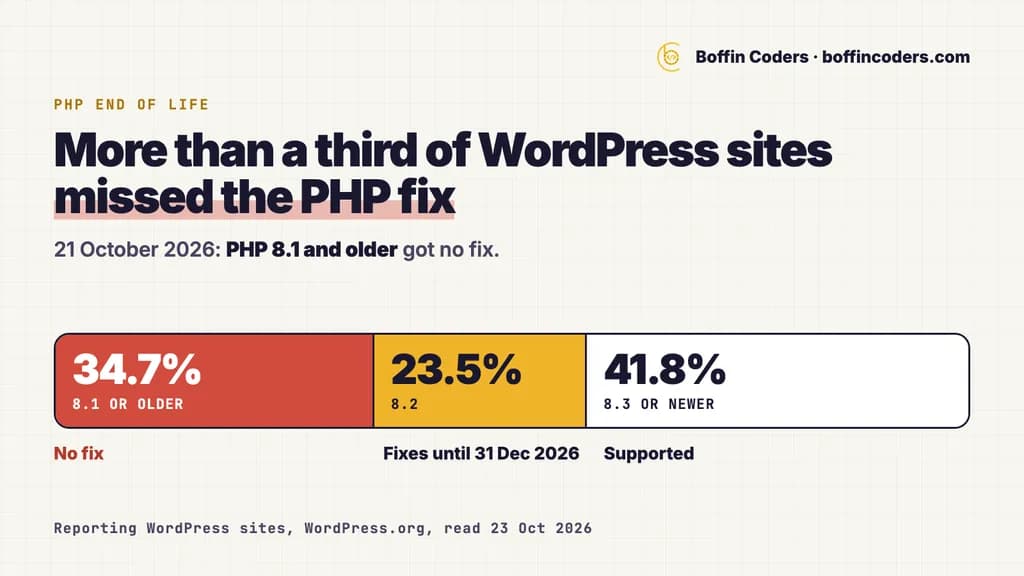
PHP end of life is the date after which a PHP version gets no more security fixes from the PHP project. In October 2026 four versions are still supported: 8.2, 8.3, 8.4 and 8.5. PHP 8.1 reached end of life on 31 December 2025, and 8.2 follows on 31 December 2026. So when the PHP project fixed two critical flaws on 21 October 2026, sites on 8.1 or older got nothing. If your site runs one of those versions, it stays exposed until someone upgrades it.
More than a third of the WordPress sites that report their PHP version missed that fix. The site still loads, the plugins still work and nothing on the screen looks wrong. That is exactly why so many stay on old versions for years.
Which PHP versions are end of life?
The PHP project gives each version about two years of active support, with bug and security fixes. Then come about two years of security fixes only. After that the version is end of life, and nothing found in it gets fixed. The supported versions page on php.net puts it plainly: users of an end-of-life release "may be exposed to unpatched security vulnerabilities".
PHP version | Security fixes | Status in October 2026 |
|---|---|---|
7.4 | Ended 28 November 2022 | End of life |
8.0 | Ended 26 November 2023 | End of life |
8.1 | Ended 31 December 2025 | End of life |
8.2 | Until 31 December 2026 | Security fixes only |
8.3 | Until 31 December 2027 | Security fixes only |
8.4 | Until 31 December 2028 | Active support until 31 December 2026 |
8.5 | Until 31 December 2029 | Active support until 31 December 2027 |
You can check the dates yourself on the PHP supported versions page. The version your site runs decides how long you have.
PHP 8.1 end of life: what changed on 31 December 2025
PHP 8.1 end of life came on 31 December 2025. Its last release was 8.1.34. Code still runs on it and most sites on 8.1 look normal. What changed is that nobody at the PHP project fixes new flaws in it any more. Every flaw found after that date stays open on every server that still runs 8.1.
PHP 8.2 end of life is 31 December 2026
PHP 8.2 has had security fixes only since its active support ended on 31 December 2024. PHP 8.2 end of life is 31 December 2026, and then those fixes stop too. A site on 8.2 did get the October fix, in 8.2.35. But if you are planning an upgrade from 8.2 anyway, go straight to 8.3 or newer and save yourself a second upgrade next year.
What did the PHP security release of 21 October 2026 fix?
On 21 October 2026 the PHP project released 8.5.12, 8.4.27, 8.3.36 and 8.2.35. The PHP Foundation says they fix two critical vulnerabilities in memory management and error handling, parts of PHP that nearly every request touches. Under the right conditions, both let an attacker who is not logged in run code on the server.
The detail that matters for site owners: on Apache with mod_php, one of the two can be triggered before any of your site's own code runs. A careful choice of plugins does not protect you, because the flaw sits in PHP itself, underneath WordPress and every plugin. The flaws are rated 9.2 out of 10 on the standard severity scale.
The release came a day earlier than planned, because the vulnerability identifiers leaked online on 20 October. Versions 8.1 and older got no release at all. They are end of life, so the fix was never going to reach them from the PHP project.
How many websites still run an unsupported PHP version?
WordPress publishes a live count of the PHP versions its sites report, which makes it the best public picture of the problem. We read WordPress.org's public count on 23 October 2026. Of the WordPress sites that report their PHP version, 34.7% run PHP 8.1 or older, so they received no fix on 21 October. Another 23.5% run 8.2, and 41.8% run 8.3 or newer.
PHP version | Share of reporting WordPress sites | Security fixes |
|---|---|---|
7.3 or older | 5.6% | Ended 6 December 2021 or earlier |
7.4 | 15.5% | Ended 28 November 2022 |
8.0 | 3.6% | Ended 26 November 2023 |
8.1 | 10.0% | Ended 31 December 2025 |
8.2 | 23.5% | Until 31 December 2026 |
8.3 or newer | 41.8% | Until 31 December 2027 or later |
PHP 7.4 is the biggest single group on an unsupported version: 15.5% of reporting sites, almost four years after its last fix. If nothing moves before the end of the year, the 23.5% on 8.2 join them, and well over half of these sites will run a PHP version with no fixes.
WordPress itself recommends PHP 8.3 or greater. It still runs on PHP 7.4 in older set-ups, and its own requirements page says those older versions have reached end of life and may expose your site to security vulnerabilities. A site can run every plugin perfectly and still sit on a version that nobody patches.
How do you check your WordPress PHP version?
Checking your WordPress PHP version needs no technical access:
- Open Site Health. In the WordPress dashboard, go to
Tools > Site Healthand choose theInfotab. - Expand the Server section. Scroll down to the line
PHP version. - Compare it with the first table. On 8.3 or newer you have time. On 8.2, plan the move before 31 December 2026. On 8.1 or older, plan it now.
Site Health may already be warning you with "Your site is running an outdated version of PHP, which requires an update". Many owners dismiss that message because the site works. The October flaws are the reason not to.
If your site is not WordPress, your hosting panel shows the PHP version set for each site. With shell access you can also run:
1php -vThe command line can report a different version from the one your website uses, because one server can run several versions side by side. The setting in your hosting panel, or a written answer from your host, is the check to trust.
What breaks when you upgrade PHP?
Most sites move up a version without any visible change. Trouble comes from code written for old versions, usually an abandoned plugin, an old theme or custom code nobody has touched for years. The migration guides on php.net list what changed between versions. Four of those changes break old code:
- PHP 8.0 removed
create_function()andeach(). A plugin or theme that still calls either one stops with a fatal error. - PHP 8.0 changed how numbers compare with text that is not a number, so
0 == "foo"is now false where it used to be true. A check built on the old behaviour can give a different answer without any error message. - PHP 8.0 made
matcha reserved word, so code that used it as a name stops working. - PHP 8.2 deprecates dynamic properties unless a class opts in with
#[\AllowDynamicProperties]. That is a warning, not a failure, but it marks code to fix before a later version removes the feature.
A site moving from 7.4 to 8.3 crosses all of these in one step. That is why a jump of several versions needs a test copy first.
How do you upgrade PHP safely?
- Take a full backup of the files and the database, and confirm that your host can switch the PHP version back if you need it.
- Update WordPress, every theme and every plugin to their newest versions before you change PHP.
- Make a staging copy of the site and run a PHP compatibility scan on it. WordPress suggests a compatibility checker plugin, and warns that such tools can miss problems or flag false ones.
- Switch the staging copy first. Open your key pages, send a test through every form, run a test order if you sell online, and read the error log.
- Replace what fails. If a plugin breaks and its author does not answer, WordPress's own advice is to find a plugin with similar features.
- Switch the live site at a quiet hour, check the same pages again and keep the backup for a few days.
Which PHP version should you move to?
Move to 8.3 or newer. WordPress recommends 8.3 or greater, and rated 8.3 fully compatible from WordPress 6.8. PHP 8.3 gets security fixes until 31 December 2027, 8.4 until 31 December 2028 and 8.5 until 31 December 2029. If your plugins are ready for it, 8.4 buys you a year before the next forced move. Newer PHP versions also run faster, which makes the upgrade one of the cheapest ways to speed up a WordPress site.
What should you ask your host, and when do you need a developer?
On most hosting plans the host installs PHP and you pick the version, or the host changes it on request. Five questions get you a clear answer in one email:
- Which PHP versions can my site use, and which one does it use today?
- Is my site's PHP on the 21 October 2026 release (8.2.35, 8.3.36, 8.4.27 or 8.5.12) or newer?
- If my site is on 8.1 or older, do you backport security fixes to that version, and can you confirm it in writing?
- Can I switch the version for this site myself, and switch it back if something breaks?
- Do you offer a staging copy, so I can test the new version before the live site moves?
The third question matters because some hosts run PHP from an operating system vendor or a paid long-term support service, and those received the October patch ahead of the release so they could ship it. If your host cannot say yes in writing, assume your old version is unpatched.
You need a developer when the compatibility scan flags your theme or a custom plugin, when the site breaks on staging and the plugin has no one maintaining it, or when the site is custom PHP rather than WordPress. For a WordPress site you can bring in WordPress developers in India by the hour, at US$12-25 an hour, to fix the code and run the switch on staging. If your site is custom PHP on an old version and the upgrade means rewriting parts of it, our legacy application modernization services cover that rewrite, with the scope agreed before work starts and the invoice after you have seen the work.
Keep reading
Santosh K Sharma
WordPress and Shopify Developer
Santosh K Sharma builds and maintains WordPress and Shopify sites, from theme and plugin work to store migrations and performance fixes. Santosh K Sharma writes about keeping client sites fast, current and easy to manage.
Frequently asked questions
PHP end of life means the PHP project no longer fixes anything in that version, security flaws included. Your site keeps running, but every flaw found after that date stays open on each server that still runs the version. php.net lists PHP 8.1 and older as end of life, and PHP 8.2 reaches end of life on 31 December 2026.
Not answered here?
Need this built?
We build websites and apps for businesses, and work behind digital agencies as their development team. Tell us where things stand on a 20-minute call.