Flutter Offline-First Uploads: Retries, Backoff and Recovery
- October 28, 2026
- 12 min read
Flutter and Dart Developer
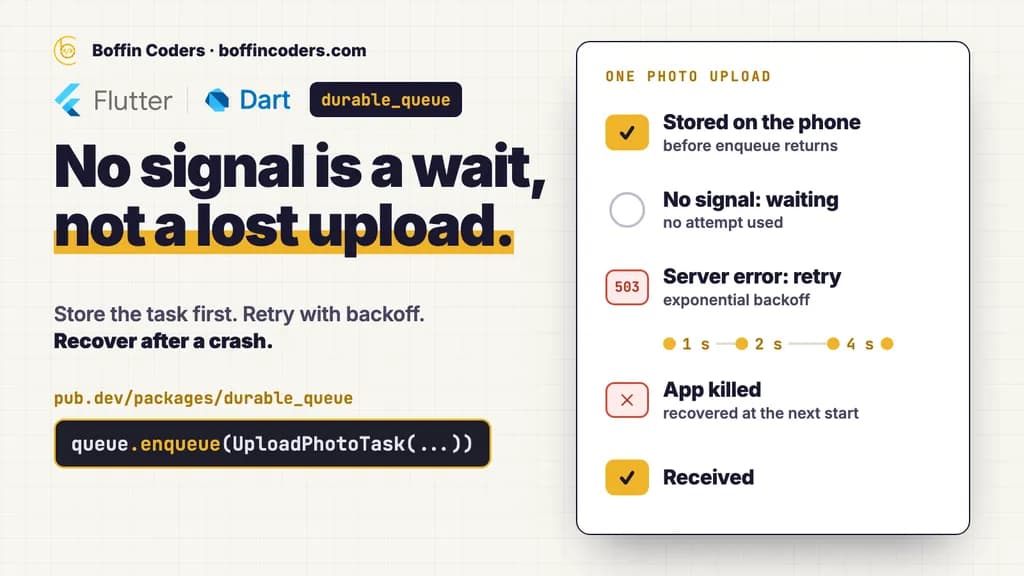
Flutter offline-first uploads work when the upload is saved on the phone as data before anything goes over the network. A queue then sends it when there is a connection, retries failures with exponential backoff, and picks up unfinished work after a crash or a restart. A try/catch around the request cannot do this, because the work is gone once the request fails and the app closes. Below is the pattern, with code from durable_queue, the open-source Dart package we maintain for it.
durable_queue is published on pub.dev by boffincoders.com under the MIT licence, with its code on GitHub. On 28 Oct 2026 its version 0.5.6 held 160 of 160 pub points, pub.dev's own quality score, and had 1,021 downloads in the previous 30 days. It supports all six Flutter platforms: Android, iOS, web, Windows, macOS and Linux.
Prefer to watch? The durable_queue walkthrough on YouTube follows one photo upload through no signal, a server error, a double tap and a crash, and ends on the recordings from real phones.
Why do uploads fail in a Flutter app?
Uploads in a Flutter app fail for ordinary reasons: the network drops, the server answers 503, or the user closes the app in the middle of the request. Catching the error handles one failure and leaves five questions open. Boffin Coders built durable_queue around those five, and its README lists them as the decisions a try/catch leaves to you:
- Where the work lives until it can be retried, and whether it survives a restart.
- How long to wait between attempts, and when to give up.
- How to stop a double tap from uploading the same photo twice.
- How many uploads may run at once, and which ones go first.
- What happens to the next step, such as telling the server about the photo, when the upload before it fails.
A retry loop inside the request answers the second question and nothing else. The other four need the work to exist somewhere other than a function that is running, because a function that is running stops when the app does.
What does Flutter offline-first mean for uploads?
Flutter offline-first means the phone, not the server, is where work starts and waits. For an upload, the tap writes a task to local storage and the user moves on. Boffin Coders builds this as a queue: each task is a type name and a JSON payload, stored before enqueue returns, and a worker sends it when the conditions allow. The user never waits on the network to finish an action.
In an offline first app, three rules keep that promise:
- The task is data, not a closure. The queue stores
toJson()and rebuilds the task with a decoder registered for its type, so the task can be rebuilt after a restart. Store the file's path, never its bytes. - Storage comes first. With the SQLite adapter,
durable_queue_sqlite, the write is a committed transaction (write-ahead log,synchronous = FULL), so it survives the app being killed or the phone losing power straight after. - Every task runs at least once, until it succeeds or its attempts run out. It is not exactly once: if the app dies after the server stored the photo but before the queue saved the result, the upload runs again. The idempotency key further down is how the server spots that repeat.
How do you set up an upload queue in Flutter?
An upload queue in Flutter needs three parts: a task class that turns into JSON and back, a handler registered for its type, and a call to enqueue with a retry policy. This is the quick start from the durable_queue README, the package Boffin Coders publishes on pub.dev. photoApi.upload stands for your own upload code.
1import 'package:durable_queue/durable_queue.dart';
2
3final class UploadPhotoTask extends DurableTask {
4 UploadPhotoTask({required this.path});
5
6 final String path;
7
8
9 String get type => 'upload_photo';
10
11
12 Map<String, dynamic> toJson() => {'path': path};
13
14 static UploadPhotoTask fromJson(Map<String, dynamic> json) =>
15 UploadPhotoTask(path: json['path'] as String);
16}
17
18Future<void> main() async {
19 final queue = DurableQueue(
20 storage: MemoryQueueStorage(), // use a persistent adapter in an app
21 maxConcurrentTasks: 3,
22 );
23
24 queue.register<UploadPhotoTask>(
25 type: 'upload_photo',
26 decoder: UploadPhotoTask.fromJson,
27 handler: (task, context) async {
28 await photoApi.upload(task.path); // your code
29 },
30 );
31
32 await queue.start();
33
34 await queue.enqueue(
35 UploadPhotoTask(path: '/storage/avatar.jpg'),
36 retryPolicy: RetryPolicy.exponential(
37 maxAttempts: 5,
38 initialDelay: Duration(seconds: 1),
39 ),
40 );
41}enqueue returns once the task is stored, and the worker runs it in the background of your process and retries it if the handler throws. maxConcurrentTasks: 3 lets three uploads run at once, and the rest wait for a free slot. MemoryQueueStorage is for tests. In an app, use a storage that survives a restart, such as durable_queue_sqlite on Android, iOS, macOS, Windows, Linux and the web. durable_queue_flutter then starts the queue with the app, pauses it while the app is in the background and resumes it in the foreground.
How should retries and exponential backoff work?
Retries should wait longer after each failure, stop after a set number of attempts, and skip errors that will never succeed. With exponential backoff the wait doubles each time: five attempts starting at one second wait 1, 2, 4 and then 8 seconds, because the first run counts as an attempt. In durable_queue, which Boffin Coders maintains, the full policy reads like this.
1RetryPolicy.exponential(
2  maxAttempts: 5,
3  initialDelay: Duration(seconds: 1),
4  maxDelay: Duration(minutes: 1),
5  jitter: true,
6);
maxDelay caps any wait at one minute. With jitter: true each delay moves by up to 20 percent either way (the default jitterFactor of 0.2), so a crowd of phones that lost signal together does not retry in the same second. Jitter is off unless you turn it on. Two more settings decide what a retry is for:
retryIfpicks which errors are retried. A dropped connection is worth another try. A file the server rejected is not, and it should fail at once.retryDelayreplaces the policy's wait when the error says how long to wait, such as an HTTP 429 or 503 with aRetry-Afterheader. The attempt still counts towardsmaxAttempts.
If your app uses Dio, durable_queue_dio has these rules ready for HTTP errors, including Retry-After.
How does Flutter offline sync wait for the network?
Flutter offline sync should wait for the network without counting the wait as a failure. In durable_queue, the package Boffin Coders maintains, that wait is a gate. A task type that requires the network is held while the gate is closed, uses no attempts while it waits, and starts as soon as the gate opens. Other work keeps running meanwhile.
1final network = ManualQueueGate();
2queue.addGate('network', network); // add gates before registering types that need them
3
4queue.register<UploadPhotoTask>(
5  type: 'upload_photo',
6  decoder: UploadPhotoTask.fromJson,
7  handler: upload,
8  requires: {'network'},
9  // A connection error means "offline", not "this upload failed".
10  deferOn: (error, stackTrace) =>
11      error is SocketException ? 'network' : null,
12);
A phone that reports Wi-Fi is not always online, for example behind a hotel or airport sign-in page. deferOn covers that case: the request fails with a connection error, the task waits instead of failing, the attempt does not count, and the gate checks again. The task tries again after gateErrorDelay, 30 seconds by default, or as soon as the gate closes and reopens. On Flutter, durable_queue_connectivity provides this gate ready-made on connectivity_plus, with an optional check against your own server.
How do you stop a double tap from uploading twice?
Stop a double tap with two keys that do different jobs. A deduplication key makes a second enqueue return the first task's id while that task is still pending, waiting, running or scheduled for a retry. An idempotency key travels with the request, so the server can drop a repeat that slipped through after a crash. durable_queue, which Boffin Coders publishes, takes both on enqueue, because each covers a case the other misses.
1await queue.enqueue(
2  SyncUserTask(userId: '123'),
3  deduplicationKey: 'sync-user:123',
4  idempotencyKey: '123',
5);
A completed, failed or cancelled task does not block its deduplication key, so the user can send the same file again later on purpose. The idempotency key is stored with the task and handed to your handler, which decides how to send it. durable_queue_dio sends it in the Idempotency-Key header, the same value on every attempt. Your server has to honour that header, so check it does before you rely on it.
Can a Flutter background upload continue after the app closes?
A Flutter background upload continues after the app closes only when the operating system runs it, because the queue runs inside your app's process and does not wake a closed app. durable_queue, maintained by Boffin Coders, can hand the upload to the system through durable_queue_transfer: a background URLSession on iOS, WorkManager or a user-initiated data transfer job on Android. The queue keeps the bookkeeping, and the user can leave.
A handed-off task keeps waiting across restarts until the system reports the result, and it does not hold a concurrency slot meanwhile. Work the app was running itself is different. When the app is killed in the middle of it, the next start recovers each task left running: that attempt counts, then the retry policy schedules another try or fails the task. If the user force-quits the app, the system may stop its background work until the app is opened again. Nothing is lost then either: the work is restarted or retried at that point.
What the kill tests show
The package's own tests kill the demo app with six uploads in flight, on an Android 14 emulator (API 34) and on an iOS 26.5 simulator (iPhone 17 Pro). A run passes only if every photo is uploaded and the step after each upload runs exactly once. On both, all six uploads completed and each follow-up ran exactly once. On Android, the uploads that were cut off were sent a second time after the network returned. These are emulators and simulators, and real phones can differ in how hard they stop apps in the background, as the package's guarantees page says. The README also links two recordings on real phones, 78 seconds on an iPhone and 103 seconds on Android, in which the app goes to the home screen and every upload still reaches the server.
Flutter Workmanager and the queue
To run the queue itself while the app is away, durable_queue_workmanager runs it from Flutter Workmanager background jobs. The app and the job open the same storage, and a small lease makes them take turns, so the queue never runs twice at once. The timing is the operating system's: Android runs such jobs at most every 15 minutes, for up to about 10 minutes, and iOS decides by itself when, giving each about 30 seconds.
How fast is a durable upload queue?
A durable upload queue costs a fraction of a millisecond per task. In durable_queue's benchmark run on GitHub's macOS and Ubuntu runners, storing one task in SQLite took a median of 157 microseconds on macOS and 224 on Ubuntu. Recovering 1,000 interrupted tasks out of 10,000 took 581 and 266 milliseconds. Boffin Coders publishes the full results with the package, from benchmark run 40456305352.
Storage | Store one task, macOS | Store one task, Ubuntu | Run 5,000 tasks, macOS | Run 5,000 tasks, Ubuntu | Recover 1,000, macOS | Recover 1,000, Ubuntu |
|---|---|---|---|---|---|---|
Memory | 9.00 µs | 27 µs | 121 ms | 75.5 ms | 6.01 ms | 9.86 ms |
SQLite | 157 µs | 224 µs | 2.90 s | 3.14 s | 581 ms | 266 ms |
SQLite + encryption | 183 µs | 249 µs | 3.29 s | 3.47 s | 463 ms | 325 ms |
Hive | 215 µs | 307 µs | 2.40 s | 2.95 s | 254 ms | 289 ms |
Hive (no flush) | 63 µs | 73 µs | 1.18 s | 831 ms | 73.7 ms | 71.0 ms |
How it was measured: Dart 3.13.7 with dart run, on a macOS runner with 3 ARM64 processors and an Ubuntu runner with 4 x64 processors, 5 rounds each, median round shown. The handlers do nothing, so the numbers are the queue's and the storage's own cost. With real work, the upload sets the pace, not the queue. Both runners are virtual machines, Flutter release builds are compiled ahead of time, and numbers vary between machines and runs.
Two results matter when you choose storage. Hive without flushing stores a task about four times faster than Hive with it, but its last writes can be lost if the phone loses power. And with 100,000 finished tasks kept, SQLite still opened in about 1 to 2 milliseconds, while Hive took about 1.5 seconds, because Hive reads every task when it opens. Purge finished tasks you no longer need, or use SQLite for very large queues.
When is a plain try/catch enough?
A plain try/catch is enough for work that is fine to lose, such as refreshing a feed the user can pull again. Use a durable queue when work must outlive a failed request or an app restart, and the app may finish it the next time it runs. Use the operating system's scheduler when work must run while the app is closed. The durable_queue README, which Boffin Coders keeps, compares the three.
Manual try/catch and retry loop | durable_queue | Operating system scheduler | |
|---|---|---|---|
Work survives an app restart | No | Yes, with a persistent storage adapter | Yes |
Runs while the app is closed | No | No | Yes, within the system's limits |
Retry with backoff and a retry filter | You write it | Built in | Varies by platform |
Deduplication and idempotency keys | You write it | Built in | Varies by platform |
Waiting for the network | You write it | Built in | Network constraints only |
Testable without real waiting | Depends on your code | Yes, with a fake clock | Limited |
The two can be combined: the system's background job starts the queue, which is what durable_queue_workmanager does.
If your app has uploads, forms or messages that must not be lost, that is part of what our mobile app development services cover, and you can hire Flutter developers from the team that maintains durable_queue. Once the app is live, mobile app maintenance keeps it working through each new Flutter and store release.
Keep reading
Gursewak Singh
Flutter and Dart Developer
Gursewak Singh builds Flutter apps and Dart packages at Boffin Coders, including durable_queue, the open-source queue on pub.dev that keeps uploads and form sends from being lost when the signal drops. Gursewak Singh writes about offline-first apps and mobile work that survives bad networks.
Frequently asked questions
durable_queue is free to use in a commercial app. It is published under the MIT licence, which allows commercial use, changes and redistribution as long as the copyright and licence notice stay with the code. The core package and its integration packages come from one public repository, and you add only the storage, network and upload parts your app uses.
Not answered here?
Need this built?
We build websites and apps for businesses, and work behind digital agencies as their development team. Tell us where things stand on a 20-minute call.