What Do Mobile App Maintenance Services Include, and What Do They Cost?
- October 24, 2026
- 8 min read

Flutter Developer
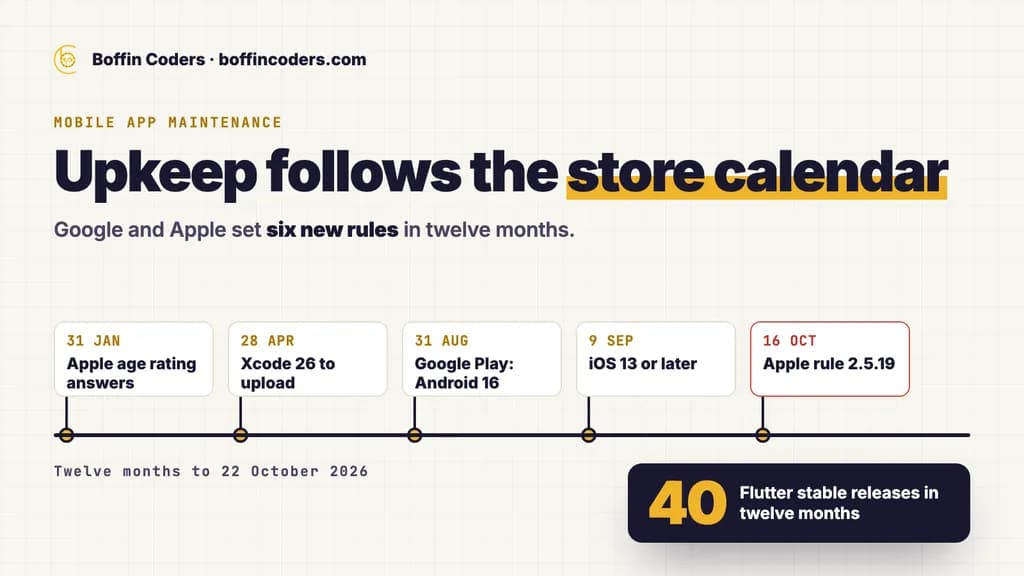
Mobile app maintenance services are the ongoing work that keeps a live app installable, secure and accepted by the App Store and Google Play: platform and framework updates, store rule changes, security patches, crash fixes and upkeep of the backend the app talks to. The yearly cost is the hours that work takes, multiplied by your developer's rate. Those hours depend less on what the app cost to build and more on how often Apple, Google and your framework change. In the last twelve months they changed often.
What do mobile app maintenance services include?
Most of the work keeps a finished app from falling behind. New features are a separate budget. A maintenance agreement worth signing covers six kinds of work.
Work | What starts it | What happens when nobody does it |
|---|---|---|
Platform and SDK updates | A new Android API level, or a new Xcode and iOS SDK | The stores refuse your next update, or show the app to fewer people |
Store rule changes | A new review guideline or a new form in the developer console | A rejected update, or an app pulled from the store |
Framework and package updates | New Flutter or React Native versions, and the packages built on them | Old packages stop building, so a small fix turns into an upgrade project |
Security fixes | A flaw in a package, an expired certificate, a leaked key | Customer data at risk, and a fix that has to happen in a hurry |
Crash and bug fixes | Reports from users and from crash monitoring | Bad reviews, and users who leave without telling you why |
Backend and third-party services | Changes to payment, maps, login or push notification services | Features that stop working while the app itself looks fine |
Small improvements, such as a new field on a form or a clearer error message, often sit in the same agreement. Keep them apart in the budget. Upkeep is the cost of keeping what you have. Improvements are choices you can delay.
How often do Apple, Google and your framework change the rules?
In the twelve months to 22 October 2026, Google and Apple set six new rules between them, and both main cross-platform frameworks shipped new versions every few months. Each row comes from the platform's own pages.
Source | What changed | Date |
|---|---|---|
Google Play | New apps and app updates must target Android 16 (API level 36) | 31 August 2026, with an extension to 1 November 2026 on request |
Google Play | Existing apps must target Android 15 (API level 35) or higher to stay available to new users on newer Android devices | 31 August 2026 |
Apple | Apps uploaded to App Store Connect must be built with Xcode 26 and the iOS 26 SDK | 28 April 2026 |
Apple | iOS and iPadOS apps must target iOS 13 or later | 9 September 2026 |
Apple | Answers to the new age rating questions, to avoid an interruption when you submit updates | 31 January 2026 |
Apple | Guideline 2.5.19: an app must not add features after review that were not in the version Apple reviewed | 16 October 2026 |
Flutter | 40 stable releases, four of them new versions | October 2025 to October 2026 |
React Native | Six new versions, 0.83 to 0.88 | December 2025 to October 2026 |
We counted Flutter's own release index for the twelve months to 21 October 2026: 40 stable releases, four new versions (3.38, 3.41, 3.44 and 3.47) and 36 patches. On the React Native side, its release page already listed version 0.84, released in February 2026, as unsupported by October.
What happens to an app nobody updates?
An app nobody updates fades from the stores over months. On Google Play, an existing app that targets an older Android version than the rule asks for is only offered to devices running that version or an older one. Every new phone your customers buy is a phone that cannot find it.
On the App Store, the cost arrives on the day you need a fix. Every upload must be built with the current Xcode and SDK. If the app was last built two years ago, an urgent one-line fix first needs the project and its packages brought up to date. Only then can the fix ship.
Why do framework releases matter to an owner?
Your developer does not need every patch the day it ships. Packages, though, follow the framework. When a payment or maps package drops support for an old version, your app cannot take that package's security fix without an upgrade first. Small, regular upgrades cost less than one large jump across several versions.
What does mobile app maintenance cost each year?
The cost guides that app agencies publish usually put yearly maintenance at 15 to 20 percent of what the app cost to build. It is an easy number to remember and a weak way to budget. A cheap app built on old packages can cost more to keep alive than an expensive one built cleanly. The work comes from the platforms' calendar and the state of the code. The original invoice says little about either.
A better budget counts the work. Mobile work at Boffin Coders is billed at US$20-38 an hour, depending on seniority and the stack, and a dedicated mobile developer starts at US$3,500 a month. Whatever rate your developer charges, the method below gives you a number you can check.
A worked budget you can repeat
- List the dated changes. Start from the table above. Google Play's own table shows a new Android target level each August, in 2025 and again in 2026, and Apple's list shows a new Xcode rule in April of 2023, 2024 and 2026.
- Add your framework's upgrades. Count the new versions in a year (four for Flutter and six for React Native in the last twelve months) and decide how many you will take.
- Ask your developer for hours per item. A good developer can estimate each item after one look at the code. Write the estimates down.
- Add a monthly allowance. Crash fixes, monitoring and small support questions need a fixed number of hours each month.
- Multiply by the rate. Hours times rate is your yearly upkeep. Keep improvements on a separate line.
If the estimate for one upgrade looks large, ask why. The answer usually tells you how far behind the app already is.
Should maintenance be a monthly retainer or paid by the hour?
It depends on how often the app changes. An app with a release every few months suits hours billed as you use them, with the dated changes planned ahead. An app that ships every week, takes payments or runs part of the business every day suits a fixed monthly arrangement, so that someone knows the code and answers quickly.
Whichever you choose, check three things in the terms:
- Response time for a crash. How fast someone starts on a crash that stops users, and how fast on a minor bug.
- What counts as upkeep. Platform updates and security fixes belong inside the agreement. New screens do not.
- How you leave. A minimum term mostly protects the supplier. A month's notice either way is fair to both sides.
Boffin Coders bills mobile work for the hours used, invoices after you see the work and asks for no minimum term on a dedicated developer.
What should a mobile app maintenance agreement cover?
Before you sign, make sure the agreement answers these questions in writing:
- Which store deadlines and framework upgrades are planned for the next twelve months, and when.
- How crashes are monitored, and who hears about them first.
- What you receive each month: what shipped, with a link to each change, and what is planned next.
- Where the source code lives, and whether you can read it at any time.
- Who pays for third-party services such as maps, push notifications and crash monitoring.
Who should hold the store accounts and signing keys?
You should. The Google Play developer account, the Apple developer account, the signing keys and the backend's cloud accounts belong to the business, with your developer added as a user. If a supplier holds them, changing supplier becomes a rescue project. The same goes for the domain and the hosting, and who should own your software accounts walks through each one.
When is it time to rebuild instead of maintaining?
Maintenance stops making sense when each store deadline turns into a project of its own. Three signs point that way. The framework is several major versions behind, so every fix starts with an upgrade. Packages the app depends on have been abandoned by their authors, so there is nothing left to upgrade to. And nobody still working on the app understands how it was built.
At that point, compare a year of upkeep with the cost of a rebuild on a current stack. A rebuild in Flutter gives you one codebase for iOS and Android, so each new store rule is handled once. If you want one developer who knows the app and stays with it, you can hire Flutter app developers in India by the month and keep the code in your own accounts.
If you would rather hand the whole job to one team, mobile app development and upkeep covers the work above, planned against the store calendar and invoiced after you see it.
Keep reading
Varinder Singh
Flutter Developer
Varinder Singh builds cross-platform mobile apps in Flutter for iOS and Android, from first screen to store release. Varinder writes about shipping Flutter apps that pass store review and stay easy to maintain.
Frequently asked questions
Mobile app maintenance services include platform and SDK updates for new Android and iOS rules, store rule changes, framework and package upgrades, security fixes, crash and bug fixes, and upkeep of the backend and third-party services the app uses. Small improvements often sit in the same agreement. Keep them on a separate budget line, because you can delay them.
Not answered here?
Need this built?
We build websites and apps for businesses, and work behind digital agencies as their development team. Tell us where things stand on a 20-minute call.