Which Website Animations Suit Your Site, and Which Ones Cost You Clients?
- October 22, 2026
- 11 min read

WordPress and Shopify Developer
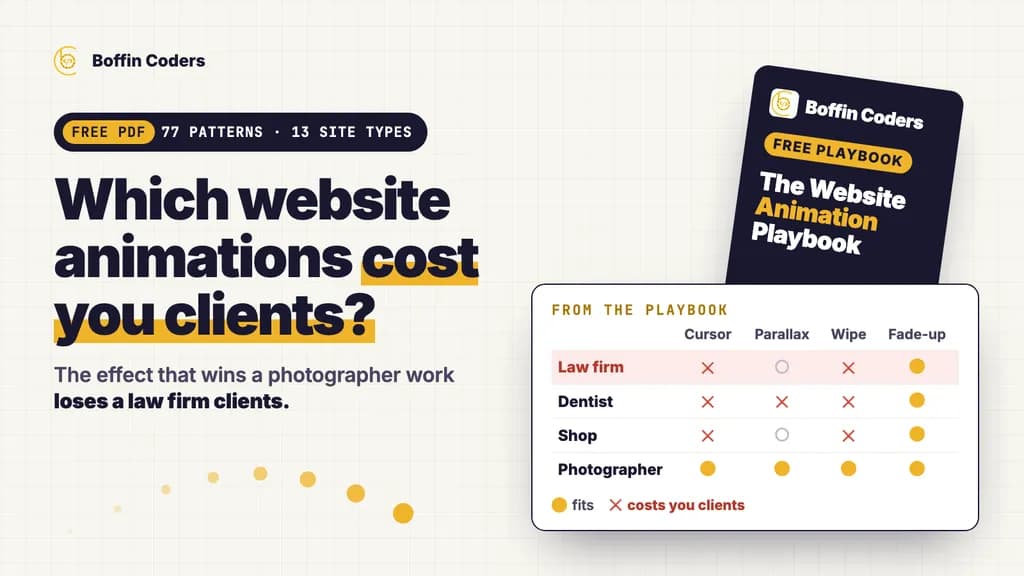
The website animations that suit your site depend on what kind of business it is. A law firm needs quiet motion that confirms and explains, such as sections that fade in once, tabs that slide and a form that ticks when it is sent. A photographer can afford image reveals, cursor previews and page transitions, because the work is the product. Choose motion by your website type first and by effect second, and give every animation one job: explain, guide, confirm, reassure or express.
Most lists of the best website animations are galleries of award winners. They are good for seeing what is possible and of little use when the site belongs to a dentist, an online shop or a SaaS product. This guide sorts 77 animation patterns by the job they do and by the kind of website they suit. It then shows how to build the common ones in Next.js with Motion, the library that was called Framer Motion. Owners can read the tables and skip the code. Developers and agencies will find the code along with the rules for performance and accessibility.
Free PDF, no email asked
The Website Animation Playbook, yours to keep
All 77 patterns in one file, each rated for 13 kinds of website. It saves to your device at once, with no form to fill in.
- 77 patterns in ten families: what each one does, how to build it and how heavy it is
- A motion budget for each of the 13 kinds of website
- Timings for every kind of motion, from a button press to a page transition
- The ten rules and a checklist to run before launch
PDF · 29 pages · 1.6 MB
What are the main types of website animations?
Every animation on a good website does one of five jobs, and naming the job is the quickest way to decide whether an effect belongs.
Job | What it does | Typical patterns |
|---|---|---|
Explain | Shows how something works or what changed | A process line that draws itself, a card that expands into detail, a chart that grows |
Guide | Moves the eye to what comes next | A section that fades up once, staggered cards, a reading progress bar |
Confirm | Answers a tap or a click | A button that presses, a success tick, an add-to-cart badge that bumps |
Reassure | Makes waiting clear | Skeleton screens, step progress in a long form, blurred previews that sharpen |
Express | Gives the brand a personality | Kinetic type, a custom cursor, a 3D hero, page transitions with a wipe |
The first four jobs belong on every website. The fifth, express, is where websites differ and where most mistakes happen. An effect that expresses a creative studio well looks out of place on an accountant's site, and it slows that site down for no gain.
By technique, website animations fall into ten families: text motion, scroll and section motion, layout and card motion, cursor effects, page transitions, micro interactions, loading states, data and proof, images and video, and ambient or 3D backgrounds. The sections below cover the families that matter most.
Website animation examples for each kind of site
Start from the motion budget your kind of website can carry. A budget counts the distinct patterns across the whole site, and a fade-up repeated on every page is still the same pattern.
Website type | Budget | Use | Avoid |
|---|---|---|---|
Professional services and B2B | Quiet, 2 to 4 | Fade-up once, staggered cards, count-up for real figures, tab underline | Custom cursors, kinetic type, preloaders, 3D |
Healthcare and wellness | Quiet, 2 to 3 | Gentle fades, accordion FAQ, booking steps, success tick | Parallax, fast or bouncy motion, loops |
Local trades and home services | Minimal, 1 to 3 | Tap feedback on the call button, before and after slider | Preloaders, page transitions, background video |
SaaS and software products | Expressive, 5 to 8 | Sticky product walkthrough, shared layout tabs, pricing toggle | Preloaders, fake dashboards |
E-commerce and retail | Medium | Add-to-cart confirmation, filter and reorder, skeletons, gallery zoom | Slow page transitions, cursor effects on product grids |
Restaurants, cafés and hotels | Medium | Photo reveals, slow zoom on hero photos, menu tabs, lightbox | Cursor effects, 3D, anything hiding opening hours |
Property and estate agents | Medium | Listing card that expands into the property, lightbox, map pins | Cursor trails, text scramble |
Education and online courses | Medium | Course progress, quiz feedback, diagrams that draw themselves | Loops beside lesson content |
Nonprofits and public services | Quiet, 2 to 4 | Count-up of real impact figures, story told by scroll | Flashy 3D, cursor effects |
Creative portfolios | Expressive, 5 to 8 | Image reveals, cursor-following previews, shared element transitions | Busy backgrounds behind the work |
Agencies and studios | Expressive, 6 to 10 | Kinetic type, magnetic buttons, page transitions, case studies told by scroll | Effects that hide what you do |
Launches, events and campaigns | Expressive, one page | Countdown, scroll-driven product reveal, one celebration on sign-up | Anything hiding the date, price or form |
Blogs, documentation and publishers | Minimal | Reading progress, copy-code confirmation, crossfade | Parallax, moving text, preloaders |
On a photographer's portfolio, a project list whose preview image follows the cursor and grows into the project page shows the work at its best. The same effect on a law firm's services list makes a buyer of legal advice wonder what else is for show. The law firm's best motion is a process diagram that draws itself as the visitor scrolls, because it explains how the firm works.
The free Website Animation Playbook holds the full matrix, with every pattern rated for all thirteen website types.
The full matrix
All 77 patterns, checked against your kind of site
The table above is the summary. The playbook marks every pattern as a fit, one to judge per project or one to avoid, for each of the 13 kinds of website.
- For each kind of website: its budget, what to use, what to use sparingly and what to avoid
- The signature pattern that suits each kind of site, and what to watch for
- Every pattern rated for all 13 kinds of website in one matrix
PDF · 29 pages · 1.6 MB
The best website animations, by the job they do
Scroll animation that runs once
The single most useful pattern for any website is the fade-up. A section fades in and rises 8 to 24 pixels the first time it enters view, then stays still. Cards in a row rise one after another with 40 to 80 milliseconds between them, capped at six to eight cards so the last one is not late. If a scroll animation replays every time the visitor scrolls back up, it turns into noise. Parallax, where layers move at different speeds, suits a hotel, a property development or a portfolio. It is also a known trigger for motion sickness, so it is the first thing to switch off for visitors who ask their device for less motion.
Micro interactions that confirm an action
Micro interactions are the small responses to a tap, a click or a typed answer. A button presses in, a field marks itself as correct, or a tick draws itself after a booking. Visitors rarely notice them until they are missing, and then a tap feels as if nothing happened. On a shop, the add-to-cart confirmation does more for the site than any other animation, because a badge that bumps and a short message stop people tapping twice.
Layout animation that shows what changed
When a filter changes, products slide to their new places instead of jumping. The underline glides to whichever tab is chosen, and an opened card grows its image into the detail view. These are the least noticed website animation examples and the most useful, because they keep visitors oriented in property listings, shops, galleries and dashboards.
Page transitions that remove the blank flash
A crossfade under 300 milliseconds suits almost any website. Shared element transitions, where a thumbnail grows into the next page's main image, suit shops, listings and portfolios. Curtain wipes and staggered blinds add time to every click, so they belong to agencies, portfolios and launches only.
Cursor animation, for desktop only
Custom cursors, magnetic buttons, cursor labels such as "View" or "Drag", spotlights that follow the pointer and image trails make a creative site memorable on a laptop. Phones and tablets have no cursor, so none of these may carry anything a visitor needs. Load them only where a mouse exists.
Text, ambient and 3D effects for pages that must impress
Kinetic typography, gradient text, gradient mesh backgrounds, particles, 3D heroes and WebGL distortion are the effects most animated websites are known for, and the most expensive to load. Keep them for pages whose job is to impress, such as a launch, an agency home page or a portfolio. Even there, show a still image first and load the scene after the page is usable.
How do you build website animations in Next.js with Framer Motion?
Framer Motion is now called Motion, and it is free and open source. Install the motion package and import from motion/react. Any file that imports from motion/react needs the "use client" line. So keep each page a server component, put the motion in a small wrapper and pass the server-rendered content in as children. The text then stays in the HTML that search engines and AI crawlers read.
The fade-up that runs once, as one component:
1'use client'
2import { motion } from 'motion/react'
3
4export function Reveal({ children }: { children: React.ReactNode }) {
5  return (
6    <motion.div
7      initial={{ opacity: 0, y: 16 }}
8      whileInView={{ opacity: 1, y: 0 }}
9      viewport={{ once: true, amount: 0.3 }}
10      transition={{ duration: 0.4, ease: 'easeOut' }}
11    >
12      {children}
13    </motion.div>
14  )
15}
One provider in the root layout makes the whole site respect reduced motion. It also keeps the download small, because LazyMotion loads only the animation features in use:
1'use client'
2import { LazyMotion, MotionConfig, domAnimation } from 'motion/react'
3
4export function MotionProvider({ children }: { children: React.ReactNode }) {
5  return (
6    <LazyMotion features={domAnimation} strict>
7      <MotionConfig reducedMotion="user">{children}</MotionConfig>
8    </LazyMotion>
9  )
10}
Inside that provider, components import m from motion/react-m and write <m.div> instead of <motion.div>.
Some website animations need no JavaScript at all. Hover states are CSS transitions, and a scroll animation can run on the browser's own scroll timeline, which Chrome, Edge and Safari support. Other browsers show the plain page:
1@media (prefers-reduced-motion: no-preference) {
2  @supports (animation-timeline: view()) {
3    .reveal {
4      animation: reveal linear both;
5      animation-timeline: view();
6      animation-range: entry 0% entry 60%;
7    }
8  }
9}
10
11@keyframes reveal {
12  from { opacity: 0; transform: translateY(16px); }
13  to   { opacity: 1; transform: none; }
14}
Use Motion for the work CSS cannot do: exit animations, gestures and drag, layout changes, shared elements and anything driven by state. That is most of what Next.js animation needs, and the Framer Motion examples above handle the patterns almost every site uses. Load heavy pieces such as 3D scenes, animation players and maps through next/dynamic after the first view, behind a still image of the same size.
Next.js page transitions
Current versions of Next.js support React's ViewTransition component in the App Router with no extra configuration. It gives crossfades and shared elements through the browser's View Transitions API, which every major browser now supports within a page. A browser without the API simply changes page. If your site is still on Next.js 15, upgrade Next.js to version 16 first. An entry animation in template.tsx also works. A Framer Motion page transition that animates the old page out with AnimatePresence has no documented pattern between App Router routes, so build exits on view transitions instead.
If you would rather have the build done for you, our Next.js developers work to these rules.
Do animations slow a website down?
They can, and that cost decides which effects are worth it. Three rules keep animation cheap.
- Animate transform and opacity only. Moving, scaling, rotating and fading are cheap for the browser. Animating width, height, top or margin makes it lay out the page again on every frame.
- Show the first screen at once. The main heading, the first paragraph and the main button should not fade in. Hiding them delays Largest Contentful Paint, the moment Google counts the page as loaded, which should come within 2.5 seconds.
- Keep the main thread free. A tap must get a visible answer quickly. Google's Interaction to Next Paint measure wants that answer within 200 milliseconds, and a page busy running effects misses it.
Animation that moves elements with transform causes no layout shift. On this site, sections fade up once and cards rise once with a capped stagger, while nothing moves on the main heading, the lead or the buttons. When we ran Lighthouse on four of those pages on 15 October 2026, layout shift measured 0 on every one.
How do you keep website animations accessible?
People can ask their phone or computer for less motion, and a website should respect that request. With Motion, MotionConfig reducedMotion="user" does most of the work. In CSS, wrap movement in prefers-reduced-motion: no-preference. Keep simple fades and drop movement, parallax, zooms and loops.
The accessibility guidelines most websites are measured against add three more rules. Anything that moves on its own for more than five seconds, such as a logo marquee, a carousel or a background loop, needs a way to pause it. Nothing may flash more than three times a second. Animation triggered by a visitor's own action should be possible to switch off. Motion that carries information also needs words, so an error field that shakes still needs an error message.
The website animations checklist
Before a site goes live, check each point:
- Every animation has a job: explain, guide, confirm, reassure or express
- The main heading, first paragraph and main button appear at once
- Only transform and opacity are animated, apart from layout animations
- Section reveals run once
- Reduced motion settings remove movement, parallax, loops and zooms
- Anything moving for more than five seconds can be paused
- Cursor and hover effects appear only where a mouse exists, with tap equivalents
- Heavy scenes, players and maps load after the first view
- Layout shift stays at 0 with every animation running
- The page has been tried on a mid-range Android phone on mobile data
If a new site or a redesign is coming, plan the motion as part of the design. Our UI and UX design team decides it together with the layout, and agencies can hand us the whole build under their own brand through white-label website development.
Before your next build
Keep the rules beside the design
One file for owners, designers, developers and agencies, so the motion is decided with the layout and never added at the end.
- The ten rules that keep a site fast and easy to use
- The timings and the speed rules from this guide, in one place
- The launch checklist, ready to share with your team or your client
PDF · 29 pages · 1.6 MB
Keep reading
Santosh K Sharma
WordPress and Shopify Developer
Santosh K Sharma builds and maintains WordPress and Shopify sites, from theme and plugin work to store migrations and performance fixes. Santosh K Sharma writes about keeping client sites fast, current and easy to manage.
Frequently asked questions
There is no single name. Designers say motion design or interaction design, and developers say web animation or UI animation. Sites built around animation are often called interactive or immersive websites, small responses to clicks are micro interactions, and pages that tell a story as you scroll are called scrollytelling. Whatever you call it, check that each animation does a job for the visitor.
Not answered here?
Need this built?
Hire dedicated Next.js developers in India
US$18-35 an hour, or from US$3,000 a month for a dedicated developer. Shortlisted profiles within two working days; a developer you choose starts within one to two weeks. They work in your tools, under your management.
How hiring Next.js developers in India worksNeed this built?
We build websites and apps for businesses, and work behind digital agencies as their development team. Tell us where things stand on a 20-minute call.