What Is Shopify Hydrogen Now, and Can You Add It to a Next.js Site?
- October 19, 2026
- 10 min read
Founder, Boffin Coders
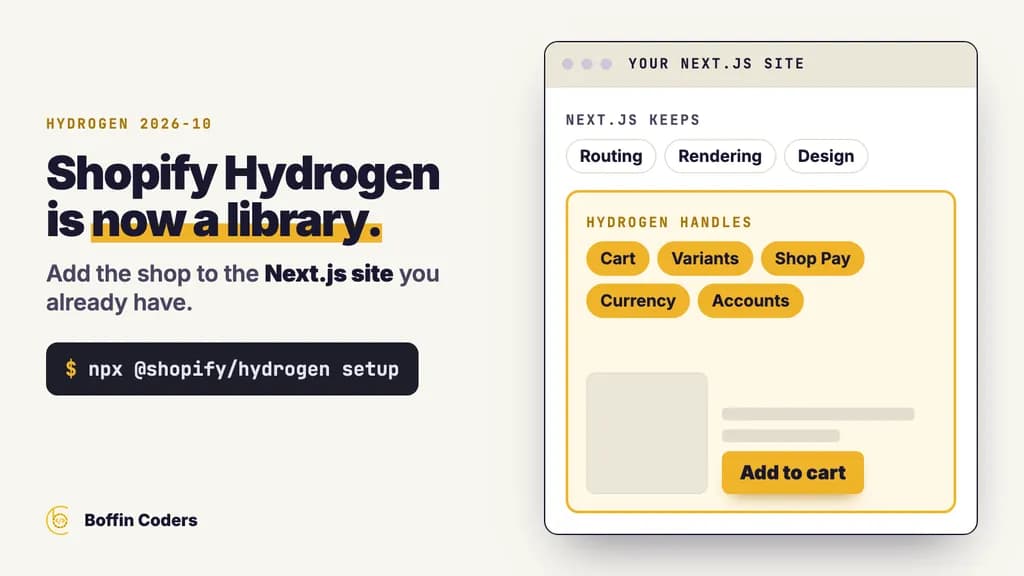
Shopify Hydrogen is now a JavaScript library that adds Shopify commerce to the site you already have, Next.js included. Since version 2026-10, generally available from 14 October 2026, you install it into your existing project instead of rebuilding on a separate framework. Hydrogen handles the cart, product variants, prices in the buyer's currency, Shop Pay, customer accounts and analytics that respect consent. Next.js keeps routing, data loading and rendering, and the design stays yours.
Before version 2026-10, using Hydrogen's cart meant building your whole shop on Hydrogen. Now the shop can live inside the site that already brings you visitors.
What is Shopify Hydrogen?
Shopify Hydrogen is Shopify's open-source toolkit for building your own storefront in code, on top of Shopify's Storefront API, instead of using a Liquid theme. Up to the 2026-04 line it was a framework built on React Router: to use its cart or analytics, you built the whole storefront on it. From 2026-10 it is a library that works with any JavaScript framework. Shopify ships starters for React Router and Next.js, and its Hydrogen site shows the same cart code for Nuxt, SvelteKit, Astro, SolidStart and plain JavaScript.
Your products, stock, orders and checkout stay in Shopify, exactly as they do with a theme. With a Liquid theme, Shopify renders the pages. With Hydrogen, your own app renders them and asks Shopify for the data.
What changed in Hydrogen 2026-10?
Three things changed for a site owner. First, the package no longer asks you to adopt a framework, so it fits a site you have already built. Second, it ships with 20 skills: written guides that teach coding agents how to use it, kept in your project and matched to the version you installed. Third, a storefront built with it works with shopping agents. In browsers that support WebMCP, an agent can search your catalogue and update the cart, and Shopify Checkout submits the order after the buyer confirms.
Shopify's Hydrogen 2026-10 announcement also says Hydrogen uses the same standard storefront actions as Liquid themes. So compatible apps, storefront parts and agents share one cart contract, whichever way the pages are drawn.
Will an existing Hydrogen storefront stop working?
No. Shopify says existing Hydrogen storefronts keep working as they do now, and there is nothing you need to do today. When you are ready to move, a migration skill walks a coding agent through it: you keep your pages and routes and change where the commerce code comes from. The older line was still getting releases during the preview: 2026.4.7 came out on 2 October 2026.
Can you add Shopify to an existing Next.js site?
Yes. A Next.js Shopify setup no longer needs a second app or a rebuild. You add the Hydrogen package to the Next.js project you have, connect it to your store and build the shop pages in your own design. Shopify's announcement points Next.js teams to a ready storefront built on Hydrogen and maintained by Vercel, the company behind Next.js. The Hydrogen site lists Vercel, Cloudflare and your own Node server as hosts, alongside Oxygen, Shopify's own storefront hosting, which is still free.
A Next.js site that already ranks gains the most from this. A separate shop on a subdomain or a second platform has to earn its own place in search, while a shop inside the same site shares its domain, its navigation and the links the site has already earned.
What does Hydrogen handle, and what stays with Next.js?
Shopify's announcement lists the commerce parts Hydrogen takes on. Everything else stays in your Next.js code.
Part of the shop | Who handles it |
|---|---|
The cart, including two quick taps on "Add to cart" | Hydrogen |
Product variants and collection filters | Hydrogen |
Predictive search | Hydrogen |
Prices in the buyer's country and currency | Hydrogen, from your store's markets |
Shop Pay and the checkout itself | Shopify Checkout |
Customer login and accounts | Hydrogen, with your server's session |
Analytics that respect the visitor's consent | Hydrogen |
Routing, data loading and rendering | Next.js |
Design, content pages and the blog | Next.js, and you |
Do Next.js and Hydrogen agree on React?
They do. Hydrogen 2026.10.1 lists React 18 or 19 as an optional peer, and Next.js 16.4.2 asks for React 18.2 or React 19, so a current Next.js app needs no React change to take Hydrogen. If your site is on an older Next.js, upgrade it first: the guide to upgrading Next.js to version 16 lists the steps and the checks that catch what breaks.
How do you set up Shopify Hydrogen in a Next.js project?
You set up Shopify Hydrogen in a Next.js project with one command in the project root, then the setup skill or your own code connects the store. Work through the steps in this order, and check each one before you start the next.
- Have a Shopify store with your products, prices and the markets you sell to already set up.
- Run the setup command in your Next.js project. It installs
@shopify/hydrogenwith the package manager it finds there. - Follow the hydrogen-setup skill yourself, or ask your coding agent to set up the store. Shopify says the agent builds the home, collection, search, product, cart and account pages, adds analytics and smoke-tests the result.
- Turn on the GraphQL checks, so a wrong field fails in your editor and in your build before a customer ever sees it.
- After every Hydrogen upgrade, sync the skills, so your agent follows the instructions for the version you now run.
The commands come from the package's own README:
1npx @shopify/hydrogen setup
2npx @shopify/hydrogen gql check --fail-on-warn
3npx @shopify/hydrogen skills sync
4npx @shopify/hydrogen skills check
What does the setup command change in your project?
The setup command adds the package and copies Hydrogen's skills into two folders, .claude/skills and .agents/skills, so Claude Code, Codex, Cursor and OpenCode all find them. It writes both every time, so the project never has to say which agents it uses. Each skill file records the package version and a hash of its content. On a later sync, a skill you have edited is kept and reported when a newer one is waiting, and --force replaces your edits with the package's version.
For editor checks, add Hydrogen's TypeScript plugin (@shopify/hydrogen/ts-plugin) to your tsconfig.json. It generates storefront-graphql-env.d.ts and customer-account-graphql-env.d.ts at the project root: add both to .gitignore.
Should you let a coding agent build the store pages?
Let the agent write the first draft, and have a developer review it before it goes live. The skills give the agent instructions that match the version you installed, but a shop takes real money from real people, so a person should approve anything that cannot be undone. Every review should check three things: where customer tokens are kept, where login runs and what happens after a timeout.
- The README says to keep Customer Account tokens in protected server session storage or encrypted HttpOnly cookies, and out of any storage the browser can read.
- Customer Account login needs a public HTTPS address. On your laptop that means a tunnel or trusted local HTTPS.
- Do not retry a Customer Account change after a timeout unless that change is safe to run twice.
What did we find when we checked the package?
We read both Hydrogen lines on the npm registry on 16 October 2026, without installing either, and the change from framework to library shows in the package itself.
Hydrogen 2026.4.7 | Hydrogen 2026.10.1 | |
|---|---|---|
What it is | A framework on React Router | A library for any framework |
Framework it requires | React Router 7.16 and its dev tools | None. React, Vue and Vite are all optional |
Runtime dependencies | 9 | 2 |
Entry points | 10, including React Router presets and Oxygen | 12, including React, Vue, Vite, customer accounts and agent skills |
Command-line tool | None in the package | A |
Size unpacked | About 6.4 MB | About 11.1 MB, skills included |
You can repeat the check in a few seconds. It reads the registry only and installs nothing:
1npm view @shopify/hydrogen@2026.10.1 peerDependencies peerDependenciesMeta dependencies
2npm view @shopify/hydrogen@2026.4.7 peerDependencies dependencies
Did prices follow the buyer's country?
Not on sample data. We asked Shopify's public mock store for the price of one product as a buyer in four different countries, and it gave the same Canadian-dollar price all four times. That is expected, because a sample store has no prices set for other markets. Hydrogen shows prices in the buyer's currency only when your Shopify store has that market and its currency set up. Sample data cannot show that, so run your currency tests on a development store with your real markets. This is the query we sent, with the country changed each time:
1curl -s https://mock.shop/api -H 'Content-Type: application/json' \
2  --data '{"query":"query @inContext(country: GB) { products(first: 1) { edges { node { title variants(first: 1) { edges { node { price { amount currencyCode } } } } } } } }"}'
Hydrogen, a Liquid theme or a separate shop: which suits your business?
Keep a Liquid theme when Shopify is your whole website and the theme does what you need. Add Hydrogen to Next.js when your main site already runs on Next.js, earns visits and you want to sell from it under one design and one domain. Stay on the old Hydrogen framework for now if you built on it and it works, and move when the migration suits you.
Your situation | Best fit | Why |
|---|---|---|
Shopify is your whole site and the theme works | Stay on a Liquid theme | Least to build and run. The theme editor and theme apps keep working |
Your Next.js site ranks and you want to sell from it | Hydrogen inside Next.js | The shop joins the site that already earns visits, with one design and one domain |
You built on the old Hydrogen framework | Stay, then migrate when ready | Shopify says nothing changes today, and the migration skill moves the commerce code |
You want a shop on React Router, Nuxt, SvelteKit or Astro | Hydrogen inside that framework | The same library and cart code, with a starter for React Router |
Where does the extra work sit?
With Hydrogen you own the storefront code: the pages, their speed, their search markup and their upgrades. Hydrogen is versioned like Shopify's APIs, with names such as 2026-10, so plan an upgrade and a skills sync each time a new version arrives. A Liquid theme hands most of that to Shopify, so with Hydrogen you get more control and one site in exchange for more code to look after.
What should you check before the shop goes live?
Check the parts a customer touches first, then the parts your reports depend on. Run each check on a development store with your real markets before the shop takes a real order.
- Tap "Add to cart" twice quickly and change a quantity. The cart count must stay right.
- View a product from each market you sell to and confirm the currency.
- Decline analytics consent in one browser and accept it in another, then check that orders still reach your Shopify reports.
- Sign in and out on your real HTTPS address, and confirm no customer token sits in browser storage.
- Make sure
gql check --fail-on-warnandskills checkboth pass in your CI build. - Note the Hydrogen version you run and who will move it to the next one.
If you would rather have the Shopify side added to your Next.js site for you, our Shopify and CMS team builds it into the site you already have, or you can hire Shopify developers by the month to work inside your own team.
Keep reading
Manoj Sethi
Founder, Boffin Coders
Manoj founded Boffin Coders in 2017 and leads its work with agencies: white-label builds, delivery and partnerships. Manoj writes about how agencies can add development capacity without losing control of their clients.
Frequently asked questions
Shopify Hydrogen is Shopify's open-source JavaScript library for building a custom storefront in code. Since version 2026-10 it works inside any JavaScript framework, including Next.js, React Router, Nuxt, SvelteKit and Astro. It handles the cart, product variants, prices in the buyer's currency, Shop Pay, customer accounts and consent-aware analytics, while your framework keeps routing, rendering and the design.
Not answered here?
Need this built?
We build websites and apps for businesses, and work behind digital agencies as their development team. Tell us where things stand on a 20-minute call.