Should you leave WordPress? The five signs, and the one that is not one
- October 1, 2026
- 5 min read

Co-Founder, Boffin Coders
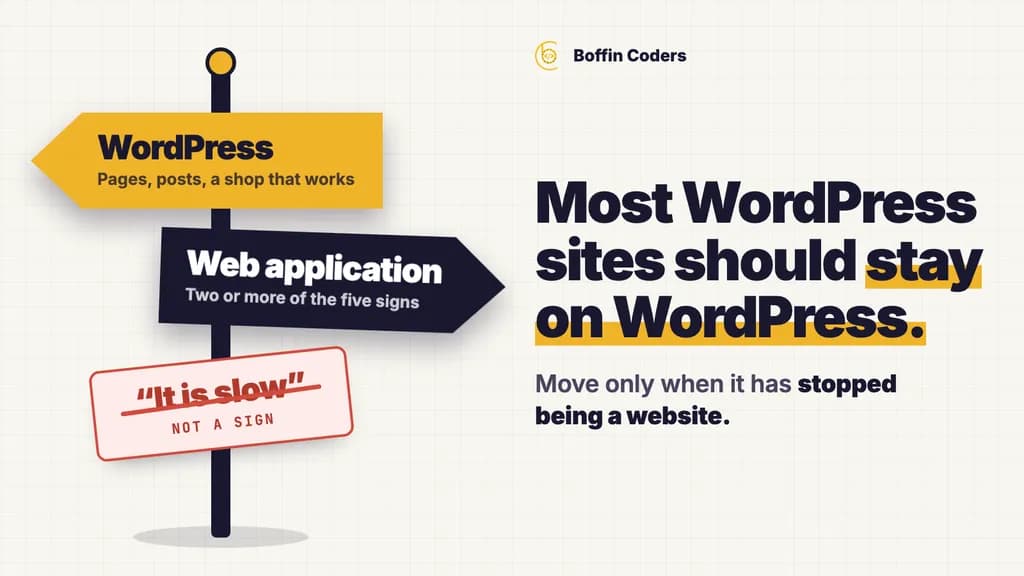
Most WordPress sites should stay on WordPress. If your site is pages, posts, a contact form and a shop that works, moving it to a custom web application costs money and gets you a site that does the same thing. The move is worth it when the site has quietly stopped being a website: when people log in to do their job in it, when the data is not posts, when integrations write back. Here are the five signs that has happened, the one sign everyone mistakes for it, and what a move actually costs.
The one sign that is not a sign
"It is slow." Nine times out of ten this is hosting, images or the theme, and it is fixed in a day: a decent host, images resized for phones, a theme that does not load six sliders and four fonts. A slow WordPress site rebuilt as a slow Next.js app is a slow site with a bigger invoice.
Before anyone quotes a migration for speed, ask for three numbers: time to first byte from the host, the size of the largest image on the home page, and the number of scripts loaded. If the first is over half a second, the second over 300 KB, or the third over twenty, fix those. If all three are already good and it is still slow, keep reading, but that is rare.
The five real signs
The five signs
Two or more, and it is an application wearing a CMS
Real signs it has outgrown WordPress
- Logged-in users do their job in itA portal, a member area, a dashboard staff open every morning.
- The data is not postsBookings with statuses, orders with line items, records that relate to records.
- Integrations write backReading from a CRM is fine. Writing into a practice system is an application.
- Plugins are doing application logicThe plugin list is your dependency tree. Can you say what each one is for?
- Developers edit code more than editors edit contentThe tell is in the git log for the last six months.
The one that is not a sign
- "It is slow"Nine times in ten this is hosting, images or the theme, and it is a day of work.
- Check three numbers firstTime to first byte over 0.5s, largest home-page image over 300 KB, more than twenty scripts.
- A slow site rebuilt is still slowIt just arrives with a bigger invoice.
1. Logged-in users do their job in it. A client portal, a member area, a dashboard that staff open every morning. WordPress's login is built for authors. When it becomes the front door for customers, you are running an application on a publishing tool, and every plugin that touches accounts is a security surface you did not choose.
2. The data is not posts. Bookings with statuses, orders with line items, records that relate to other records. Custom post types and ACF fields can model this for a while. Past a certain point every query is a workaround and every report is a plugin.
3. Integrations write back. Reading from a CRM is fine. Writing bookings into a practice system, syncing stock two ways, pushing invoices: each is a plugin or a snippet somebody wrote, and when the third-party API changes, nobody knows which one broke.
4. Plugins are doing application logic. Twenty active plugins, three of them "essential", and an update to one breaks checkout. The plugin list is the application's dependency tree. If you cannot say what each one is for, you have an application nobody owns.
5. Developers edit code more than editors edit content. The tell in the git log. If most changes in the last six months were PHP and JavaScript rather than pages, the site is being developed, not published. Develop it on something built for that.
Two or more of the five, and the site is an application wearing a CMS. One of them alone is usually a plugin away from fine.
What a move actually costs, and the part everyone gets wrong
A rebuild is priced as a web application project: scoped once, with the content model, the integrations and the migration as separate lines so you can see what each costs. The number varies too much by site to print here. The shape does not.
The part that costs more than any of those lines is the one nobody budgets for:
losing URLs. A rebuild changes how pages are made. Old addresses stop existing without anyone deciding they should, Google drops them, and the traffic graph tells you six weeks later. We moved a 10,723-page site to Next.js in a week and proved no address moved with a before-and-after sitemap diff: the check, and the four things it cannot catch, are written up here. Run it on any migration, ours or anyone's. If a vendor has not heard of it, that is the risk in their quote. Our website migration services run that comparison on every move: every URL listed, mapped to its new address and checked after launch.
The cost nobody budgets
The rebuild is priced. The URLs are the risk.
A rebuild changes how pages are made. Old addresses stop existing without anyone deciding they should, and the traffic graph says so six weeks later.
10,723
pages moved
A full site onto a new framework.
1week
to do it
Content, templates, redirects, the lot.
0
addresses lost
Proved with a before-and-after sitemap diff, not asserted.
What you keep, and the honest middle option
If two or more signs apply but the content side (blog, pages, the marketing site) works fine, you do not have to move all of it. The common shape:
- The marketing site stays on WordPress, edited by the people who edit it today.
- The application (the portal, the bookings, the dashboard) is built alongside it, on its own subdomain or path, talking to the same accounts.
- WordPress becomes a content source (headless) only if the application needs its content. Otherwise the two sit side by side and nobody retrains.
The honest middle option
You rarely have to move all of it
- 01
WordPress
The marketing site stays
Pages, posts and the blog stay on WordPress, edited by the people who edit them today.
- 02
Web application
The application is built alongside
The portal, the bookings, the dashboard - on its own subdomain or path, in your accounts.
- 03
Optional
Headless only if needed
WordPress becomes a content source only when the application actually needs its content.
That is cheaper than a full rebuild and it removes the four dangerous signs without touching the one that was fine.
Who should do it
If the site is staying on WordPress and just needs someone to own it (the plugin list, the updates, the theme) that is a WordPress developer by the month, not a project. If it is becoming an application, that is a scoped build, and you should interview the engineer who will own the data model before you sign, because that decision is the one you live with. If you are an agency and it is your client's site that has outgrown WordPress, the same scoped build runs under your name as white-label web application development.
Either way: your hosting, your domain, your repository, from the first commit. A migration is the moment agencies quietly move things into their own accounts. Here is the list of accounts and who should own each.
Related: Web application development · Hire WordPress developers in India · Rebuilding without losing URLs
Keep reading
Jyoti
Co-Founder, Boffin Coders
Jyoti co-founded Boffin Coders and looks after client relationships and how projects run from first call to handover. Jyoti writes about hiring, process and what makes a development partnership work.
Frequently asked questions
When two or more of five signs apply: logged-in users do their job in the site, the data is not posts, integrations write back to other systems, plugins run application logic, and developers change code more often than editors change content. One sign alone is usually a plugin away from fine. Two or more, and the site is an application wearing a CMS.
Not answered here?
Need this built?
We build websites and apps for businesses, and work behind digital agencies as their development team. Tell us where things stand on a 20-minute call.