I Save Life: location-based app development you can check
I Save Life is our own blood donation app for Android and iOS, built in Flutter. A family posts a request at a hospital, and a server function alerts only donors within 50 km whose blood group is a match. If you are planning location-based app development of your own, you will meet the same problems: alerts that cannot depend on one phone, AI that must not invent data, and paid API keys that belong on a server.
- Android and iOS, phones and tablets
- Matching and alerts run on the server
- Worked on since November 2022
We built this app for ourselves and publish it under our own name. It is live, and you can install it now.
- Alerted: a group the app matches to B+, available, past the 90-day wait, within 50 km
- Filtered out: another group, unavailable, a recent donation or too far
What does I Save Life prove about location-based app development?
Boffin Coders built I Save Life because families who need blood forward the request on WhatsApp, and it reaches people who cannot help. The app replaces that broadcast with one request at one hospital, which a server sends only to donors within 50 km whose blood group fits and who are free to give. It is live in both app stores, so you can install it and try it yourself.
Requests arrive messy
They come as forwarded chat messages, phone calls and handwritten hospital slips, and someone under stress has to turn them into a form.
Anyone can search
A guest without an account can look for donors near a place, so donor search cannot depend on being signed in.
Donor phones stay private
Guests see a donor’s name, blood group and distance, and the phone number only appears once someone signs in.
The alert cannot wait on one phone
The request has to reach donors even if the requester’s phone goes offline straight after they submit it.
If your app sends people to a place, or tells the people near a place that something needs them, it has the same four constraints, whatever it is for. Our mobile app development services cover the app, the backend behind it and the store work, the three places where those constraints are solved.
How does the app match donors by blood type and distance?
In I Save Life, donor matching runs in a Firebase Cloud Function on the server. Boffin Coders wrote it in four steps: draw 50 km geohash bounds around the hospital, query the donors inside them, drop everyone the rules leave out, then send one push alert to each phone that is left. The app holds the same blood group table as the server, and a unit test fails if the two copies differ.
Bounds around the hospital
The hospital picked on the map gives the coordinates, and the function turns them into 50 km geohash bounds.
One query per bound
Each bound is one range query on the donor records, and the results are merged by document.
Filters
Out go the requester, anyone marked unavailable, anyone inside the 90-day wait after a logged donation, groups the table does not match and anyone past 50 km by exact distance.
Alerts
Push alerts go out in batches of up to 500 on a heads-up Android channel and expire after 24 hours. Dead tokens are removed.
Donor search uses the same table. With Include compatible blood groups switched on, a search for A+ also returns A−, O+ and O− donors, sorted with available donors first, then the exact group, then distance. The group table and the 90-day wait are rules in the app’s code, and the app tells donors with declared health conditions to check with a blood bank.
A geohash query returns a box around the point, not a circle, so the function checks the exact distance again before anyone is alerted. Your app needs that second check too, or people just outside the radius get an alert that was never meant for them.
Settings in the code
- Alert radius around the hospital
- 50 km
- Donor search radius, 50 km at most
- 15 km
- Wait after a logged donation
- 90 days
- Push tokens per batch
- 500
- Alert lifetime
- 24 hours
- Request closes, after its needed-by date
- 7 days
- Emergency search radius
- 10 km
- Pause before a hospital search
- 350 ms
How to build a location-based app: four problems to solve first
If you are working out how to build a location-based app, decide early where each job runs. Boffin Coders moved four jobs in I Save Life away from the phone: sending alerts, calling Google Places, deciding who may read or change data, and closing old requests. Each started on the phone or nowhere, and each now runs in a Cloud Function or in database rules.
Alerts that do not depend on the sender’s phone
From 2022 the requester’s phone did the matching itself. It ran a 50 km query over every user, then posted to Google’s legacy push endpoint once per user, with a server key built into the app, whatever their blood group or availability.
Alerts stopped if that phone lost signal, any user could read every other user’s record, the key shipped in every copy of the app, and then Google retired the legacy API. Since June 2026 one HTTPS Cloud Function checks the sign-in token, validates the request, saves it and picks the donors. Requests from test builds reach only accounts flagged as testers.
For your app: when a message has to reach people, send it from your server, never from the phone that asked.
Geolocation app development without an API key in the app
In geolocation app development the quick route is to call Google Places from the phone with the key built in. I Save Life did that in three places, through a vendored autocomplete package, a forked place picker and direct calls, and a typo or a hospital missing from Places left the user stuck.
Since October 2026 one map-first picker serves the request form and donor search. You drag the map under a centre pin, search with a 350 ms pause and stale answers dropped, or drop the pin and type the hospital’s name. Three Cloud Functions call Places with the key held in Secret Manager, using session tokens and an 8 second timeout.
For your app: keep paid API keys on your server, and give people a way on when the place they need is not in the results.
Database rules written from the code
The repository had no Firestore or Storage rules, so nobody could tell from the code who could read or write what, and guests could get donor phone numbers through the search function.
We traced every read and write the app makes, who makes it and which fields it touches, and wrote the rules from that trace. Anything only the server does, such as creating requests or deleting accounts, is closed to the app. A requester may change one field on their own request, to mark it fulfilled. Guests never read the database directly, and donor search returns phone numbers only to signed-in users.
For your app: write the rules from what the code really does, so someone calling your backend without the app still meets them.
Requests that close themselves
The first attempt, in May 2023, had every phone that opened the home screen mark requests older than 15 days as fulfilled. Closing then depended on someone nearby opening the app, and any phone could change other people’s requests.
Since June 2026 a scheduled Cloud Function runs every 24 hours and closes requests 7 days after their needed-by date, 450 at a time, recording that the system closed them. The new rules make the old approach impossible, because no phone can change a request it does not own. A second daily job reminds donors when their 90-day wait is over.
For your app: work that must happen on a schedule belongs in a scheduled job, not in whoever opens the app next.
Can AI form filling be trusted with a blood type?
AI form filling in I Save Life may keep a blood type only when the requester’s own text contains it. Boffin Coders built the Fill in seconds button with the same rule for phone numbers, whose digits must appear in the source, and a blood type read from a photo of a handwritten slip is kept with a warning for the requester to check. The model suggests, and the requester submits.
Capture on the phone. The requester speaks, pastes a forwarded message or photographs the hospital form. Speech recognition runs on the device, and so does text recognition, through Apple Vision on iOS and Google ML Kit on Android behind one Dart call.
Read it twice. A local parser of 802 lines of Dart never outputs a blood type or phone number that is not in the text. Gemini, through Firebase AI Logic, gets a JSON schema in which blood type is a fixed list, and the instruction “Return only facts present in the input”.
Merge, and refuse. The model’s blood type stays only if the source mentions it, and its phone number only if those digits are in the source. If the model fails, or takes longer than 10 seconds for text or 18 for a photo, the parser’s result is used.
The requester checks. The filled form opens for review, and any hospital name found in the text pre-fills the hospital search.
Speech and text recognition run on the phone. The recognised text, and the photo when there is one, then goes to Gemini through Firebase AI Logic. Nine unit tests cover chat, spoken and form inputs, the rule that no blood type is invented and the merge. The feature shipped on 18 and 19 August 2026. If a model fills in fields that matter in your app, such as an amount, a date or an address, keep its answer only where the input supports it and let a person confirm the rest.
Urgent: my father needs 2 units of blood at City General Hospital by tomorrow morning. Please call Sam on 0123 456 789.
- Blood type
- Model said O+Refused: not in the message
- Units
- 2Kept
- Hospital
- City General HospitalFills the hospital search
- Phone
- 0123 456 789Kept: digits in the message
- Blood typeChoose the blood type
- Units2
- HospitalCity General Hospital
- Contact0123 456 789
What do the main screens of I Save Life look like?
I Save Life has six main screens. The home screen leads with Request and Find Donors. The request form opens with Fill in seconds: the app fills the fields from speech, a pasted message or a photo, marks what it filled and what is still missing, and submits nothing until the requester checks it. The requester then confirms on the map the hospital the app read from the request. The donor list filters by blood group and can include every compatible group, the profile lets a donor switch availability and WhatsApp messages on or off, and Emergency Help lists hospitals and ambulances within 10 km. These are screens from a test build: the donor and patient names are sample data, and the hospitals come live from Google Places.
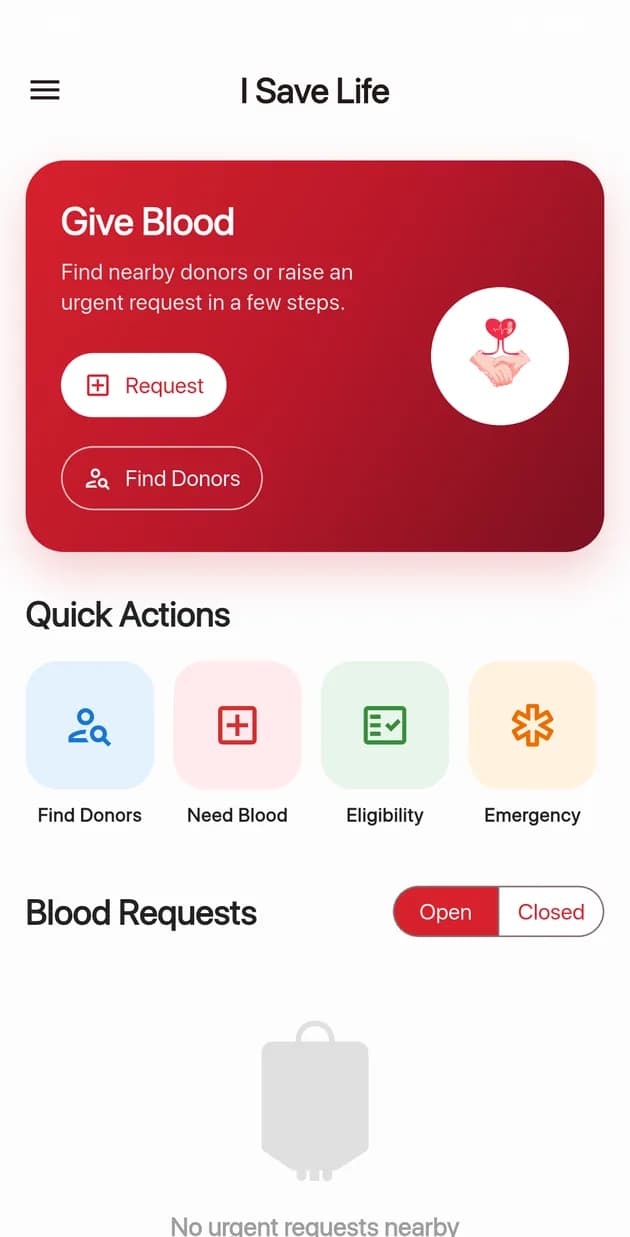
Home: request blood or find donors 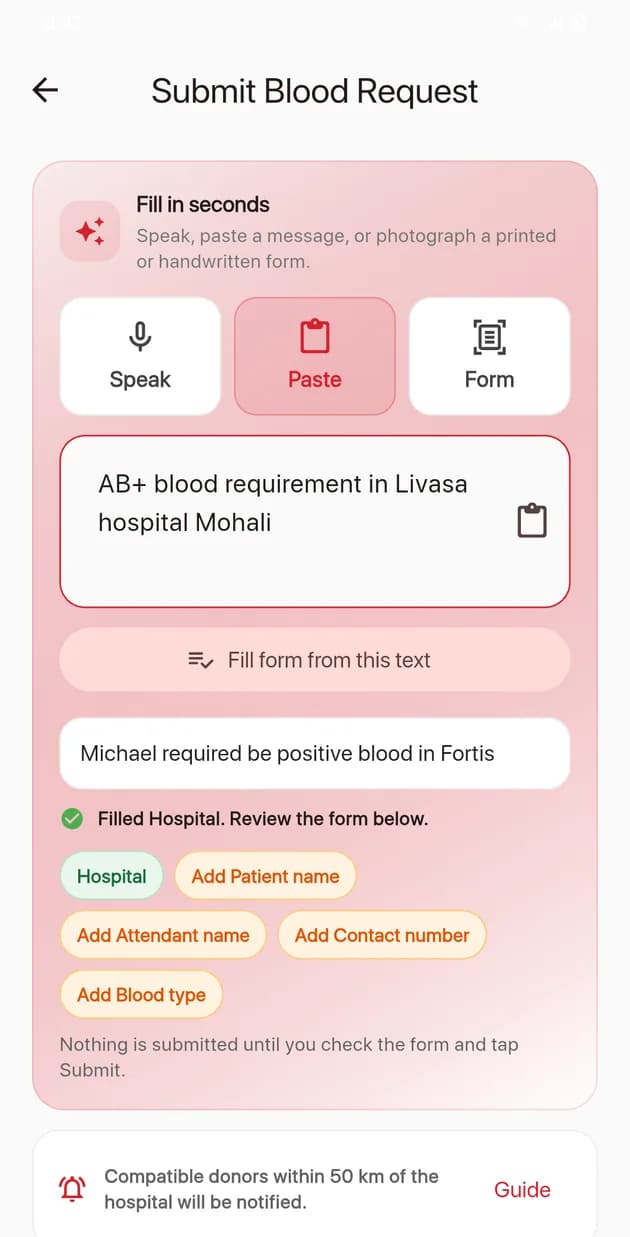
Fill in seconds: the app fills, you check 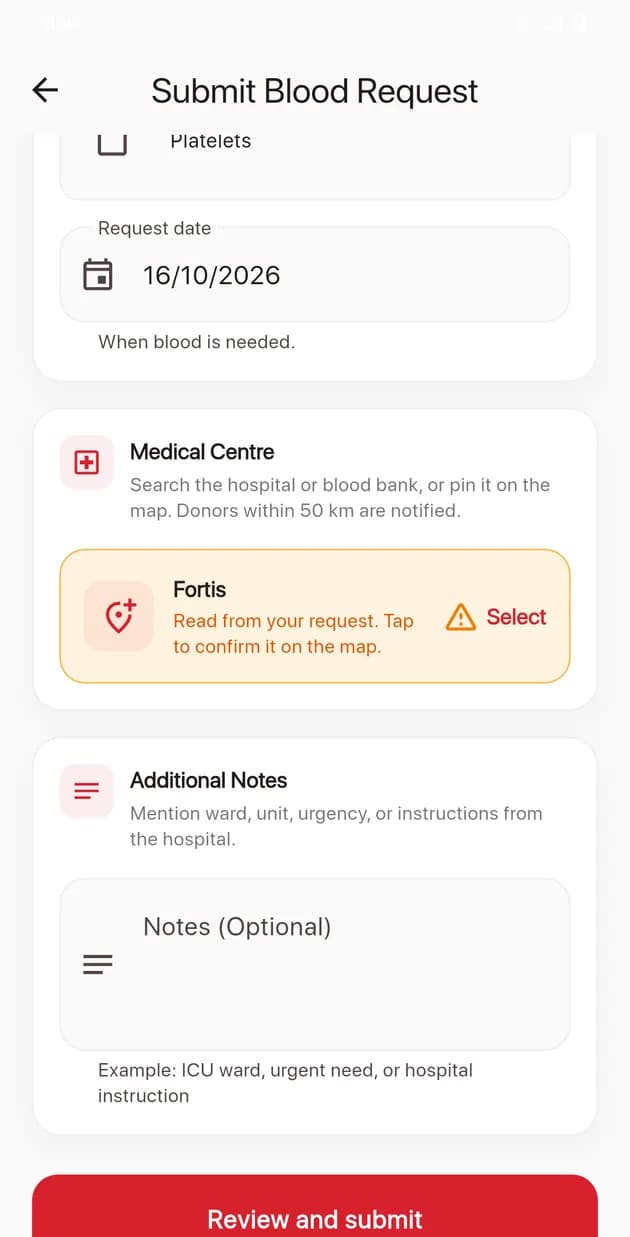
The hospital is confirmed on the map 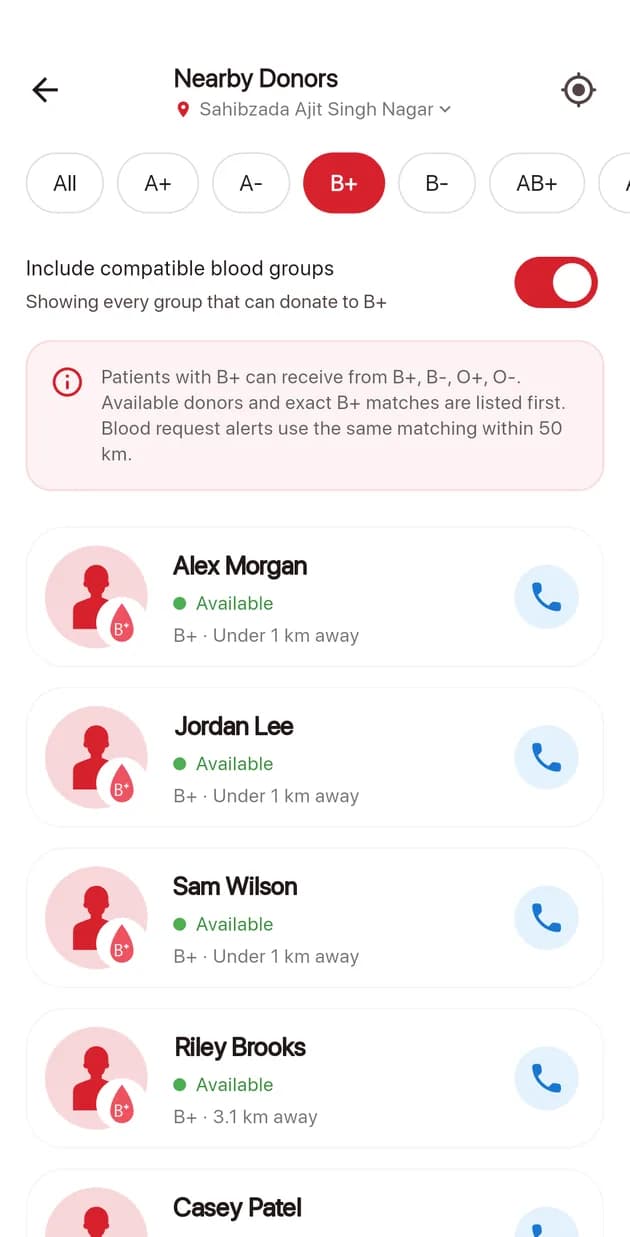
Donors by blood group, compatible groups included 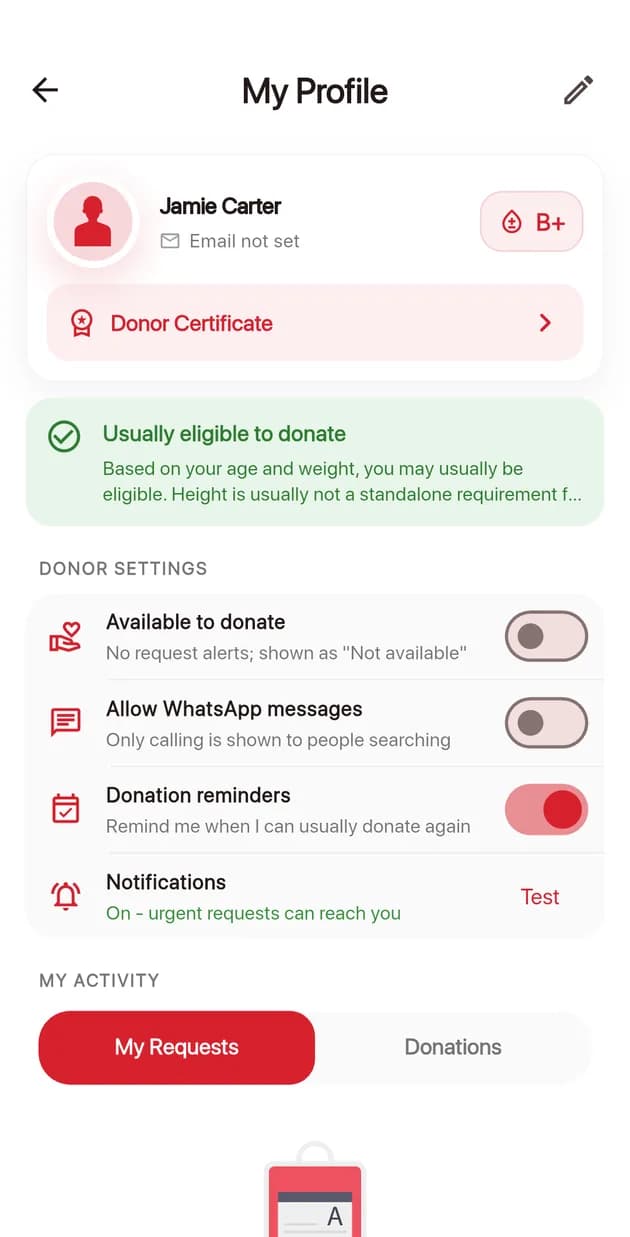
Donor controls: availability and contact 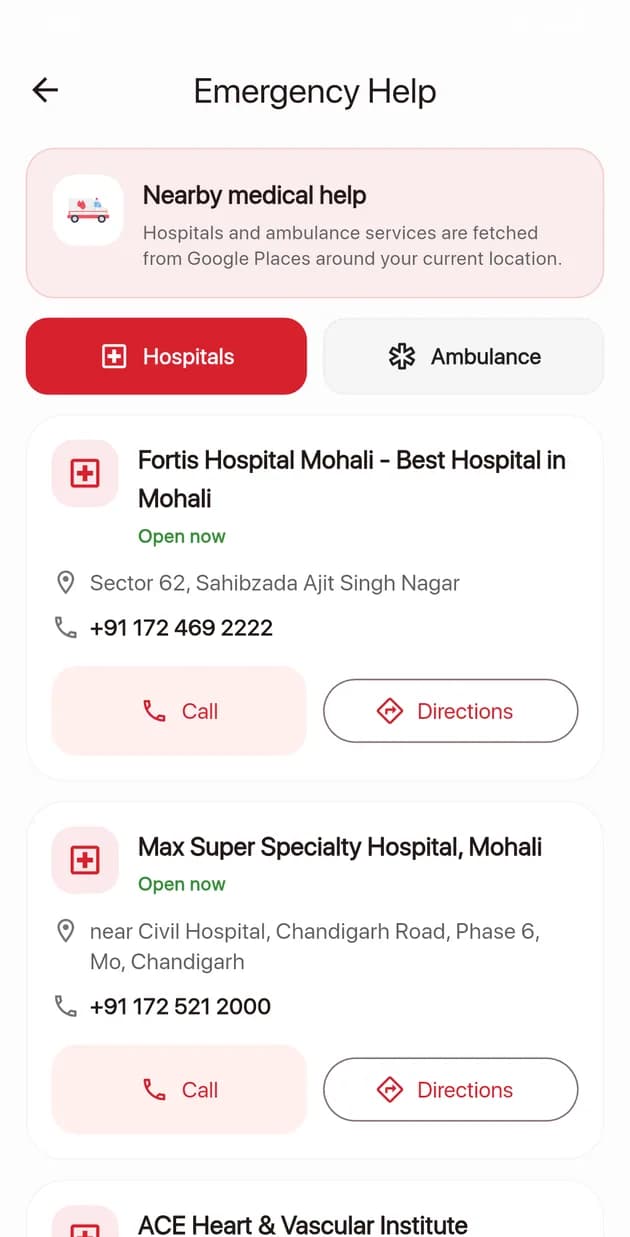
Emergency Help: hospitals and ambulances
What does it take to keep a Flutter app live in both stores?
Keeping I Save Life live has meant a run of platform changes from Google and Apple. Boffin Coders moved its alerts off Google’s retired legacy push API, answered Apple’s request for location purpose strings, filed an iOS privacy manifest, moved the Android build to Gradle Plugin 9 and the iOS app to the UIScene lifecycle, and replaced CocoaPods with Swift Package Manager.
- Flutter
- Dart
- Firebase
- Node.js 22
- Kotlin
- Swift
- Google Maps SDK
- Gemini
| What changed | What the app does now |
|---|---|
| Google retired its legacy push notification API | Alerts go out from Cloud Functions through the Firebase Admin SDK, since June 2026. |
| Apple’s ITMS-90683 notice on upload 4.0.3: a linked SDK refers to the Always location permission | The purpose string is in place and says the app does not track you in the background. The app still asks for location only while in use. |
| Android 13 asks for notification permission at run time | The app asks on Android 13 and later, and on older Android it detects a blocked app or a blocked alert channel. |
| Account deletion inside the app | Shipped in November 2022. Since October 2026 a server function deletes the user’s records and donations, closes their open requests and removes the sign-in. |
| Android Gradle Plugin 9 | The build runs on AGP 9.2.1, with WorkManager, Room and Startup pinned because the ads SDK pulled versions that broke release builds. |
| Apple’s privacy manifest | PrivacyInfo.xcprivacy declares 8 collected data types, all linked to the user and none used for tracking. Ad data is declared in the Google Mobile Ads SDK’s own manifest. |
| The iOS UIScene lifecycle | The Swift AppDelegate moved to UIScene on 6 October 2026. |
| The CocoaPods repository goes read-only in December 2026 | Every iOS dependency comes from Swift Package Manager, and text recognition moved from a CocoaPods-only plugin to Apple Vision and ML Kit through a native channel, on 15 October 2026. |
On 15 October 2026 flutter analyze reported no issues. Every pull request runs the analyser, 20 app unit tests, the Cloud Functions tests and an Android release build, and every push to main adds an iOS release build. If your Flutter app needs this kind of upkeep, you can hire Flutter developers from our team by the month, with no minimum term.
How has I Save Life changed since November 2022?
The first commit of I Save Life is dated 7 November 2022, and Boffin Coders has shipped it in stages since then: the first release with account deletion in 2022, guest search and a stable release in 2023, server-side matching in June 2026, AI form filling in August 2026 and a round of platform work in October 2026, when the Places calls moved to the server too. The figures below were read on 13 to 15 October 2026.
November 2022
First release
Phase one of the app, with account deletion inside the app from 8 November.
2023
Guests and certificates
Guest donor search in May, a stable release in July and the donor certificate in August.
June to July 2026
Matching on the server
Server-side alerts and request closing in June. The external donor API was removed in July.
August 2026
Fill in seconds
AI form filling with speech and text recognition on the device, shipped on 18 and 19 August.
October 2026
Platform work
Notification fixes, the UIScene lifecycle, Play release 1.0.1, Places calls moved to the server, the privacy manifest and Swift Package Manager.
Two parts of the first release did not last: alerts sent from the requester’s phone with a server key inside the app, and old requests closed by whichever phone opened the home screen. Both moved to the server in June 2026, together with database rules written from a trace of the code, and the Places key followed in October. If you are planning an app like this, put the server jobs, the rules and the keys in the right place from your first release.
175
Countries and regions
Where Google Play release 29 (1.0.1) is available
4.0.6
Latest App Store upload
Uploaded on 6 October 2026
10
Cloud Functions
Node.js 22, in the same repository
20
App unit tests
Plus offline Cloud Functions tests
Read from Play Console, App Store Connect and the repository, 13 to 15 October 2026.
Planning a location-based app?
We build Android and iOS apps in Flutter for businesses, and under their own name for agencies. Projects start at US$4,000, and a dedicated Flutter developer starts at US$3,500 a month. Tell us what your app has to do on a 20-minute call.
Run an agency? We can build it under your brand through white-label app development, and you see the work before you pay.