Why Did Your Google Business Video Verification Fail, and How Do You Pass It?
- October 17, 2026
- 9 min read
Founder, Boffin Coders
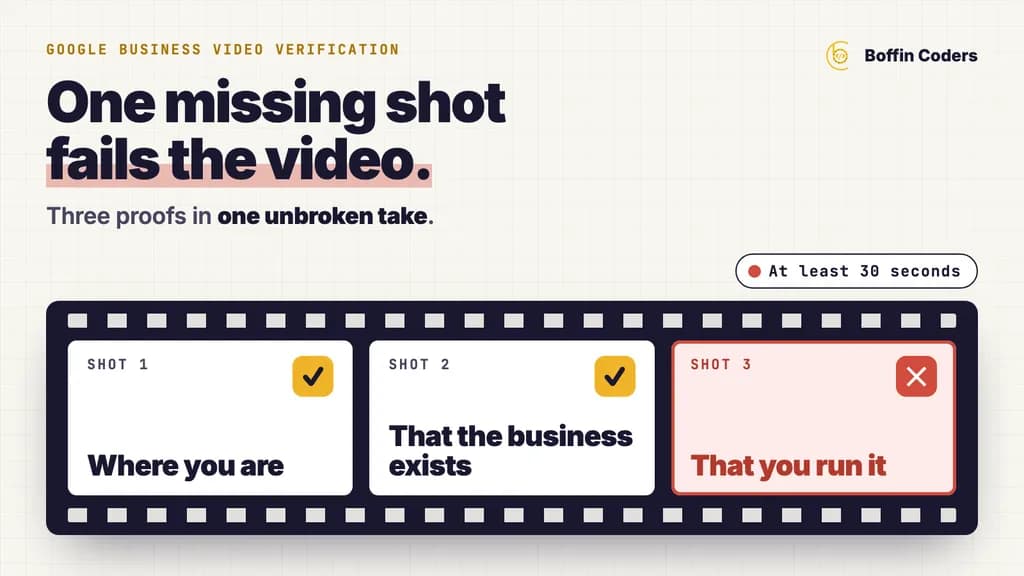
Google business video verification fails when the video leaves out one of the three things Google asks for: where the business is, proof that it exists, and proof that you run it. It also fails when the recording breaks a rule: shorter than 30 seconds, paused or edited, or showing other people's faces or private documents. Open your profile on your phone, tap Review issues to see what was missing, then record one new take that keeps everything from the first video and adds the missing shot.
Why is Google asking you for a video?
Google picks the verification methods for each profile, and you cannot change them. Its help page says the options depend on your business type, public information, region and opening hours, and that Google recommends video verification wherever a business is eligible for it. So a profile that once had a phone code or a postcard may now offer only a video, and that change alone is no sign of a problem with the profile. If you have seen it called Google My Business video verification, that is the old name for the same process, and the steps are the same.
Until a profile is verified, you cannot edit details such as your name or hours, and you cannot reply to customers from it. A failed video leaves the listing sitting on the map, out of your control, while customers read whatever it shows.
You record GBP video verification yourself through the Business Profile on your phone, upload it, and a reviewer watches it later. A live video call with a support person is a separate method that some profiles are offered, only during business hours.
What does a Google business video verification need to show?
Google wants three proofs in one unbroken take. What counts as proof depends on how you serve customers.
Proof | Storefront (customers come to you) | Service area (you go to customers) |
|---|---|---|
Where you are | Street signs, the building number, the businesses next door | Street signs and landmarks at your business address, or your own street if you work from home |
That the business exists | Your name on a permanent sign, wall or window, matching the profile exactly | Your tools, equipment, workspace, business cards or branded clothing |
That you run it | Something only staff can reach: the till, the kitchen, a stockroom, the booking system | Opening a branded van with your key, doing the work, or an invoice, permit or utility bill in the business name |
A hybrid business, such as a restaurant that also delivers or a physio clinic that also visits patients at home, follows the storefront rules, because customers do come to the address.
Google also sets rules for the recording itself. It must be at least 30 seconds long, in one unbroken take with no edits, and recorded live through the profile on a phone. You cannot film it earlier and upload it later. Bank, tax and ID numbers, private information about anyone and other people's faces must stay out of the shot.
Why did your Google Business Profile video verification fail?
Most Google Business Profile video verification failures come from one missing shot, and the phone or the light is rarely the cause. Google's own examples of the reasons it gives are "Business name not visible on storefront", "No nearby area shown" and "Missing proof of authorization to operate the business". Each one names a proof the reviewer could not see in the video.
The name on the sign does not match the profile
The name in the video must match the name on your Business Profile. A sign with a short form of the name, on a profile that carries the full name plus a list of services, is a mismatch a reviewer can refuse. Either the sign or the profile name has to change, and the profile name should be your real business name with no keywords added to it.
No sign at all, because the clinic is inside a bigger building
A clinic on the second floor of a medical centre, or a salon chair rented inside another salon, often has no permanent sign of its own outside. Google says a business without permanent on-site signage should be listed as a service-area business instead of a storefront. If your name is on a permanent board in the lobby or on your own door, film that, then walk to your room in the same take.
The street was never shown
Starting the video at your front door leaves out the location. Start outside, at the nearest street sign or a building number you can read, then walk to the business without stopping.
Nothing proved you run the place
Filming the waiting room proves the place exists. To prove you manage it, open the till, open the locked treatment room or the stockroom with your key, or show the booking system on the reception screen with no client names visible.
The recording broke a rule
A clip that stops and starts, a video under 30 seconds, a customer's face in shot, or a letter with your bank details on it can each fail an otherwise good video. Clinics need extra care here: keep patients, records and any appointment list with names on it out of the shot.
How do you plan a video that passes first time?
Plan the route before you press record, because the take cannot be paused. You can copy the worked example below: walk it once without the phone, then record it once.
Second | Clinic, salon or dental practice | Plumber, electrician or cleaner |
|---|---|---|
0 to 10 | Street sign and building number, then the shops either side | Street sign or landmark near your address |
10 to 25 | Walk to the entrance and hold on your permanent sign | Walk to your van and hold on the branded side |
25 to 45 | Open the door with your key, walk past reception to a staff-only room | Open the van with your key and show the tools inside |
45 to 60 | Open the till or the booking system with no names on screen | Show an invoice or utility bill in the business name, with account numbers covered |
A clinic, salon or practice with a front door
Film it before you open or after you close, so no customer walks into the shot. Physios, dentists, barbers and beauty salons all pass the same way: street, sign, staff-only space. If the practice shares a building, show the building's own sign with its number, then your name on the board or door.
A tradesperson who goes to the customer
Plumbers, electricians, locksmiths and cleaners have no shop to film, so the van and the tools carry the video. A van with your name on the side is the strongest single proof you have. If the van is unmarked, use branded clothing, business cards and a document in the business name.
A business run from home
Google allows you to record the landmarks and signs in your own street. Do not film inside your home beyond your workspace, and do not add your home address to the profile if customers never come to you.
How do you record and upload the video?
Open your Business Profile on your phone and tap Get verified. You may be asked for your phone number first. Choose Business video, read the requirements, allow access to the camera, microphone and location, then start recording. When you stop, watch the video back. If anything is missing, tap Try again and record the whole thing again, then tap Upload video.
What if the video will not upload?
Google says some videos fail to upload on the first try and should simply be uploaded again. A strong signal helps, so upload over Wi-Fi if the mobile signal at your premises is weak, and keep the phone connected until the upload finishes.
What do you do after a rejection?
Start from what the first video got right. On your phone, open the profile and tap Review issues. Google lists what the reviewer could not see, and asks for a new video that includes everything from the first one plus what was missing. The review of each video can take up to 5 business days. Two things on Google's own help pages can save you days: the Review issues button, and instant verification when your website is verified in Google Search Console.
If the second video fails too, check whether other methods have appeared on the profile, and try those. Google asks you to try the methods available to you before you contact its support team. Avoid changing your business name, address or category while you wait, because Google says changes to business details can trigger another verification.
Can a verified website speed up verification?
Sometimes. Google's help page says it verifies some profiles at once when the business has verified its website in Google Search Console. If you have a website, trying it costs nothing, and Search Console tells you other useful things, such as whether Google actually indexed your pages. Add your site to Search Console, verify it, and make sure the website on your profile is that same address.
Keep the business name the same on the sign, the profile and the website. A clinic that wants the listing to turn into bookings once it is verified also needs a site that takes them, which is what physio website design should be built for.
What should you check before you record again?
Run through this list on the day:
- The profile name matches the sign, letter for letter.
- The storefront or service-area setting matches how you really serve customers.
- The route starts at a street sign or building number.
- One staff-only space or document is in the plan.
- No customer, patient or private paper will be in shot.
- The take will run past 30 seconds without a pause.
Get those six right and you remove the common reasons for a rejection. If you would rather have someone keep the listing right once it is verified, Google Business Profile management is part of our local package, and the free check starts with your listing.
Keep reading
Manoj Sethi
Founder, Boffin Coders
Manoj founded Boffin Coders in 2017 and leads its work with agencies: white-label builds, delivery and partnerships. Manoj writes about how agencies can add development capacity without losing control of their clients.
Frequently asked questions
Google My Business video verification is often the only option because Google chooses the methods for each profile from its business type, public information, region and opening hours, and you cannot change them. Google's help page recommends video wherever a business is eligible. Record the video first. If no available method works after a real attempt, contact Business Profile support from the help page.
Not answered here?
Need this built?
We build websites and apps for businesses, and work behind digital agencies as their development team. Tell us where things stand on a 20-minute call.