What should a website handover checklist include?
- October 12, 2026
- 11 min read
Founder, Boffin Coders
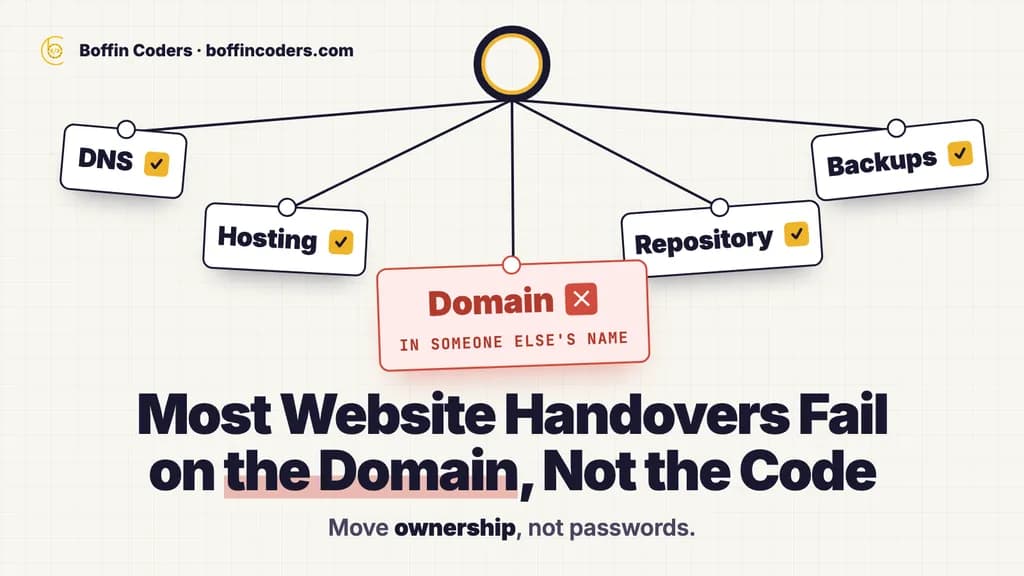
A website handover checklist should cover six things: the accounts the site runs on, the code and how it is deployed, the content and database, the integrations and their keys, the search setup, and a written list of what is known to be broken. Collect them in that order, before the old developer's access ends. Then test each one yourself, because a login you have not tried is not a login you have.
Most handovers fail on the first item, not the last. The code is usually fine. The domain is in someone else's name.
What is a website handover?
A website handover is the moment ownership and day-to-day control of a site move from one person or team to another: from a freelancer to an agency, from one agency to the next, or from a developer back to the business. A good handover moves three things together: the accounts the site runs on, the knowledge of how it works, and the history of what was changed and why. A handover that moves only passwords has moved the least useful of the three.
It is also the riskiest week in a site's life. Nothing new is being built, so nobody is watching closely. Access is being added and removed. And the one person who knows why a strange setting exists is about to stop answering messages.
What should you collect before the old developer leaves?
Collect everything that would stop the site if it disappeared tomorrow: the domain and DNS, the hosting, the code repository, the database and its backups, every third-party key, and the analytics and Search Console properties. Each item should end up in an account that your business, or your client's business, owns. The checklist below is grouped so you can work through it in one sitting with the outgoing developer.
Accounts and logins
- Domain registrar. Whose name and email is the domain registered under? When does it renew? Is auto-renew on, and on whose card?
- DNS. Where are the DNS records managed? This is often a different place from the registrar. Export a copy of every record before anything changes.
- Hosting. The server or platform account, the plan, the region and the renewal date.
- Email. The mailboxes, and the separate service the site uses to send email: password resets, order confirmations, form notifications.
- Analytics and Search Console. Which properties exist, and who is listed as owner. An owner can remove everyone else.
- Admin users on the site itself. List every administrator account in the CMS. Remove the ones nobody can name.
The rule for every line is the same one we use when we start any project: the account is created with an email address the business controls, and the developer is added as a member, never as the owner. The full list of accounts, and the role to grant on each one, is a separate guide.
Code, repository and deployment
- The repository. Where the code lives, with its full history. Ask for it to be transferred to an organisation you own, not sent as a zip file. A zip file has no history, and the history is how you find out why something was done.
- The version that is live. Which branch or commit is running on the server right now? If the answer is "the one on my laptop", copy the code from the server as well.
- How to deploy. The exact steps from a code change to the live site, written down. Ask the outgoing developer to deploy one small change while you watch.
- Environment settings. The list of settings the site needs to run, such as database addresses and service keys. You need the names and where each value is stored, not the values pasted into an email.
Content, database and backups
- A fresh backup, taken on handover day, of the database and the uploaded files. Restore it somewhere once. A backup that has never been restored is a hope, not a backup.
- Where the automatic backups go, how often they run and how long they are kept.
- Media and uploads. On many sites these live outside the database, in a storage bucket or a folder on the server, and they are easy to miss.
Integrations, API keys and payments
- Every service the site talks to: payments, maps, forms, CRM, email marketing, chat, search, and anything that runs on a schedule.
- Who owns each of those accounts. A payment account must be in the business's own name, with the business as the only owner.
- The keys. Plan to replace every key after the handover. The old developer had them, so new keys are part of a clean start, not a sign of distrust.
- Scheduled jobs and webhooks. Nothing on the page shows them, so ask directly what runs at night and what other systems call the site.
How do you take over a website from another developer?
Take over a website from another developer in two stages. On day one, move ownership of the accounts and confirm you can sign in to each one yourself. In the first week, read the code and the live site before you change anything, and write down what you find. Boffin Coders works the same way when an agency hands us a client's site: access first, then a written report on the code as it stands, then the first change.
Day one: move ownership, not passwords
Sharing a password moves access. It does not move ownership. On day one, the goal is for the business to own the domain, the hosting, the repository and the analytics, with the outgoing developer still added as a member until the week is over. Then sign in to each account yourself, from your own device. Tick the line only when that works.
Keep the old developer's access for a few days, not a few weeks. Most questions come up early, and an open line is worth more than a closed account. Then remove their access in one sitting, and replace the keys straight after.
Week one: read before you change
The fastest way to break an inherited site is to tidy it up in the first week. Read it first:
- Run the deploy once, with no code change, to prove the steps work.
- Update nothing yet. List the plugins, packages and versions, and note which are out of date.
- Click through the main journeys, such as the contact form, the checkout and the login, and note what fails today, so nobody blames the new team for it later.
- Read the error logs for the last month, if they exist.
- Write a one-page report: what is there, what is risky, and what you would fix first, in order.
That report is the most useful document in the whole handover. It is also what the client, or your manager, will want to see before they approve any work.
How do you keep search rankings when a website changes hands?
Keep search rankings through a handover by keeping three things exactly as they were: every page address, the redirects that already exist, and ownership of the Search Console and analytics properties. Save the full list of the site's URLs before anyone changes anything, and compare it again after each release. Boffin Coders runs this check on its own sites and has published the commands, so anyone can repeat it on any site.
Save the list of URLs before anything changes
A handover often comes just before a rebuild, and a rebuild is where URLs get lost. Nobody decides to lose them. A template is tidied, an address gets "cleaner", and a whole family of pages moves at once. Google notices weeks later, and by then nobody remembers which change did it.
The check is simple. Save the sitemap before the change and again after it, then compare the two lists of addresses, not the totals. A total can match while one page is dropped and another is added.
We ran it on our own site, timezones.in, which Boffin Coders owns and built, when it moved to a new framework in one week: 10,722 addresses before, 10,723 after, none dropped. The site and its sitemap are public, so you can open both yourself. The commands, the twelve-line script and the four things the check cannot see are in Your rebuild will drop URLs. Google will tell you in six weeks.
Check every redirect rule against pages that still work
Inherited sites carry inherited redirect rules, and some of them are wider than they look. One wildcard rule meant for a few hundred old articles can also catch a live page, tell Google it has moved for good, and take its traffic with it. Before you add or keep a rule, test it against the live pages it might catch. How a redirect list swallows a page that still works, and how to write the rule so it cannot has four commands you can run on any site.
Keep Search Console and analytics with the owner
The history in Search Console and analytics is the only record of how the site performed before you arrived. If those properties belong to the old developer, the history leaves with them. Add the business as owner first, then remove the old developer. Never delete a property and start a new one if you can transfer it.
What should the outgoing developer hand you in writing?
The outgoing developer should hand over a short written document, not just access. It should say how the site is built, how to deploy it, which services it depends on, what is known to be broken, and what renews when. One or two pages is enough. When Boffin Coders finishes a project, the accounts are already in the client's name, so this document is the only thing left to hand over.
The known-issues list
Ask for it directly: "What is broken, fragile or patched that I should know about?" Every site has a list. If the answer is "nothing", ask again with prompts: a plugin that cannot be updated, a form that sometimes fails, a script that someone runs by hand, a server that runs out of disk space, a page that only works in one browser.
The renewals calendar
Domains, security certificates, hosting plans, plugin licences and paid services all renew on different dates, often on a card that belongs to the person who is leaving. List each one with its date and the card it is on, then move it to the business's own card. A site that goes offline because a licence lapsed on a former developer's card is an avoidable failure, and this list is how you avoid it.
What if the previous developer will not hand over?
If the previous developer will not hand over, start with what you can recover without them. The domain registrar has its own process for proving you own the domain. The live site's code and files can usually be copied from the server if you control the hosting. Analytics and Search Console can be verified again by whoever controls the domain. Ask for everything else in writing, once, with a date.
A stalled handover is often not hostile. It is usually a busy person who never wrote anything down. A clear list, sent once, with each item marked "have" or "need", gets better results than a long email about the relationship. The checklist above works as that list.
The lasting fix is the rule from the first section: next time, every account starts in the business's name, so there is nothing to hand over.
Who should run the takeover when an agency inherits a client's site?
When an agency inherits a client's site, the takeover should be run by whoever will maintain the site afterwards, because they will live with every decision made in that first week. For an agency without spare developers, that can be a white-label partner working under the agency's name. Boffin Coders takes over sites this way: the code goes into the repository the agency names, and the client deals only with the agency.
In practice, the agency keeps the client relationship and we do the reading, the report and the first fixes behind it. We pick up the code where it stands, read it before changing anything, and report on the work done to date. You see that report, and every change after it, before we invoice anything. Website and CMS takeovers are covered on the white-label web design and CMS page, and the wider model for agencies is on the white-label development page.
If you are about to take over a site, start with the accounts. If you can sign in to all of them yourself, the rest of the checklist is work. If you cannot, it is a negotiation, and it is better to find that out on day one.
Keep reading
Manoj Sethi
Founder, Boffin Coders
Manoj founded Boffin Coders in 2017 and leads its work with agencies: white-label builds, delivery and partnerships. Manoj writes about how agencies can add development capacity without losing control of their clients.
Frequently asked questions
A website handover checklist is the list of what must move when a site changes hands: the domain, DNS, hosting and email accounts, the code repository and deploy steps, the database and backups, every integration and key, the Search Console and analytics properties, and a written list of known issues. Each item is ticked only when the new owner can sign in to it themselves.
Not answered here?
Need this built?
We build websites and apps for businesses, and work behind digital agencies as their development team. Tell us where things stand on a 20-minute call.